Skip to content

Photo / Video Showcase / Archived topic

Scorpion Fish

Started by snoack ·

  • 4Posts
  • 4Replies

Read-only discussion

Scorpion Fish

4 posts
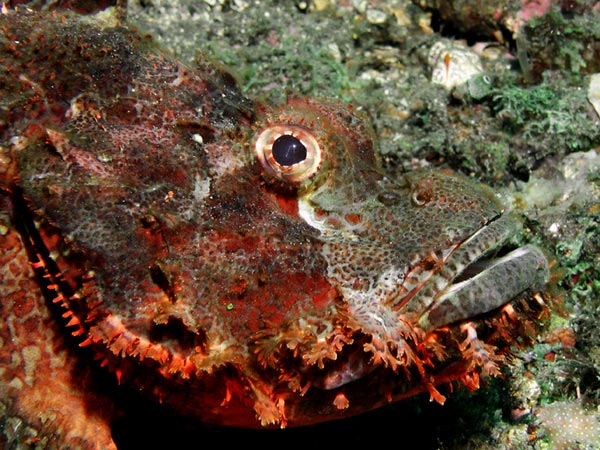
  1. I'm somehow not quite happy with this shot, maybe it's the background ?

    The fish is a bit underexposed but the white spots in the background are still washed out. I think the composition and strobe angle are ok.

    Any ideas how to make it better next time ?


    Sabine


    Scorpionfish

    F8, 1/200s, YS90DX 1/2 power

    White Balanced, sharpened and resized with PS

    Scorpion1.jpg

  2. Hi Sabine,


    I think your strobe needed pointing down and above the subject to isolate the background and to pick out the shape of the scorpion's head and outline. The background being so close has encroached on an otherwise nicely composed and cropped presentation.


    What focus mode: CU or Macro? Macro I feel could have done the job.


    Also if you had angled the shot more from the front of the head it would have helped isolate it from the background...


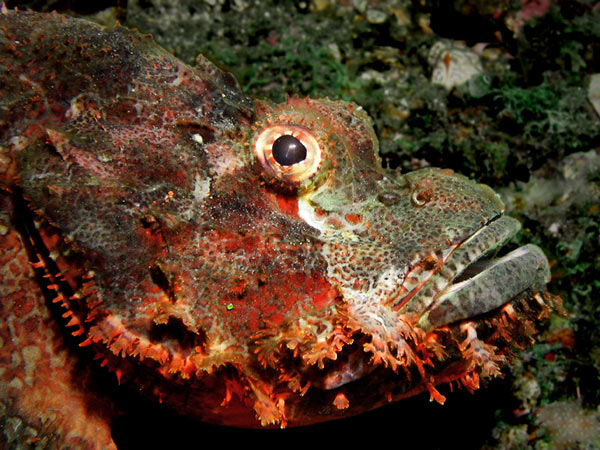
    Ok, I took the liberty of 5 minutes in PS 7 reducing the problems (too quickly!).


    Basically all I did was: Use the marquee and followed the shape of the head from top left to bottom right and out above white coral and back around the outside. In Select, chose inverse, and in filters used the blur option to reduce the sharpness from the background. Then reduced the level of brightness.

    In select again chose inverse to work on the fish here it was possible to sharpen it by 200% as well as adjusting the hue, saturation brightness and contrast. I think the Oly. always requires contrast adjustments.

    Finally adjusting the colour bias slightly, deselecting and done.


    Hopefully this now (as you may agree) improves it a lot?


    This is a lovely character shot and well worth doing everytime you see one - beautiful fish...


    Let me know eh?


    Copyright Sabine Noack :blink:

  3. Bob,


    i think you are right, macro would have been better here (although i had to use the zoom here, because i couldn't get closer and lower without damaging the reef).

    Opening the aperture and using a higher shutter speed would also have been better (blurring the background by technique and without the help of PS B) )

    Inspired by your version of the pic, i also played around a bit, here is my "creative" version of the scorpion.


    I think i'll start a "how to improve a shot with PS" section with examples on my website,


    Sabine


    Scorpion2.jpg

  4. Hi Sabine,


    Looks like you've got the hang of it! Happy that I could help I am...


    One tip when cutting out/extracting or the like, is to blow the picture right up (400%+). This allows more precise 'cutting out'.


    Another: To get maximum saturation at point of capture use TTL on close-up macro. The darker the colour the closer the strobe, light & dark subjects will often require bracketing altering the strobe and not the exposure settings. Some of the strange scorpion's in Lembeh are very difficult to photograph even with a state of the art metering system.


    BTW: I put the sparkle in his eye by using "lens flare" in filters-render you can vary the intensity and move the lightspot. I love using this on large eyes to create a more graphical rendition of the original image.


    However, None of the pictures I have posted are altered - these are straight out of the scanner, and as they would appear in a magazine to support articles, but certain design houses find this attractive.


    Looking forwards to more pix soon, but if you don't want to clog up the site email them to me.

Turtle

Account

Navigation

Search

Search

Configure browser push notifications

Chrome (Android)
  1. Tap the lock icon next to the address bar.
  2. Tap Permissions → Notifications.
  3. Adjust your preference.
Chrome (Desktop)
  1. Click the padlock icon in the address bar.
  2. Select Site settings.
  3. Find Notifications and adjust your preference.