Skip to content

Photography Gear and Technique / Archived topic

Tip: Mounting LED44 Focus Light to Ike Compact Housing

Started by JackConnick ·

  • 7Posts
  • 7Replies

Read-only discussion

Tip: Mounting LED44 Focus Light to Ike Compact Housing

7 posts
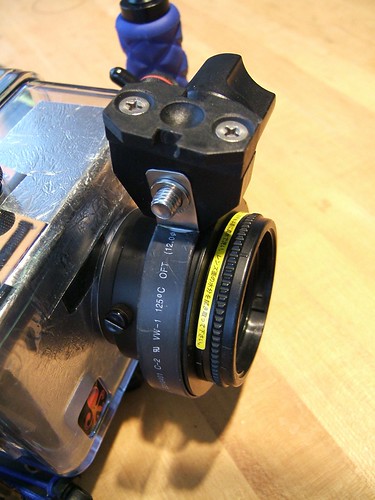
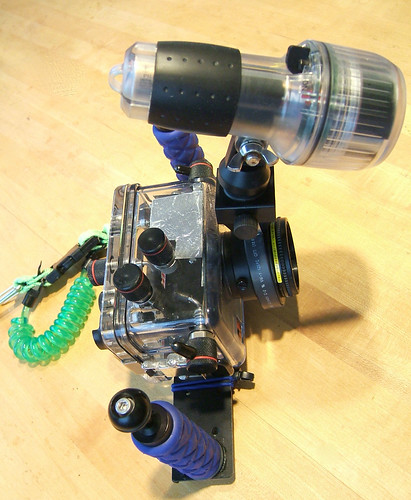
  1. I've put up an entry on my blog about mounting an LED44 focus light to the lens adapter that goes on the Ikelite compact housings such as the Fuji F810/E900 and others. The light helps the camera focus fast and you to frame quicker. This mounting option frees up both sides for use with two strobes. It does require some minor modification to the mount (re-drilling a hole on the strap).


    See: Ike Compact Housing with LED44 Focus Light Port Mount


    Enjoy,

    Jack
     

    273978193_220da16e77.jpg


    273978075_7413e06e0e.jpg

    Edited by JackConnick
  2. I fixed the link which was broken.


    Jack

  3. How does the lens port mount to the housing body?


    If it's not a quarter-turn bayonet mount, be careful your focusing light and its mount become a pretty big lever that could pop the lens port off if bumped _or_ cause a minor flood easily even if the port is a bayonet mount.


    Consider rigging a third ball adapter above the camera housing.

    post-6274-1161483955_thumb.jpg

  4. How does the lens port mount to the housing body?


    If it's not a quarter-turn bayonet mount, be careful your focusing light and its mount become a pretty big lever that could pop the lens port off if bumped _or_ cause a minor flood easily even if the port is a bayonet mount.


    Consider rigging a third ball adapter above the camera housing.


    Your idea is interesting, but bulky to me. But there are a lot of ways to rig a light.


    I find that a lot of these get in the way of controls on the top of the camera. I really like the light out in front and easy to adjust.


    This is held onto a wet Inon lens adapter that's held on with 3 plastic screws. Yes, you do have to be careful, but there's no chance of flooding. The Fantasea housings use this mount on their ports without issue, I've just adapted it to work on the Ike compact cases, where there isn't a better alternative.


    IMHO, YMMV!


    Jack

    Edited by JackConnick
  5. Ultralight makes an adapter that works on their handles or arms for mounting any light to any housing that uses Ultralights arms or handles.


    It is called the Neck ball adapter, works on any "neck" under their balls, it can be put in any position and tightened. Then you need a clamp and then the adapter to your light.


    See the "what's new" section of the web page. www.ulcs.com


    ULCS

  6. These Ikelite lens port adapters are held on to the housing with 3 small plastic thumb screws. I've broken them off tightening them with my fingers.


    While the LED44 isn't a monstrous light, I'm not sure I like the idea of the leverage it could exert.

  7. I know it looks that way, but I've dove this setup now for about 12 dives or so without any problems. The LED44 is quite buoyant.


    I twisted one of the plastic screws in half once (before using the light this way), what a PITA to get out, had to heat a paper clip and 'drill' it.


    If anything there is more of a tendency for the adapter to twist, whether or not you have the light mount on it. It is held on quite securly on to the port by any one of those three screws. I am thinking of going to a metal screw and just being careful not to over-tighten. I'm also thinking of putting a couple of dots of silicone into the groove to give a stop for the screws. Not sure that it'd stick, and since I haven't tried it I wasn't going to suggest it at this time.


    Again, people asked what I do and this is how, YMMV.


    Jack

    Edited by JackConnick
Retra

Account

Navigation

Search

Search

Configure browser push notifications

Chrome (Android)
  1. Tap the lock icon next to the address bar.
  2. Tap Permissions → Notifications.
  3. Adjust your preference.
Chrome (Desktop)
  1. Click the padlock icon in the address bar.
  2. Select Site settings.
  3. Find Notifications and adjust your preference.