Skip to content

Lights, Strobes, and Lighting Technique / Archived topic

What's the right way to connect the Ikelite dual sync cord ??

Started by CADiver ·

  • 8Posts
  • 8Replies

Read-only discussion

What's the right way to connect the Ikelite dual sync cord ??

8 posts
  1. I just read http://andrewtrevor-jones.com/ikelited300.html


    where he described how to connect the dual syn cord ....


    >I reattached the base plate and prepared the strobes. I would be using 2 DS125 strobes as I had done >with the D70. I charged both strobe batteries and attached them to their strobes. As I have two strobes, I >used the 4103.52 dual strobe sync cord. I connected the strobe connector (with blue ring) to the strobe >bulkhead on the housing, the master strobe connector (no ring) to the right hand strobe and the other >connector (red ring) to the left hand strobe. I mounted the strobes to their ball/socket arms and the arms >to the base plate. The set up was ready for testing.


    What's difference bettween where to connect the blue and red and no ring ?

    I remember reading the manual, it said the blue is the main and red is secondary if you want to set them at different power and the no ring connects to the housing. So I have been connecting the blue to my left and red to my right. Have I been doing it wrong ?!!


    Thanks!

    Dominic

  2. Blue - goes to the housing. Red/no color to the strobes. Turn the "no color" strobe on first, then the red one. If you want to use just one strobe, turn the "red" strobe off.


    http://ikelite.com/downloads/instructions/...pdf/4103_52.pdf

    Edited by jlyle
  3. Blue - goes to the housing. Red/no color to the strobes. Turn the "no color" strobe on first, then the red one. If you want to use just one strobe, turn the "red" strobe off.


    http://ikelite.com/downloads/instructions/...pdf/4103_52.pdf


    Good to know I did it wrong ! But I wonder what it meant to connect wrong ?! Am I not getting the full power ? ttl ? or just nothing ?! Cause my strobes did fire <_<

    But I always run both on in TTL but sometime use the lower half of the dial in the housing control.

  4. What Jim said. :D


    I suspect the way you had it may not have made a lot of difference, but if you had turned one off, it may not have worked. When connected as per Ikelite's instructions, you can turn the one with the red band off and still use the other strobe.


    While I usually use both strobes, I only have one spare battery pack for the DS125s and so if I do a double dive I replace the battery on the master (no band) strobe knowing that if the other strobe dies, I will at least have one working strobe.

  5. As Andrew said, if your "red one" dies the other one still working, but not backwards. If your "not colored" start to dies doesn´t matter if the "red one" battery is full, you´ll start to see some problems with the strobes and even with the camera.

    Edited by rodriguezfelix
  6. As Andrew said, if your "red one" dies the other one still working, but not backwards. If your "no colored" start to dies doesn´t matter is the "red one" battery is full, you start to see some problems with the strobes and even with the camera.


    That is true if you are using iTTL, if you are not and are fully manual AND you blank out the unused pins leaving only the FIRE pin then the camera does not know any better and will cheerfully fire away regardless of strobe status.


    The bonus here is also you can set different power levels on each strobe and you only need two of the six wires in the lead to work.


    Downside is no iTTL.


    Lot of 'and' caveats in there, sorry about that.


    Paul C

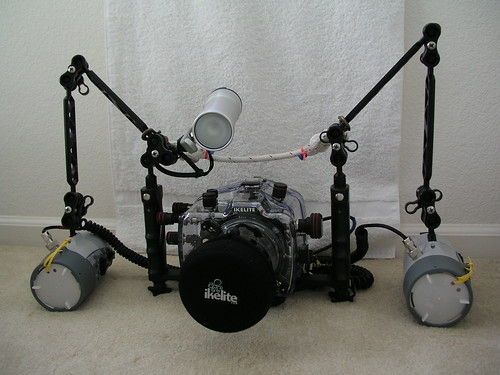
  7. So I just check, I actually didn't have the connection confuse. It was my memory got confused. So I had them connected ok but it's good read for all your responses.

    Thank you !

    590558581_72a4cd101d.jpg

  8. Now you own everybody a beer. :D

Keldan

Account

Navigation

Search

Search

Configure browser push notifications

Chrome (Android)
  1. Tap the lock icon next to the address bar.
  2. Tap Permissions → Notifications.
  3. Adjust your preference.
Chrome (Desktop)
  1. Click the padlock icon in the address bar.
  2. Select Site settings.
  3. Find Notifications and adjust your preference.