



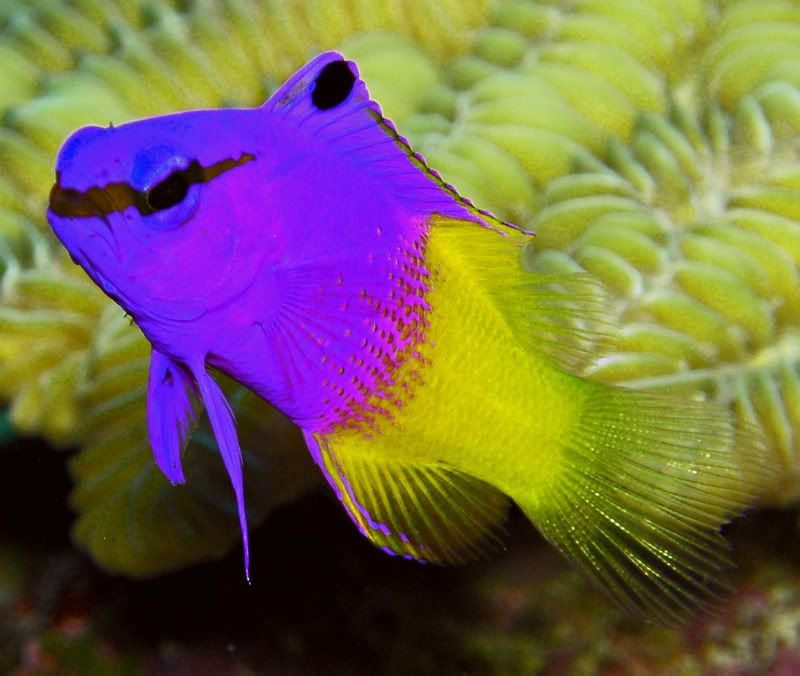
Forgetting about color for now, which crop and orientation do you prefer?
#1

#2
Read-only discussion
Forgetting about color for now, which crop and orientation do you prefer?
#1
#2
Hi,
I prefer # 1. In # 2, the gaze of the Fairybasslet appears to be looking away, drawing the viewer's eye towards the left which makes the composition less pleasing visually. That being said, I would prefer a tighter crop on # 1 eliminating some of the background to the right and above the FB.
Was this taken with your new camera?
Looking forward to seeing you in Bali!
Cheers,
Ellen
definitely #1, and great shot by the way...
Another vote for No 1. I too would like to play with taking about 10% off the right and top. I really like how the complete fish is in focus. Very nice.
Steve
definitely 1 
#1
ditto
No. 1, too.
I think that the focus is off in both. It seems to be in the middle of the fish, leaving the eye slightly soft.
Alex
Thanks for the advice everyone. Ellen, yes, it was taken in Curacao with the new camera. It's the first decent shot I've gotten of a FB in 4 years, although Alex says the eye is out of focus. Maybe unsharp mask can help? LOLWas this taken with your new camera?Cheers,
Ellen
# 2 is my original cropping and how I captured the fish, then Robyn wanted it for her presentation. She didn't crop it as close as I did and flipped the fish. At first I really liked what she did, then I started having doubts and preferring mine. But I think a compromise with a tighter crop like you and some others suggested, along with her orientation is the way to go. Thanks everyone.

Terms of Use Privacy Policy Guidelines We have placed cookies on your device to help make this website better. You can adjust your cookie settings, otherwise we'll assume you're okay to continue.

A worldwide community for underwater imaging.
