Skip to content

Photography Gear and Technique / Archived topic

New Dobro Storage

Started by TheRealDrew ·

  • 16Posts
  • 16Replies

Read-only discussion

New Dobro Storage

16 posts
  1. Awhile back (well a good while back) someone mentioned the Dobro Robot storage - a system to which you could add hard drives/expand as needed and it offerred data protection/RAID 5 type system


    On of the drawbacks was that it was USB 2.0. I have been keeping an eye on it and they released it now with FW800. Of course not the same speed as the RAIDs needed for some things (HD Video) but it may be good as a general back up for less bandwidth intensive items since it specs with speeds of FireWire 800 of up to 52MB/s reads & 34MB/s writes


    http://www.drobo.com/Products/drobo.html


    They also state it got a bit quieter.


    Of course nothing replaces a good back up plan and nothing is perfect, but could be interesting to store things that get by with the speeds.

  2. USB 2 is obviously a problem for native attachment. FW800 improves the speed but still has the capacity limit which is now surpassable with 4 drives. eSata would be better because of that.


    The network attachment box is still limited to USB2. :)


    I've never tested one but I understand how one is implemented internally (having been an engineer for these things previously) and I suspect it isn't fast enough to support fast host attachments anyway.


    I think this kind of box could be interesting but isn't in this case because it isn't expandable enough, has attachments that are too slow, and presents a block interface rather than a file system interface. There is a third interface that needs adoption and that interface is the ideal way to add storage. ZFS is built around that concept but doesn't take it far enough as I understand it.

  3. It might've been me who posted it (or if not exclusively me, I have mentioned it around). I was one of the beta testers of their first generation units. At the time I wasnt satisfied with the speed since I had a mobo that had too many USBII ports and the interrupts were getting in one another's way when I tried to watch streaming full-data-rate DVD files from it. But for still backups it would be fine. There's a lot to be said about a RAID-like solution that swaps striping/mirroring methods on the fly, lets you upgrade individual disks at any time, rebuilds itself after any failure, etc. There's a bit of storage overhead you pay for the ease-of-use, but really for it's intended market I think it's fine. I just wanted a bit more.


    FW is better - throughput is actually a tad higher than USBII thanks to lower CPU demand of the interface - but still not GB ethernet.


    If you're a photo or video pro and truly need backup storage to safeguard your livelihood, and also therefore presumably (since it's your "job") have more time to configure and maintain, I'd look at the Lime 'unraid' systems, myself.


    http://lime-technology.com/


    Similar end-user concept to the DROBO except it is NAS not DAS, but similar in that they aren't quite using RAID, have rebuildability, can mix disk sizes, etc. Basically they sell a full thin client and you build a basic system with lots of drive bays, so it doesn't have to be a high end processor or motherboard to keep up with whatever your editing platform is.

  4. Have you used a Lime system before? Looks interesting.


    Update: After browsing the forums at Lime I got two impressions. First was that people were complaining how slow it was. Second was that the posters there are hilariously ignorant of RAID. If they don't understand RAID it seems unlikely they will improve upon it. I suspect Lime is nothing more than a Linux network server with rudimentary file redundancy added on.

    Edited by craig
  5. No, I have no personal experience.


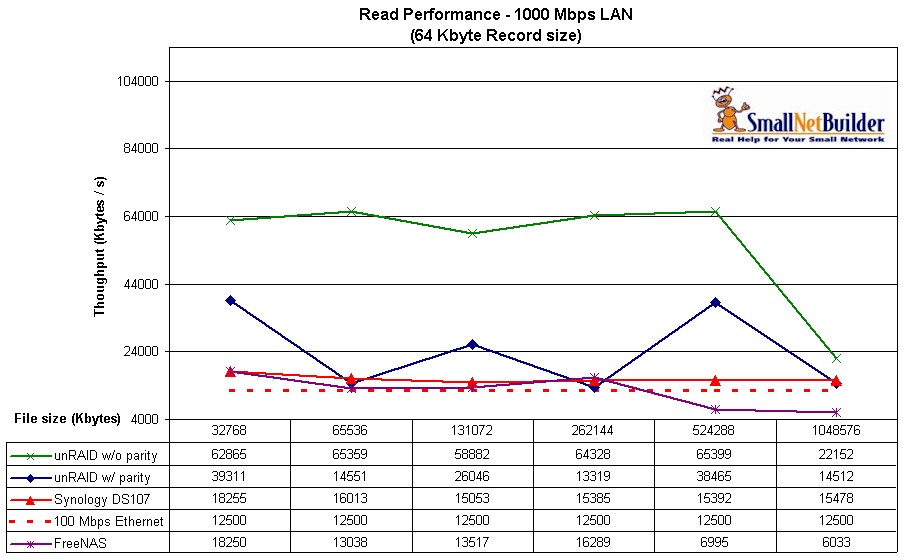
    It's really not intended for enhanced speed, but reliability due to where they store the parity data for backup. Reviews indicate it isn't horrendously slow (certainly no slower than any other NAS setup) but no doubt it is certainly slower than having a RAID controller on your main machine. 'twas never intended to be FASTER than true RAID, just a bit more configurable with mixed disks and a bit safer. FreeNAS probably is just as good an option.


    http://www.smallnetbuilder.com/myincludes/...rmance_read.jpg


    Of course I first started looking at it a couple years ago, was pointed there by several enthusiastic AVForums posters who used it to back up their huge (multi-TB) AV collections. It might not have 'aged' well since introduction...of course it would've been a nightmare to leap onto Windows Home Server thinking it was Microsoft so it had to be a bit more professional, only to suffer gradual data corruption. Heard they finally fixed that what, last month??

    Edited by rtrski
  6. Ideally, a storage appliance should do what it is intended and do so at the speed of the spindles involved. Anything less is a failure of the engineers who design it and it amazes me at the near 100% failure rate of meeting that basic criteria. When I did that job, I met that requirement each of 3 successive generations. It's difficult to find a product today that can do it.


    There's no excuse for a storage product today that can't keep up with the disks. There's plenty of bus speed, CPU, and memory bandwidth to get the job done. If Lime can't do it now what's the point in believing in their product? Disks are slow, software is fast, and transfer rates aren't a problem. When a company deliberately chooses slow interfaces, like Drobo, that tells you what their intent is. They may set a low bar but I'm not interested. The industry needs someone to put these underachievers out of business. It may not be obvious, but the industry can do far better.

  7. Hey guys


    Thanks for the info and input, will try to post a longer reply, it has been one of those days :)


    But it looks like this may be falling short (?) even with the limited use I though it could be used for which was more to supplement other things such as eSATA RAIDs with something that could be plugged in the FW port of computers as extra bulk storage for the lower bandwidth items/uses with some protection.


    Good info all around and I appreciate it...

  8. I thought this thread was about data backup and perhaps modular storage add-ons, not about the fastest storage medium possible. Any backup solution automatically has tradeoffs below the corporate infrastructure type level....even the OP acknowledged he wasn't after HD video streaming. Those tradeoffs (speed, maintenance required, hardware commonality restrictions, reliability of backup vs. individual or multiple spindle failures, reliability of surrounding client hardware such as redundant PSU or battery backup, price, etc.) determine value to a given consumer, and simply expecting the best of any one of those without influencing the others (^ speed = ^ cost) isn't realistic. I kind doubt anyone here is considering a fiber channel array as a realistic backup solution, or looking for a SAN extension. :) Maybe Lime isn't that great a solution - I admit again to no personal experience, and haven't really looked at it in some time since my initial exposure. But I still think by comparison craig's spec-ing the moon when all the OP wanted was a piece of tasty cheese.


    RealDrew: for stills or even DVD-quality video, if the cost and the features tickle your fancy, I see no problem with the Drobo, really. Still seems a bit costly to me for not being at least GB ethernet interface directly (not USB mediated), but you're paying for essentially zero user setup and a fair amount of redundancy built in. You could likely also build your own NAS block with FreeNAS or whatever, build a computer with big drives using Windows Home Server to add to your personal network, buy a Buffalo Terastation, or for that matter just buy a single reasonably fast SATA disk and put it in an external eSATA enclosure, plug it into your editing workstation, and leave it turned 'off' when not in use as at least a modestly trustable backup (still single-point failure, but it shouldn't fail when it ain't on if you don't play football with it, or keep a coffee cup on top of it to tempt fate). The real question is what are you after: inviolable backup or additional live storage? The demands of each are different, anywhere outside the corporate IT backbone level. Anything that tries to be both on the cheap will inevitably suffer the Law of Multifunction Devices: the more functions a given device is designed to address, the less perfectly it will perform all those functions. Or 'compromises happen', for short.

  9. You should read what is posted rather than tell us what we've said. There is nothing that suggests "this thread was about data backup and perhaps modular storage add-ons, not about the fastest storage medium possible", the thread was simply about the new version of the Drobo which, by the way, is new because of improved performance features.


    When I say that a system is so slow that it can't even keep its hard drives busy my point is that the architecture is bad. That is not the same as suggesting that people buy fiber channel arrays or that anyone needs any particular level of capability.


    The overriding goal of Lime is clearly to leverage Linux and open software. That approach, in my mind, is the antithesis of proper storage system architecture. Our goal is to use disks to store data and we want that job performed efficiently and reliably. Running that job through a mountain of unnecessary and questionable code pieced together by under-qualified hacks volunteer enthusiasts is not good design.


    By all means, though, believe that because you can afford to wait for a product to decide what it's going to do that these products are good choices. Just don't be too upset when critical data is lost and you find out that not one person on the planet really knows what happened or where it went. These are storage and backup solutions; they need to not be running on a precarious stack of rickety software. We back our data up because we don't trust the mountains of software to be bug-free; we don't need to be basing our backups on that same software.

  10. for stills or even DVD-quality video, if the cost and the features tickle your fancy, I see no problem with the Drobo, really. Still seems a bit costly to me for not being at least GB ethernet interface directly (not USB mediated), but you're paying for essentially zero user setup and a fair amount of redundancy built in. You could likely also build your own NAS block with FreeNAS or whatever, build a computer with big drives using Windows Home Server to add to your personal network, buy a Buffalo Terastation, or for that matter just buy a single reasonably fast SATA disk and put it in an external eSATA enclosure, plug it into your editing workstation, and leave it turned 'off' when not in use as at least a modestly trustable backup (still single-point failure, but it shouldn't fail when it ain't on if you don't play football with it, or keep a coffee cup on top of it to tempt fate). The real question is what are you after: inviolable backup or additional live storage? The demands of each are different, anywhere outside the corporate IT backbone level. Anything that tries to be both on the cheap will inevitably suffer the Law of Multifunction Devices: the more functions a given device is designed to address, the less perfectly it will perform all those functions. Or 'compromises happen', for short.


    As to the Law of Multifunction Devices, I hear that. TVs with DVD Players and VCRs in them?


    Basically I was kicking the Drobro thought around for some storage that is self maintaining/reliable for bulk storage of items that I will access from time to time that is easy to get to. The USB was a no-go, but FW800 made it appealing for some uses.


    I have eSATA drives, such as the SeriTek 5 Bay, Wiebetechs RTXs and Macs networked via Ethernet. I do back-ups (including moving things offsite as needed) and would never suggest that anything should replace that. But some things can get moved to storage where I do not need the speed or full blown "safe" back-ups but would otherwise like the convienence of access. For instance - builds of DVD Projects. Having them somewhere where they have a bit of safety (as oppossed to just being on a single drive) while not tying up space/bandwidth for more important things has an appeal to me. Same thing for items such as audio files with Logic, Soundtrack or Garageband. Amazing how quickly terrabytes fill up nowadays when everything used to get on a Jaz Drive :) It could be Drobo or something else.


    It may be worthwhile for some things, afford a bit of protection, looks fairly simple, takes care of itself and could be something that people who may not be inclined to set up things such as RAIDs or do not get into good back up plans. And if it is in fact quiet like they claim that is a big point for me. There are posts around here where people have things on just one drive and run into issues or are looking for back-up storage (or more often just larger storage) and they appear to have all their eggs in one basket. The Drobo could be a better basket, although not perfect.


    For things such as photos, DV and HDV the speed should be enough (subject to multi-streams and huge RAW files from some of these new cameras :blush: ) So that is why it re-caught my eye as something that could be a good add-on for general use with some levels of saftey, albeit at a slightly higher cost than other things and also subject to the potential limitations in the technology, and limitations in design as to what should be achieved and other issues of "points of failure" as both you and Craig pointed out.


    Like I said I was considering one myself once they introduced the FW800 and mentioned that the feature was here.


    Now I will in all likelihood HAVE to get one since you and Craig have provided so much good information and someone needs to get their hands on one and report back on how it goes just so everyone knows one way or the other.


    Yes, you are both now officially considered enablers and I would appreciate you both coming into any thread I start called "Considering buying a ________". ;)


    Kidding aside if I do get one of these I will post back and let you know how it goes.

  11. I haven't done video for some time, but when I did I never worked on active projects using a redundant storage system. I feel the likelihood of failure during such a project is low so I can afford that risk so long as I have a recovery plan. My approach was, and probably still would be, to use a cheap storage solution with enough performance for active projects and a redundant system for archiving. The archival storage wouldn't need the write speeds required for active editing. That solution is far easier to achieve. :)


    That approach may not work for pros of course. I don't think still photography is nearly as demanding of disk performance though pros may have unique requirements there too. It's important to understand what your performance needs are as.


    I love the idea of what Drobo offers. I don't necessarily like its execution but I believe that all computers fundamentally should view disk storage as simply as Drobo does. A revolution needs to occur.

  12. As a little aside; I've had the Apple 1TB Time Capsule and Time Machine running for a few months now. It's been pretty brainless (which is what I need) and trouble free and works as advertised so far. I have not had to do any major restores, but have pulled various versions of files with no problems. There was an initial glitch with Aperture which now seems to be fixed. For the low end still photography hobbyist like myself seems to be a nice uncomplicated solution.

    Edited by loftus
  13. I haven't done video for some time, but when I did I never worked on active projects using a redundant storage system. I feel the likelihood of failure during such a project is low so I can afford that risk so long as I have a recovery plan. My approach was, and probably still would be, to use a cheap storage solution with enough performance for active projects and a redundant system for archiving. The archival storage wouldn't need the write speeds required for active editing. That solution is far easier to achieve. :blush:


    I get a little OCD I think. I will capture video and make a copy of the files to a back-up drive/storage before working on them at all (and do the same thing with photos) trying to take in account some of the items I think we have discussed in the past about point of failures. I also try to have three copies, one off-site just in case, one working and one immediate/handy back-up. And of course as long as I follow that none if it is ever needed ;) It is only when I do not follow that than of course I need it....not sure which variation of Murphy's Law that is.


    That approach may not work for pros of course. I don't think still photography is nearly as demanding of disk performance though pros may have unique requirements there too. It's important to understand what your performance needs are as.


    Agreed. And for me the video side of things (size/speed) does add wrinkles.


    TI love the idea of what Drobo offers. I don't necessarily like its execution but I believe that all computers fundamentally should view disk storage as simply as Drobo does. A revolution needs to occur.


    The basic concept (though perhaps not implementation) of the Drobo appeals to me also for all the same reasons. Perhaps the next generation may also add a eSATA connection and some other improvements. I have a couple of Weibetech RTX 2 Bays which are nice in having USB 2 (I guess), FW800 and eSATA. Can be configured RAID 0 or RAID 1 and are trayless. Pop Hard Drives in and out like floppies, and I will make backups by just putting another drive in. The time issue does not bother me because they do not even have to be hooked up to the computer to do their thing. Of course now as projects expand even the 1 Terrabyte drives are starting to seem small. :)


    As a little aside; I've had the Apple 1TB Time Capsule and Time Machine running for a few months now. It's been pretty brainless (which is what I need) and trouble free and works as advertised so far. I have not had to do any major restores, but have pulled various versions of files with no problems. There was an initial glitch with Aperture which now seems to be fixed. For the low end still photography hobbyist like myself seems to be a nice uncomplicated solution.


    For some reason I just do not associate you and the necessity for anything to be brainless. :mellow: The Drobo apparently can also do Time Machine back-ups farily well from what they say. The advantage is that with the Time Capsule if the drive goes (whatever the reason) the back-ups are gone. With the Drobo and RAID set-ups (depending on the configuration) one drive going down will not cause the data to be lost, just swap out the bad drive and the rest is rebuilt. Of course it will not prevent currupted files and other things, but it just adds a bit more security. In other words the Drobo is something "For the low end still photography hobbyist like myself". And by the way I ain't buying that either about you. I have seen what you list as your equipment, your photos, your tips and suggestions for Aperture and Photoshop...


    Like I mentioned to Craig I am a bit OCD about this sometimes and I would have something else to add to the Time Machine. Even something simple like a 1 Bay RTX or Silver Sata where I would clone/copy a drive then put that drive somewhere else like a safety deposit box or FTP the real good RAW photos somewhere for storage.

  14. Well thanks for the compliments Drew, but when it comes to all this high tech RAID stuff etc I get a little lost. You're right the Drobo looks like it will work nicely with Time Machine. I have redundancy in a sense but without RAID etc. I have the Time Capsule backing up my primary drive completely, important files like Aperture Vault and Quicken / MYOB Backups are directed to a second drive in my MacPro and some stuff even goes off site automatically to .mac. So effectively there are always 3 (even 4 of some things) copies of important stuff in various locations. What would be very cool is if Apple expands .mac (now 'Mobile me') on line ease of use backup to Aperture in the future.

    But you definitely seem to have the OCD edge on me. :)

    Edited by loftus
  15. That's pretty exciting, IMO. (although not as exciting as eSATA would have been)


    I can't tell if the price has gone up or stayed the same... anyone remember? I could swear the usb2 versions were like $600 last I looked, and now I'm seeing them at newegg for $350, and the fw800 version is on the drobo site for $500.

  16. You should read what is posted rather than tell us what we've said. ...


    ...By all means, though, believe that because you can afford to wait for a product to decide what it's going to do that these products are good choices. Just don't be too upset when critical data is lost and you find out that not one person on the planet really knows what happened or where it went. These are storage and backup solutions; they need to not be running on a precarious stack of rickety software. We back our data up because we don't trust the mountains of software to be bug-free; we don't need to be basing our backups on that same software.


    Thanks for the condescension, craig. In one sentence you remind me not to think your thoughts for you, then in the last paragraph tell me what I'm thinking, what I'm doing for my backups, and how sorry I'll be when I realize how wrong I am. Oh, am I Mr. Pot or Mr. Kettle this time? I get confused.


    I beta tested the first generation Drobo as an independent tester, so I did have direct experience to offer and did so. I decided it wasn't for me but not because of lack of trust in the data fidelity (never did 'break' it in terms of losing data at least, and I did try silly things like rearranging drives in it both off and on to see what happened...I just wasn't thrilled about the throughput but never did really nail it down to the Drobo vs. my particular build's USB being heavily loaded). There are other similarly-priced alternatives to Drobo with different or overlapping features, some home-builds, some freeware, some NAS some not so I thought I'd suggest a few of those too. Didn't claim any direct knowledge of any of them other than interest. If better eyes than mine think some of those suggestions are horsepuckey, so be it. (Shrug)


    RealDrew: good luck with the purchase, and I hope it proves to provide what you want out of it. You let ME know if I should get off the fence. Clearly I can't be trusted to make decisions for myself. :)

Keldan

Account

Navigation

Search

Search

Configure browser push notifications

Chrome (Android)
  1. Tap the lock icon next to the address bar.
  2. Tap Permissions → Notifications.
  3. Adjust your preference.
Chrome (Desktop)
  1. Click the padlock icon in the address bar.
  2. Select Site settings.
  3. Find Notifications and adjust your preference.