Skip to content

Photography Gear and Technique / Archived topic

Corner reflection problem with Tokina 10-17 with Ikelite 6" dome port

Started by mschiff ·

  • 11Posts
  • 11Replies

Read-only discussion

Corner reflection problem with Tokina 10-17 with Ikelite 6" dome port

11 posts
  1. Anyone have any ideas on what might be causing the reflections in the upper right and left corners of this image? It is a problem I had with many of the pictures I shot with the Tokina 10-17 at 10mm, a Canon Rebel XT, Ikelite Substrobe DS-125, and an Ikelite housing with the 6" 5503 dome port (with the shade). It is most apparent in the upper right corner, but it in the upper left as well.


    IMG_5361Reflection.jpg


    -- Martin

  2. Hi

    I had the same problem with my SEA&SEA dome port !

    Use very long arms and place your strobs behind port line !!!

  3. Hi there, I've had the same probs using the tokina. This can come from the strobe or sun, but the core of the problem is that part of the front of the lens (the metal surrounding the lens just below the shade) reflects - at certain light angles - into the port and back into the picture.To solve this I use a ring of thin black, nonreflective cardboard that i attach to the top of the lens, like a collar. I've also painted the zoom gear black. The fact that the domeport has no collar by default is a problem, as it calls for all sorts of reflections from lens/zoom gear onto the port.


    Try it out, it's an easy fix.

  4. Hi there, I've had the same probs using the tokina. This can come from the strobe or sun, but the core of the problem is that part of the front of the lens (the metal surrounding the lens just below the shade) reflects - at certain light angles - into the port and back into the picture.To solve this I use a ring of thin black, nonreflective cardboard that i attach to the top of the lens, like a collar. I've also painted the zoom gear black. The fact that the domeport has no collar by default is a problem, as it calls for all sorts of reflections from lens/zoom gear onto the port.


    Try it out, it's an easy fix.


    I also have reflections from my zoom gear in my images with the Tokina and S&S 8" port. Took me a fairly long time to figure out what was causing the problem.


    How do you attach your black baffle to the lens, and where exactly do you attach it. Perhaps a picture of it might help me, as I can't for the life of me figure out how to get it into the port while attached...

    Thanks,

    Robin

  5. Hi

    I had the same problem with my SEA&SEA dome port !

    Use very long arms and place your strobs behind port line !!!


    I'm pretty sure the strobe was behind the port line. I was careful to watch that.


    -- Martin


    Hi there, I've had the same probs using the tokina. This can come from the strobe or sun, but the core of the problem is that part of the front of the lens (the metal surrounding the lens just below the shade) reflects - at certain light angles - into the port and back into the picture.To solve this I use a ring of thin black, nonreflective cardboard that i attach to the top of the lens, like a collar. I've also painted the zoom gear black. The fact that the domeport has no collar by default is a problem, as it calls for all sorts of reflections from lens/zoom gear onto the port.


    Try it out, it's an easy fix.


    Thanks, I'll do that the next time I use it and see if it helps. Do you slide it inside the built in lens shade?


    -- Martin

  6. I'm pretty sure the strobe was behind the port line. I was careful to watch that.


    -- Martin


    Thanks, I'll do that the next time I use it and see if it helps. Do you slide it inside the built in lens shade?


    -- Martin


    I'll take a pic of the setup and post it here :drink:

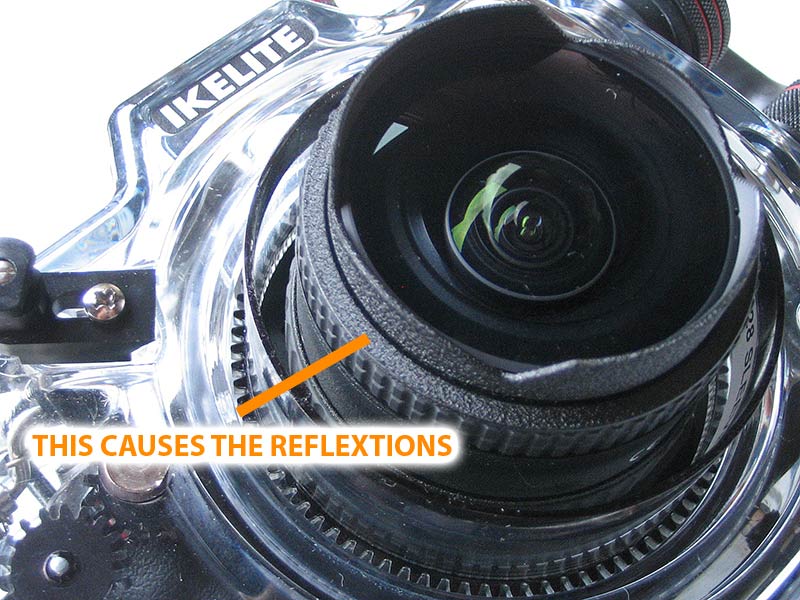
  7. Here you see the reflexion causing rim of the lens (about 4mm thick)

    post-13958-1218560509.jpg


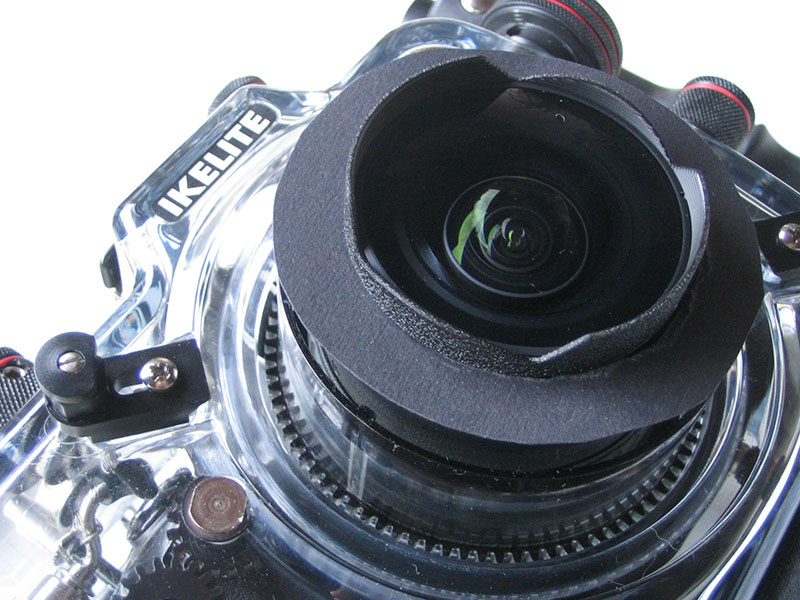
    With the collar (made of thin cardboard, it fits into a groove of the lens; glue or tape not needed; the outer diameter is roughly the size of the port entrance):

    post-13958-1218560525.jpg


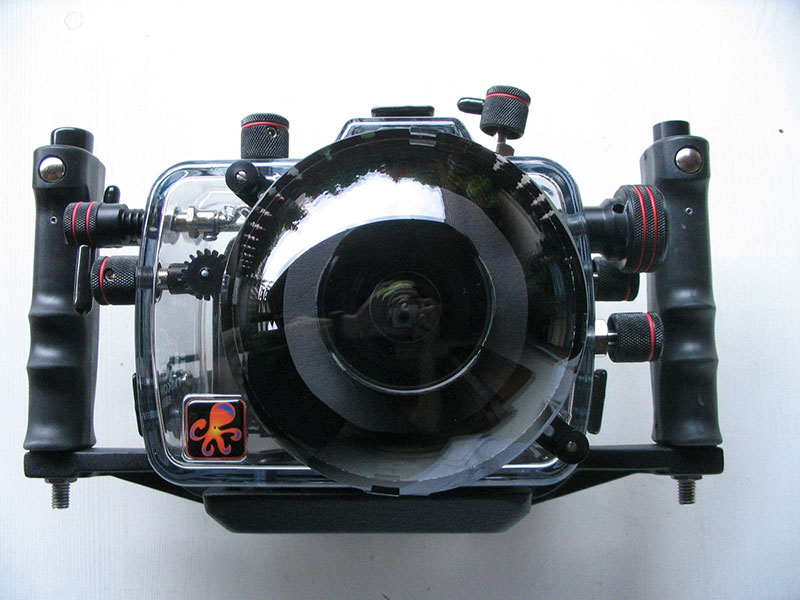
    Front view of fixed rig:

    post-13958-1218560539.jpg


    Very seldom i still get minor reflexions, they come from parts of the lens that are still exposed to light, mainly the shade; sharp edges are great in reflecting light :drink:


    One can of course think of more sophisticated fixes, like removing the lens shade and putting some nonreflective black paint on the front parts of the lens.


    Have fun, tell us whether this worked for ya.


    Phil

  8. Thanks for the excellent photos showing your cardboard attachment. I'll try it out!


    Robin

  9. Phil,


    Thanks very much for the detailed photos. I'll definitely try that the next time I use the housing (it's being repaired at Ikelite right now).


    -- Martin

  10. Hi All


    I am also getting the reflection using Canon 10-22mm lens,


    Has anybody else queried this with Ikelite? I got a reply stating i need to put black tape on my lense, I dont feel this is the right answer there must be a issue with the optics....


    On a recent trip to Red Sea the lens reflection appeared in quite a few shots..


    What would be the real fix for this?


    Thanks


    Vernon

  11. Vernon,


    My housing and flash are in for service at Ikelite right now, and I pointed them to this thread asking why it happened with the 5503 port. I'll let you know what they say.


    I'm not sure why you doubt the reply you got though. Phil posted a detailed message above about the problem and he concurs with that advice. Have you tried it? The fact that it happens only under certain conditions kind of rules out an optical problem.


    -- Martin

    Edited by mschiff
Keldan

Account

Navigation

Search

Search

Configure browser push notifications

Chrome (Android)
  1. Tap the lock icon next to the address bar.
  2. Tap Permissions → Notifications.
  3. Adjust your preference.
Chrome (Desktop)
  1. Click the padlock icon in the address bar.
  2. Select Site settings.
  3. Find Notifications and adjust your preference.