



When I open my images in CS3 Bridge the images open, then bridge changes the thumbnails slightly like I have a preset set in photoshop, but in photoshop I have all my setting to default, I must have done something as this has only just started happening and cant seem to find the solution. Does anyone know what it is? Thxs
- 6Posts
- 6Replies
Read-only discussion
PS CS3 Raw Question
6 posts
-
-
Fixed!
-
How? My laptop started doing the same thing.
Cheers,
Marli
-
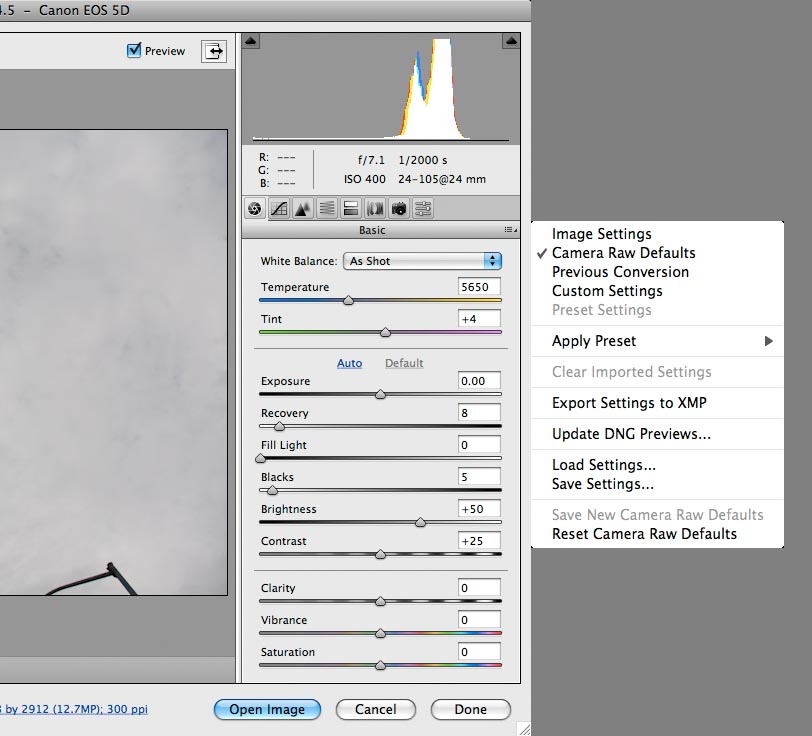
I don't know if this is the source of your "problem", but when you open a RAW image in Bridge it applies a meta-data template. When Bridge first opens, it shows the preview images in the file, then it applies the meta-data template. You will see the images come up one way, and then "change" as the new preview image is generated.
You can set (or reset) the default template with a flyout menu (small icon to the right of the word "Basic" below). I find this really useful to preprocess default settings: sharpening, chromatic aberration, etc. If you accidentally changed your "Camera Raw Default" you can reset it with this menu.
I hope that this helps.
-
I tried the above first but it did not work so this is what worked for me. Delete the preferences file sometimes it gets corrupt.
So close photoshop, then open it again this time hold down 3 keys while it opens
MAC: Command, Option, Shift
WIN: Control, Alt, Shift
You'll see a window asking are you sure, say yes and that should do it.
-
Thanks, both of you! Will try your remedies.
Cheers,
Marli


