Skip to content

Photography Gear and Technique / Archived topic

HP DreamColor LP2480zx 30bit Display

Started by Drew ·

  • 11Posts
  • 11Replies

Read-only discussion

HP DreamColor LP2480zx 30bit Display

11 posts
  1. A couple of weeks ago, I went to an animation studio to have a look at their newish monitors. My friend told me it was better than the Eizo because it was 10bit per channel (30bit RGB or 1 billion! colors) and it had over 130% coverage of various CC profiles including NTSC (LUT 601 and 603), Adobe 1998 and SRGB color gamuts. That means as it works as an excellent production monitor. Best of all it was LED as backlight and didn't cost $8-10k like many other. Since I was picking one of their leftover Sony Lumas, I had to see this monitor first hand.

    The colors from this thing were bright and almost real life. I threw up a few 14bit pictures from a 1D3 and boy was it nice looking. It is a nice monitor and at $3299, it's a bargain for a 24" production monitor.


    HP DreamColor monitor

    Edited by Drew
  2. Does anyone here speak Clingon.. I think Drews gone mad with excitement... :)


    ;)


    Dive safe


    DeanB

  3. It's Klingon, yintagh! ;)

    Edited by Drew
  4. Ghuy Cha !!!!


    I knew i couldn't understand it ...


    Dive safe


    DeanB

  5. Do you have a profile of this monitor to analyze? I'm curious just how wide the gamut is. $3299 buys a lot of monitor otherwise.

  6. Nope, I was at the studio workstation... not my own computer. For video, it's da bomb since it emulates DCI-P3 standard at like 96 or 97%. That's close enough for studio work.

    For stills, it's 100% adobe RGB 1998. I'm sure there's a profile somewhere in the HP website. They worked so hard to push it through Dreamworks that I doubt they wouldn't think of that.

  7. It is a nice monitor and at $3299, it's a bargain for a 24" production monitor.

    HP DreamColor monitor

    New price on the HP website is $2499

  8. Aw rats... right after I pick up an old Luma 20". Good thing I limit myself to fewer new items :lol:

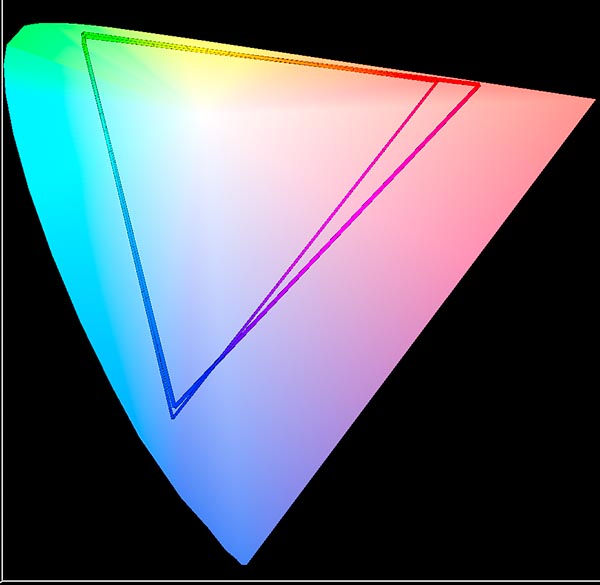
  9. I found a gamut diagram on page 9 of this PDF file. It looks like the monitor does encompass AdobeRGB. A poster here says in his measurements that the monitor is much larger than AdobeRGB.


    Even though the HP monitor supports 10 bit data, that doesn't mean your system is able to feed it 10 bit data.


    I recently upgraded my Dell 3007 to an NEC 3090 for the increased gamut. After calibration, I compared profiles in ColorThink. Here's a 2D similar to what is in HP's PDF file. 2D graphs don't tell you everything though. :lol:


    post-525-1221079841.jpg


    The HP offers a greater range in the purples according to graphs but you can see that the NEC is essentially 100% AdobeRGB as well. The NEC is a 4MP, 30" display and was about $2000.


    I've been trying to understand how large the gamut of underwater images can be recently. I've found some images that I've made that cannot be contained by BetaRGB despite what Iliah Borg claims. The images look disappointing when converted to sRGB. Anyone with insights on how large the underwater gamut is?

  10. I found a gamut diagram on page 9 of this PDF file. It looks like the monitor does encompass AdobeRGB. A poster here says in his measurements that the monitor is much larger than AdobeRGB.


    Even though the HP monitor supports 10 bit data, that doesn't mean your system is able to feed it 10 bit data.


    I recently upgraded my Dell 3007 to an NEC 3090 for the increased gamut. After calibration, I compared profiles in ColorThink. Here's a 2D similar to what is in HP's PDF file. 2D graphs don't tell you everything though. :lol:


    post-525-1221079841.jpg


    The HP offers a greater range in the purples according to graphs but you can see that the NEC is essentially 100% AdobeRGB as well. The NEC is a 4MP, 30" display and was about $2000.


    I've been trying to understand how large the gamut of underwater images can be recently. I've found some images that I've made that cannot be contained by BetaRGB despite what Iliah Borg claims. The images look disappointing when converted to sRGB. Anyone with insights on how large the underwater gamut is?

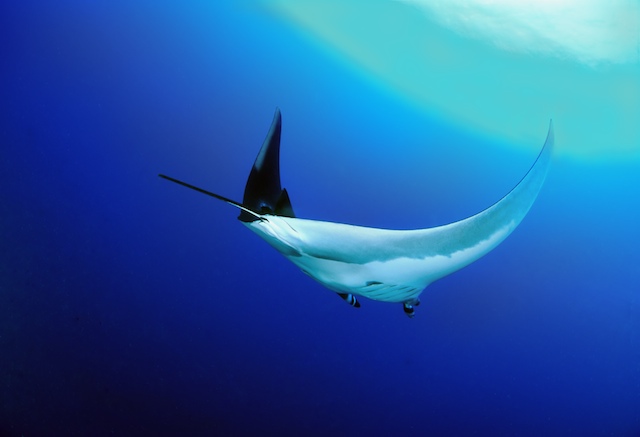
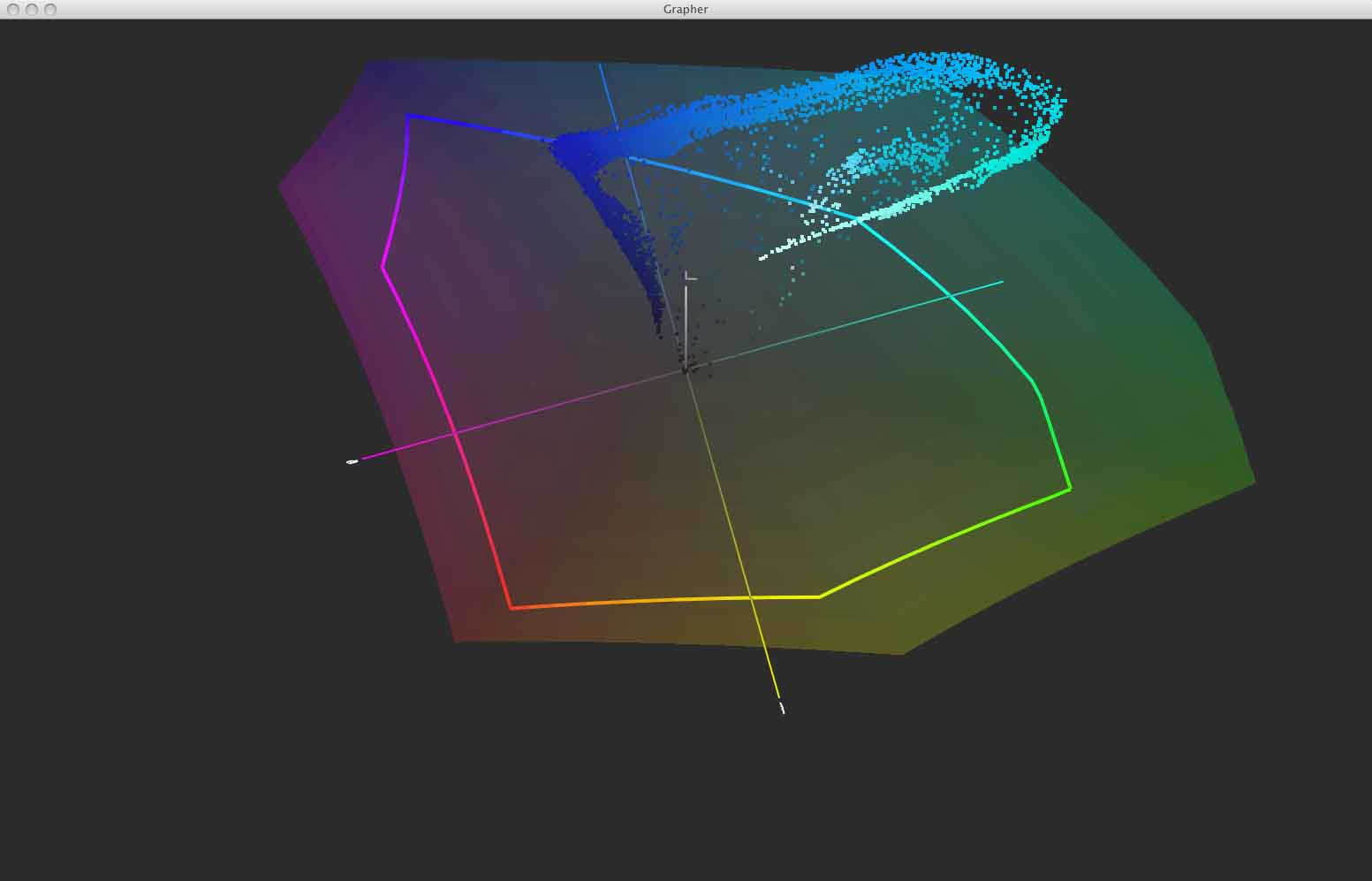
    I don't know how large the underwater gamut is, but I do know that the areas I have run into gamut issues underwater are in the cyan / blue area. An example is this image - I know it's a 'blown' sunball, but I like the surreal effect in this case, but I am unable to get it to print without compromising the outer rings of the sunball.

    Manta_Pic_and_RGB_profile.tiff

    post-5478-1221096969.jpg

    post-5478-1221097052.jpg

    Edited by loftus
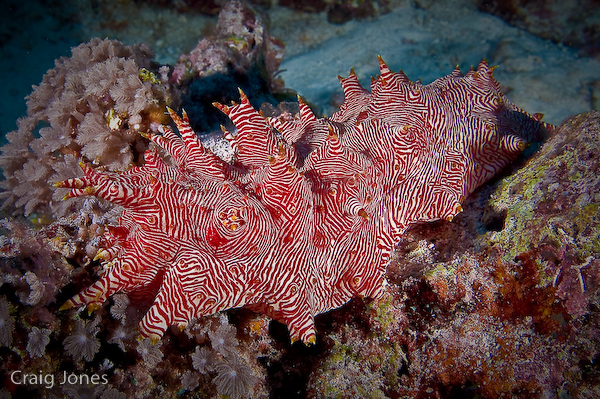
  11. I've never really thought about sunballs but that's a very interesting case. The first image I looked at was this one:

    post-525-1221105902.jpg

    This is an 8 bit ProPhoto file so it may not look good in a browser.


    The thing with that image is that anything less than ProPhoto won't contain the deep reds that the image has. On a wide gamut monitor it looks worse in sRGB.


    I had a discussion with Iliah Borg recently where he strongly suggested that BetaRGB was a large enough space to contain the output of any DSLR. I've seen published data that says that isn't so and my own profiles say it isn't. This image will not fit in BetaRGB. It still a very complicated issue since what a camera is allowed to put out versus what it is physically capable of putting out are two different things. It is possible that IB is still right (at least about the input space). Trouble is that he's picking nits on quantization loss. 16 bit is good enough with the files we generate even when we use a wider gamut than strictly necessary.


    I really wonder how much the choice of intermediate working space effects the rendering of these sunballs. If the RAW converter went straight from raw to Lab I wonder if it would help. RGB can't handle strong saturation except in midtones whereas Lab doesn't care. It might be fun to throw a sunball shot at one of these RAW gurus and hear what they have to say about it.


    Of course, what our sunball is and what we'd like it to be are two different things. :lol:

Turtle

Account

Navigation

Search

Search

Configure browser push notifications

Chrome (Android)
  1. Tap the lock icon next to the address bar.
  2. Tap Permissions → Notifications.
  3. Adjust your preference.
Chrome (Desktop)
  1. Click the padlock icon in the address bar.
  2. Select Site settings.
  3. Find Notifications and adjust your preference.