



Skip to content

Photography Gear and Technique / Archived topic

64bit vs. 32bit

Started by jeremypayne ·

  • 9Posts
  • 9Replies

Read-only discussion

64bit vs. 32bit

9 posts
  1. I'm about to get a new laptop ... dropped the primary at the dang security checkpoint at the airport ...


    I'm pretty sure I'm gonna get a Lenovo Thinkpad W-500 (been using thinkpads forever).


    Should I get 64-bit Vista or no? I'm using Lightroom 2.0 and can get CS4 (trialing now) which should both benefit ... my worry is simple stuff and other apps ...


    Will the performance boost on the photo stuff outweigh any weird incompatibilities?


    Very interested in hearing the experiences of others who have made the leap to 64-bit Windows OS.

  2. I'm about to get a new laptop ... dropped the primary at the dang security checkpoint at the airport ...


    I'm pretty sure I'm gonna get a Lenovo Thinkpad W-500 (been using thinkpads forever).


    Should I get 64-bit Vista or no? I'm using Lightroom 2.0 and can get CS4 (trialing now) which should both benefit ... my worry is simple stuff and other apps ...


    Will the performance boost on the photo stuff outweigh any weird incompatibilities?


    Very interested in hearing the experiences of others who have made the leap to 64-bit Windows OS.


    Something you may want to consider is seeing if the hard drive from the old machine can be dropped into a portable case and perhaps clone an older partition and newer partition. One with the OS that worked for you without issues as a just in case and then the 64 bit OS. Though I run Macs, I usually have a couple of OSes available as "just in case" when using newer OSes. I also do that with my virtual machines for Windows that I run on my Macs (and used to do this with Windows on my Windows Machines, but it has been awhile.)

  3. Something you may want to consider is seeing if the hard drive from the old machine can be dropped into a portable case and perhaps clone an older partition and newer partition. One with the OS that worked for you without issues as a just in case and then the 64 bit OS. Though I run Macs, I usually have a couple of OSes available as "just in case" when using newer OSes. I also do that with my virtual machines for Windows that I run on my Macs (and used to do this with Windows on my Windows Machines, but it has been awhile.)

    Great idea ... I'll have to give the physical machine back to the MIS crew at the office, but I have a backup image of the drive and can restore that to an external HD ... I guess I'd have to update the drivers to make it work with the new hardware config, but otherwise, it should serve nicely as an alternative boot device.


    Thanks, buddy! Are you gonna get snow tomorrow?

  4. Thanks, buddy! Are you gonna get snow tomorrow?


    Not sure I am actually down in D.C. area for the last week or so and heard some snow is moving in north of here (Philly and the W.S.) but I had not looked for us. Is there alot of snow in the forecast? Was going to head home probably tomorrow but maybe I should push the drive back a day and spoil my niece and nephew some more. Now officially football weather I guess.:uwphotog:

  5. Not sure I am actually down in D.C. area for the last week or so and heard some snow is moving in north of here (Philly and the W.S.) but I had not looked for us. Is there alot of snow in the forecast? Was going to head home probably tomorrow but maybe I should push the drive back a day and spoil my niece and nephew some more. Now officially football weather I guess.:uwphotog:

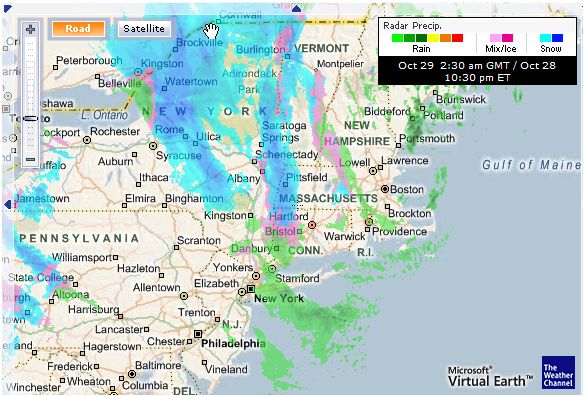
    Few inches tonight in the Hudson valley and then mixed tomorrow with more snow later in the day and the night.


    It is snowing now ...


    post-14536-1225248239.jpg

  6. 64bit lightroom is supposed to be slightly faster than the 32bit version, but I'll doubt you'll notice. What would give you the biggest gain is if your laptop supports 8GB of memory on a 64bit OS. A 32bit OS only allows for about 3GB of memory in total, while a 64bit OS can handle much more (but hardware currently dictates 8GB max). Check out if your laptop can handle 8GB and if so, get the 64bit Vista and 8GB. Otherwise it really doesnt matter, and id just get 64bit.

  7. 64bit lightroom is supposed to be slightly faster than the 32bit version, but I'll doubt you'll notice. What would give you the biggest gain is if your laptop supports 8GB of memory on a 64bit OS. A 32bit OS only allows for about 3GB of memory in total, while a 64bit OS can handle much more (but hardware currently dictates 8GB max). Check out if your laptop can handle 8GB and if so, get the 64bit Vista and 8GB. Otherwise it really doesnt matter, and id just get 64bit.

    Thanks, Cor. The machine does support 8GB of phyical RAM, but I'd likely have to order it with 4GB to start and upgrade a little bit done the road ... long story (I have to order everthing as "parts" as I'm officially only allowed to buy/use Dell at work).


    I'll do some more research today ... I'm intrgued ....

  8. Yep, just go for 64bit on any new systems with over 2GB of ram. You won't notice any difference from 32bit, and it should just work fine. A lot of the big PC makers are installing 64bit by default on new systems now. The last time I was in Costco 5 out of 6 of the laptop models on display were 64bit.


    Thanks, Cor. The machine does support 8GB of phyical RAM, but I'd likely have to order it with 4GB to start and upgrade a little bit done the road ... long story (I have to order everthing as "parts" as I'm officially only allowed to buy/use Dell at work).


    I'll do some more research today ... I'm intrgued ....

    Edited by davehicks
  9. Yep, just go for 64bit on any new systems with over 2GB of ram. You won't notice any difference from 32bit, and it should just work fine. A lot of the bit PC makers are installing 64bit by default on new systems now. The last time I was in Costco 5 out of 6 of the Laptop models on display were 64bit.

    I did ... I ordered a Lenovo w500 running 64-bit Vista with 4GB RAM and a 512mb OpenGL video card ... I almost got the 1900x1200 screen, but chose the 1600x1080 as it was brighter and the other seemed silly for that small a screen size.


    The w700 seems like a pretty nice laptop, albeit big and pricey. It has 72% AdobeRGB coverage and a (supposedly) very fast hardware calibration device built into the machine ... just seems to big to lug around.


    Here's what I've found regarding 64-bit compiled apps:


    ** CS3 - no

    ** CS4 - yes

    ** LR 1.x - no

    ** LR 2.x - yes

    ** Photomatix - no

    ** Autopano Pro - Yes

    ** PTGui Pro - Yes


    Very interested to see CS4 run with 4GB of RAM and GPU acceleration.

Ultralight Control Systems

Account

Navigation

Search

Search

Configure browser push notifications

Chrome (Android)
  1. Tap the lock icon next to the address bar.
  2. Tap Permissions → Notifications.
  3. Adjust your preference.
Chrome (Desktop)
  1. Click the padlock icon in the address bar.
  2. Select Site settings.
  3. Find Notifications and adjust your preference.
