



Skip to content

Beginner Forum / Archived topic

Vignetting, strobe arm length

Started by arfy ·

  • 3Posts
  • 3Replies

Read-only discussion

Vignetting, strobe arm length

3 posts
  1. Hi there


    I have a couple of questions as follows :


    (a) I have recently switched from a point-and-shoot to a DSLR and, apart from now living on bread and water, am pretty excited about using it.


    The system I thus far have is : Canon D40, Ikelite housing, Tokina 10-17, twin DS 125 strobes, SA 100R arms and 8" port with shade.


    I took a dip with the gear yesterday, in very low viz, and everything seemed to work well. I placed the arms behind the port as far as reasonably possible and pointed out, and didn't really get any backscatter. However, the problem I did have was that, at the lens' widest setting (10mm) the corners were blacked out (see attached photo - try to ignore air coming out of my head!) . I noticed that the problem seemed to disappear when the lens was zoomed in.


    Are the black corners the port shade or is this some form of vignetting? Any way to alleviate this problem other than removing the shade?


    (b) I'm off on my second tiger shark trip with Jim Abernethy in a few weeks' time - would you think that the arms I currently have (14") would be sufficient or might I need to extend? Certainly I had very little backscatter in low viz yesterday although any subjects I photographed were very close-up.


    I have a Sigma 17-70 lens I'll be taking on the trip and will be shortly buying the body to go in the 8" port - struggling to remove the existing body from the port at the moment but have bought an oil strap wrench which hopefully will do the job!


    Thanks


    Ben
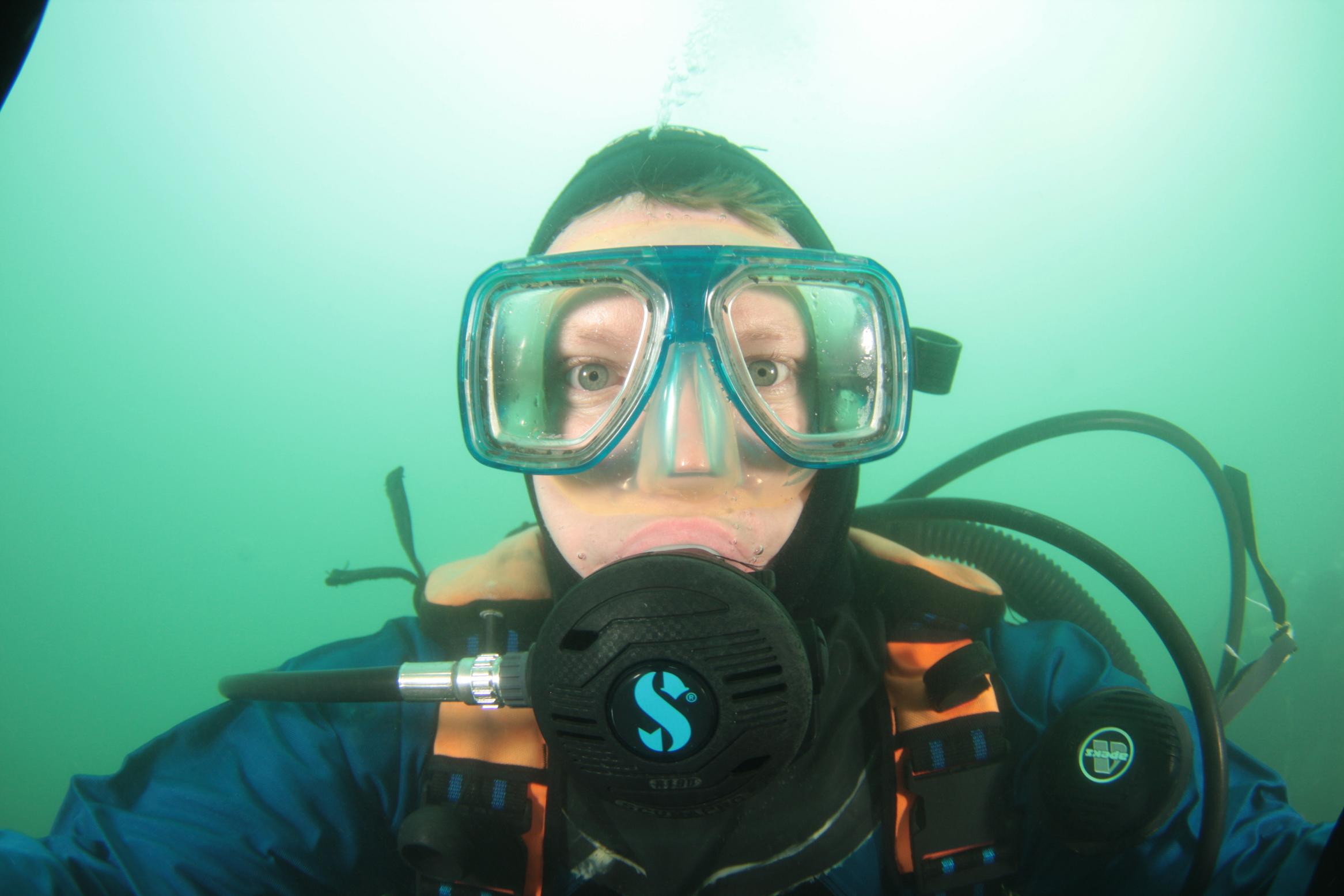
    post-17738-1227475140.jpg

  2. Hi there


    I have a couple of questions as follows :


    (a) I have recently switched from a point-and-shoot to a DSLR and, apart from now living on bread and water, am pretty excited about using it.


    The system I thus far have is : Canon D40, Ikelite housing, Tokina 10-17, twin DS 125 strobes, SA 100R arms and 8" port with shade.


    I took a dip with the gear yesterday, in very low viz, and everything seemed to work well. I placed the arms behind the port as far as reasonably possible and pointed out, and didn't really get any backscatter. However, the problem I did have was that, at the lens' widest setting (10mm) the corners were blacked out (see attached photo - try to ignore air coming out of my head!) . I noticed that the problem seemed to disappear when the lens was zoomed in.


    Are the black corners the port shade or is this some form of vignetting? Any way to alleviate this problem other than removing the shade?


    (b) I'm off on my second tiger shark trip with Jim Abernethy in a few weeks' time - would you think that the arms I currently have (14") would be sufficient or might I need to extend? Certainly I had very little backscatter in low viz yesterday although any subjects I photographed were very close-up.


    I have a Sigma 17-70 lens I'll be taking on the trip and will be shortly buying the body to go in the 8" port - struggling to remove the existing body from the port at the moment but have bought an oil strap wrench which hopefully will do the job!


    Thanks


    Ben

     

    Ben, I just reviewed the lens ports for the Tokina 10-17 with Ikelite 5503 6" DOME. Ikelite recommends port shade may need to be removed to avoid vignetting. If you are shooting with the 8" port assembly I have no answer except to shoot with lens in less than widest opening. I will be watching for other comments. Good luck Hank

  3. Looks like a crooked port shade. Make sure the long portions are on top and bottom or remove the shade completely.

Turtle

Account

Navigation

Search

Search

Configure browser push notifications

Chrome (Android)
  1. Tap the lock icon next to the address bar.
  2. Tap Permissions → Notifications.
  3. Adjust your preference.
Chrome (Desktop)
  1. Click the padlock icon in the address bar.
  2. Select Site settings.
  3. Find Notifications and adjust your preference.
