



Skip to content

Classifieds / Archived topic

Fantasea FSB-800 Flash Housing for Nikon SB800

Started by jimbo1946 ·

  • 3Posts
  • 3Replies

Read-only discussion

Fantasea FSB-800 Flash Housing for Nikon SB800

3 posts
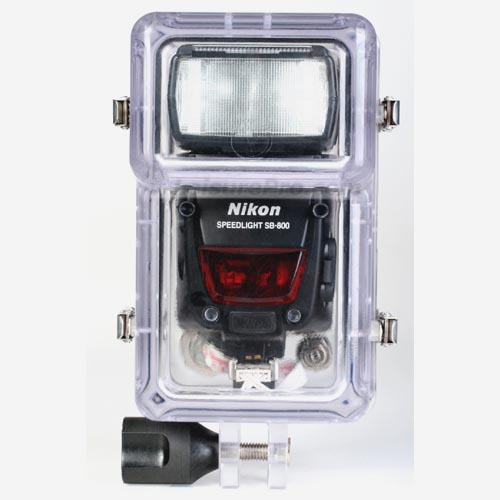
  1. For years, I've been shooting a housed Nikon SB800 flash underwater. In my opinion, it works extremely well and provides great TTL exposures. Last year I decided to try shooting a second SB800, so I bought another SB800, plus a Fantasea FSB-800 Flash Housing. I was planning to fire the second SB800 with a fiber optics link.


    Later, I decided to just stay with the one housed flash, so the Fantasea housing has never been used. Fantasea recently stopped making these housings, so they're getting harder to find in new condition. Dealers who still have them are asking around $300 for the housing and sync cord.


    I'm offering mine for $175 (no sync cord), which includes shipping to US addresses. Please note that this is the housing only and does not include the SB800 flash. I prefer payment by PayPal.

     

    3056783582_b499749cc2_o.jpg

    Edited by jimbo1946
  2. For years, I've been shooting a housed Nikon SB800 flash underwater. In my opinion, it works extremely well and provides great TTL exposures. Last year I decided to try shooting a second SB800, so I bought another SB800, plus a Fantasea FSB-800 Flash Housing. I was planning to fire the second SB800 with a fiber optics link.


    Later, I decided to just stay with the one housed flash, so the Fantasea housing has never been used. Fantasea recently stopped making these housings, so they're getting harder to find in new condition. Dealers who still have them are asking around $300 for the housing and sync cord.


    I'm offering mine for $175 (no sync cord), which includes shipping to US addresses. Please note that this is the housing only and does not include the SB800 flash. I prefer payment by PayPal.

     

    3056783582_b499749cc2_o.jpg

  3. SOLD!

Backscatter

Account

Navigation

Search

Search

Configure browser push notifications

Chrome (Android)
  1. Tap the lock icon next to the address bar.
  2. Tap Permissions → Notifications.
  3. Adjust your preference.
Chrome (Desktop)
  1. Click the padlock icon in the address bar.
  2. Select Site settings.
  3. Find Notifications and adjust your preference.