



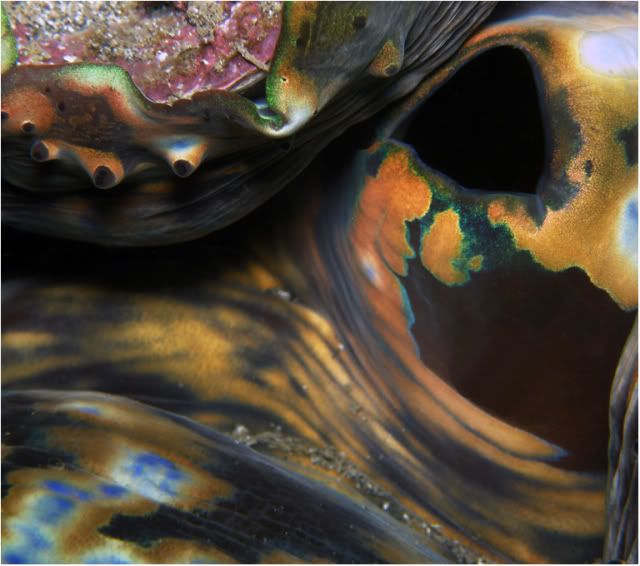
It is manipulated with a twirl a tiny bit. What do you think?
Read-only discussion
It is manipulated with a twirl a tiny bit. What do you think?
I am no expert, but I would say no, not manipulated with a twirl.
The original is home so I can't prove it now. LOL But it is twirled ever so slightly. It is most noticeable on the area below the dark hole on the top right. I was just trying to make an piece of abstract art. Don't know how successful I was. 
Hi, looks like you are going for the "artsy" look. Pop the colors more and clean up a few spots. Also a bit of darkening. I like your idea. It's looks a bit blurry....
Abstract art photography works best on 2D flat objects. I do like your image for its bright colors and strong shapes but for it to really jump out as an abstract image try shooting a subject which doesn't have as much 3D relief and shaded areas. For instance instead of shooting an area of the clam's incurrent valves try shooting around the flatter regions of the mantle. These will produce a more abstract image. As it is your picture makes quite an interesting macro shot but just lacks a little bit of abstractness (if thats even a real word ha ha)
There's a very good article in ephotozine that might give you some insights. Its about abstract landscapes but it might help you with abstract underwater.
http://www.ephotozine.com/article/Abstract-landscapes
Hope this helps,
Mike
Yeah, if the sharp detail of the shell and mantle in the top left weren't in the image, the weird iridescence and neon-like glow of the other areas of the mantle would be enhanced and you'd probably get more of that abstract, "what the hell is this?" quality that you're looking for.
http://www.flickr.com/photos/danielandrewc...157603966205041
Thanks Mike. That helped a lot.

Terms of Use Privacy Policy Guidelines We have placed cookies on your device to help make this website better. You can adjust your cookie settings, otherwise we'll assume you're okay to continue.

A worldwide community for underwater imaging.
