Skip to content

Beginner Forum / Archived topic

theory on domeport

Started by hag ·

  • 6Posts
  • 6Replies

Read-only discussion

theory on domeport

6 posts
  1. First, Hi everybody. I'm new to this forum...my name is Hans Goedecke from Germany.


    I spent the last week surfing the internet trying to find something that would solve my confusion about domeports and how they work. All I could find was explanations to the direct effect a domeport would have on underwater pictures in comparison to using a flatport.


    Things like (if something in these statements is wrong, please tell me)

    - domeports were mainly developed for wideangle optics, because optics with a focal length longer than 28 mm can still be used with a flatport

    - a domeport doesn't reduce the angle of view like a flatport, because the lightrays tend to hit the port on a 90° angle

    - a domeport can fix the chromatic aberrations in the corners of the image

    - a domeport produces a virtual image which is smaller and nearer than the actual image. this virtual image is also curved like the domeport.

    - the larger the radius of the domeport, the better for the image quality


    I'm trying to draw what happens in a domeport in a simple scheme, which should show the main advantages of the domeport.

    I will attach 3 drawings to this post.


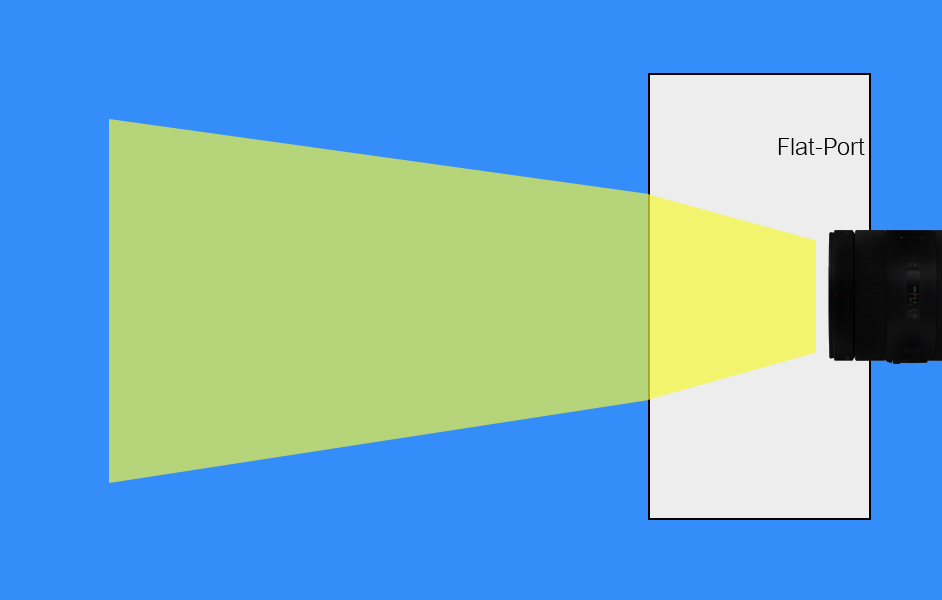
    1- The first one shows the flatport and how the angle of view is reduced.

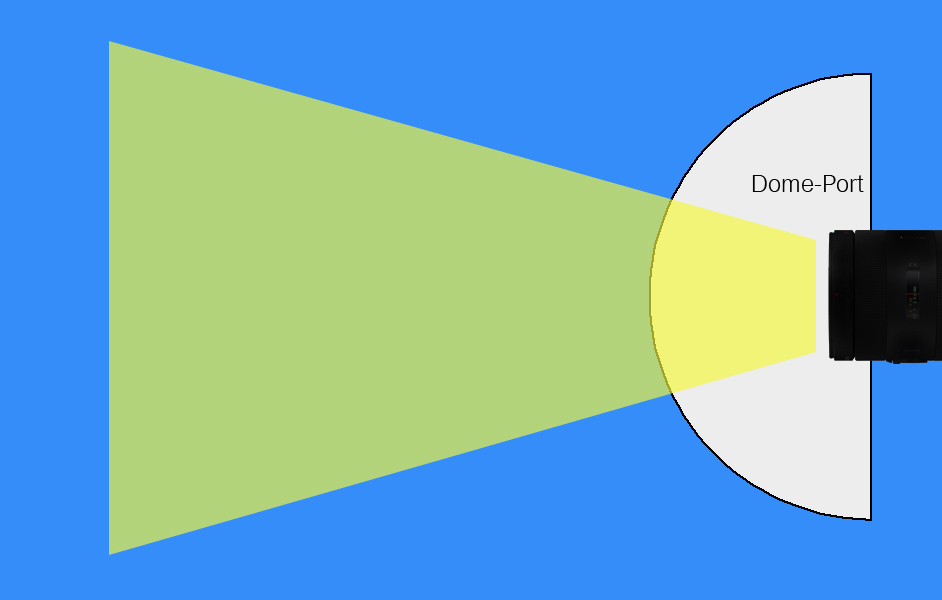
    2- the second one shows the angle of view through a dome port.

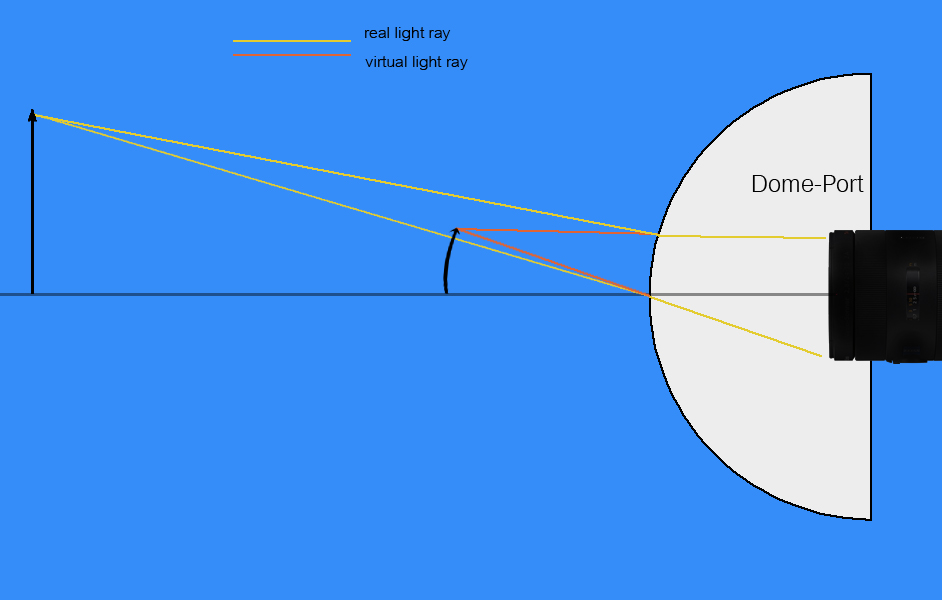
    3- the third one should show how the virtual image appears in front of a dome port.


    Now, I don't know how to understand images 2 and 3, because together they are paradox. image 2 ignores the fact of the virtual image. and image 3 ignores the advantage, that light rays hit the dome port with an angle of 90 degrees, which reduces the refraction and the optical disadvantages of a flatport.

    So one of them must be wrong??


    I hope you understood, what I would like to understand, if not please tell me, and I will explain my problem in a different way.

    cheers

    hans
    post-23199-1228400942.jpg

    post-23199-1228400957.jpg

    post-23199-1228400965.jpg

  2. Hi James,

    thanks for your reply.


    Does this mean, that

    it all depends on whether you position your camera right and if


    you position your camera, so that the nodal point of the lens is on the nodal point of the dome, ALL lightrays entering the camera actually hit the dome in an angle of 90° and what is seen by the camera is the real image and not a nearer virtual image and you don't need any diopter or close-focus lens...


    and if


    you position your camera not regarding any nodal points, what you see is the nearer virtual image, because NO lightrays that are recorded by the camera were hitting the dome port in an angle of 90° and you might need a diopter...

    ?

    Edited by hag
  3. ok... this last post was total bullshit, I've spoken to some people and understand the theory now, thanks anyway.

  4. ok... this last post was total bullshit,

    Hey Hag,

    Don't keep us in suspense. Tell us what you figured out ;)


    PS

    There is another place to look that you might find helpful http://wetpixel.com/i.php/full/dome-theory/

    Steve

    Edited by Steve Williams
  5. hi,

    yeah, good point...

    so here's a new improved scheme..

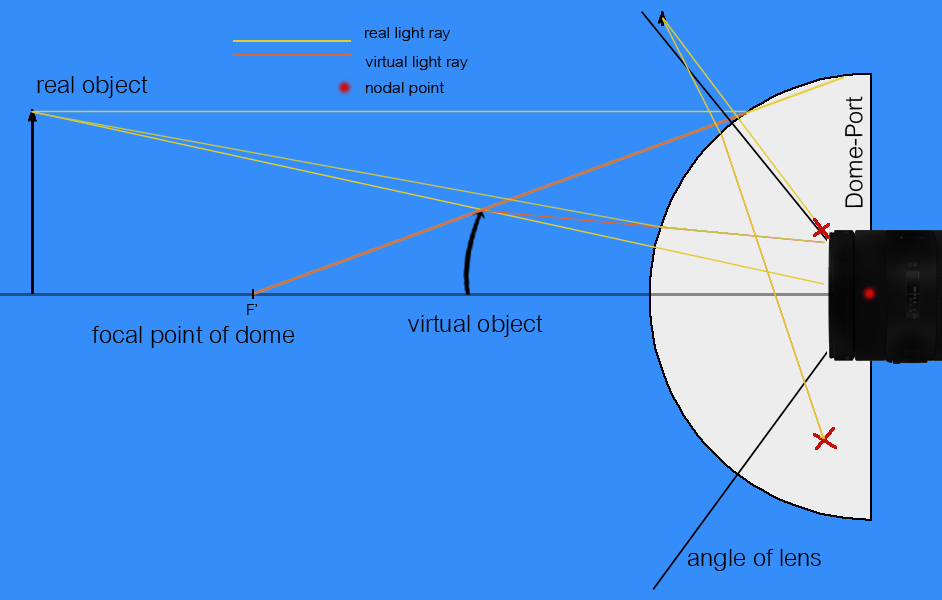
    I'll try and explain it:


    first the elements of the picture:

    - we have a real object, the actual "fish in the water" we are filming

    - a virtual object, the picture of the "fish in the water" our camera sees and which is "produced" by the domeport's optics

    - a domeport with a nodal point (the midpoint from where the distance to the glas is always the same)

    - a lens and its nodal point (you can't see that one, because its directly on the mid point of the dome)

    - the angle of the lens (which is a characteristic of the lens)

    - the yellow lightrays are lightrays that actually really exist

    - the orange lightrays are "virtual lightrays" that lead to the virtual object

    - the little black point at the upper right of the scheme is another object, that is just outside our image


    we are filming an object underwater through a domeport with a pretty wideangled lens. you can see that the angle of the lens doesn't change through the domeport...the lines that show the angle of the lens stay straight. that would look different through a flat port (have a look at the picture further up this page)


    the one lightray, that runs parallel to the optical axis, doesn't hit the lens, but I need that just to find the focal point of the domeport.

    the lightrays that do hit the lens are the other two coming from the real object. one hitting the dome in a 90° angle, going straight through to the lens, the other one being fractured by the dome, but still ending up in the lens.. if we follow that one straight backwards through the glas of the dome, we find the virtual object, where it hits the first ray, and the ray that leads to the focal point.

    a virtual object is always between the dome and the focal point of the dome. so we have to have a lens that is able to focus on this area, because that's where the camera sees the image.


    The other small object at the upper right of the scheme is just outside the frame that is recorded by the camera. some of its lightrays might hit our lens, but they are not to be seen on our frame because the angle with which they hit the lens is to steep.. this is defined by the maximum angle of our lens (the 2 black lines). the lens can't take lightrays with a steeper angle..they are lost inside the lens and don't hit the optical chip of the camera.. all lightrays emitted by the small object hit the lens with a too steep angle, that's why its out of frame.


    I hope this is all correct..

    post-23199-1228601858.jpg

Nauticam

Account

Navigation

Search

Search

Configure browser push notifications

Chrome (Android)
  1. Tap the lock icon next to the address bar.
  2. Tap Permissions → Notifications.
  3. Adjust your preference.
Chrome (Desktop)
  1. Click the padlock icon in the address bar.
  2. Select Site settings.
  3. Find Notifications and adjust your preference.