Skip to content

Photo / Video Showcase / Archived topic

Seahorse for C&C

Started by RussFair ·

  • 5Posts
  • 5Replies

Read-only discussion

Seahorse for C&C

5 posts
  1. Hi all,


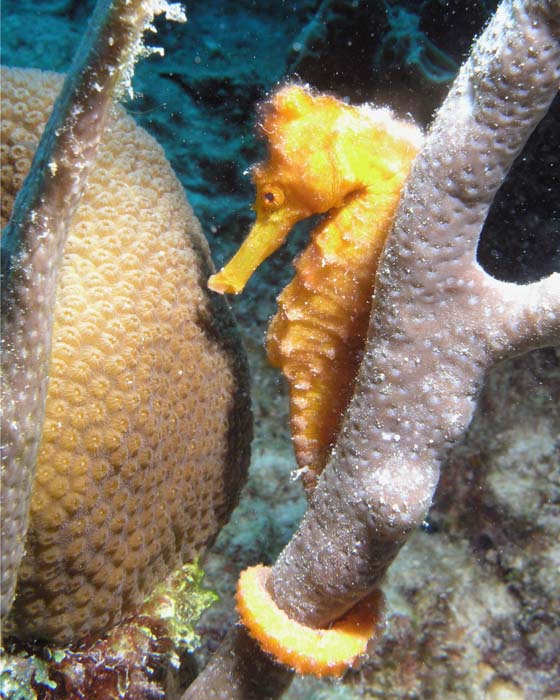
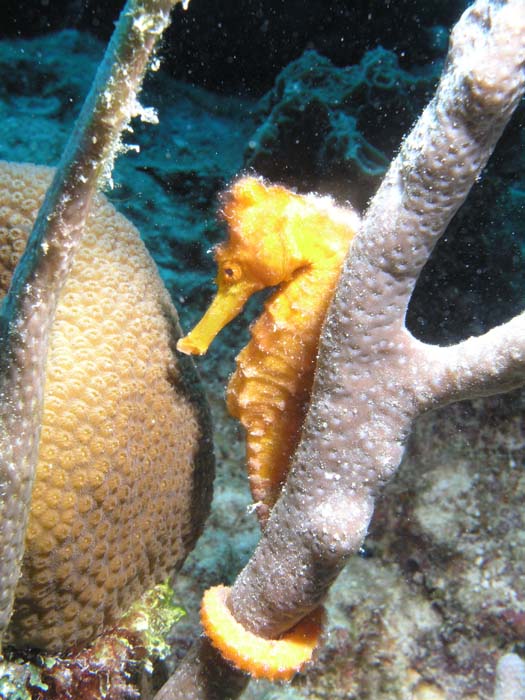
    I'm looking for some how-to-do-it-better-next-time advice here. We found this guy down in Bonaire on our last dive of the trip. This is the best of about 7 shot of this handsome devil. I shoot an Olympus 8080 with a DS50 TTL strobe. I really like this shot, but am struggling with how to avoid the blowout I see from the sand on his neck and tail. I am posting 2 pics, the original (JPG - RAW on this camera takes FOREVER to write), and an attempt to clean it up with minor brightness reduction and unsharp mask, then crop in PS Elements.


    I love some feedback on how to tackle the exposure challenge and any suggestions on how to attempt to correct it a bit in PP.


    f/8

    1/250s

    strobe on TTL


    Original
    post-18777-1228963660.jpg


    my edit attempt

    post-18777-1228963672.jpg

  2. Hi Russ,

    Thanks for putting this up.. It's a much better seahorse shot than I got in Bonaire this year. :) In my experience seahorse's are pretty tough subjects to get a great image with one strobe. I'm no expert but the one's I find are always hiding behind something which gives me a shadow I didn't want. I think you might have had better luck to bring the light in from the left on this one. I played with your image in Lightroom and it seemed to look better to my eye by dialing back the overall exposure about .5 stop and increasing the blacks to separate her a little more from the background. That is the major change. While I was playing I used the paintbrush to isolate the blownout areas and bring down the exposure some more in just those areas. I also played with a little bit of a crop, sharpened it a tad and cleaned up a few spots of backscatter. See what you think.
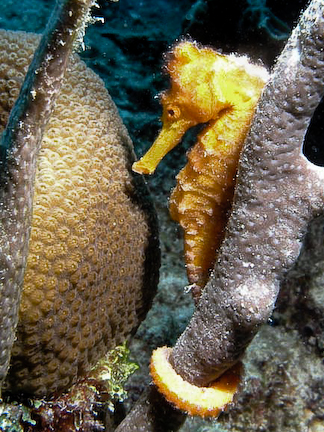

    post-4526-1228966440.jpg


    Having fun!

    Steve

  3. hey russ


    steve's edit looks a little better. you really want to get this right in camera.


    the lighting looks a little harsh, did you use a diffuser on the strobe?


    It's over-exposed, I would have plugged in some negative exposure compensation on the strobe lighting, or switched to manual strobe power. the shadowing from the coral, or the darker background (depending on the light metering you were using) were causing the TTL to calculate too strong of a strobe power.


    Pulling the strobe back a little could help reduce hot spots sometimes also, if the hot spot is a result of the area being closer to the strobe than the rest of the subject, although that won't help much if it's solely from reflective sand.


    I would have also played with the strobe positioning. It looks like it was lit from the top, and to the right a little bit? I would have tried the strobe off to the left.


    For a shot like this, I would have switched to raw so I have a better chance of recoving highlights, even with a slower write speed to the memory card. As you can see, your edit did not change the blown out areas at all, with jpeg format they are permanently blown out. In raw you can recover a couple additional stops, although looking at your photo it's possible they could have been blown out even in the raw file.


    hope this helps


    scott

    Edited by sgietler
  4. RAW is worth the wait on a subject like this and should be pretty easy to switch too with the Oly. But even RAW is unable to bring back blown out highlights. It is much better at brining up exposure than knocking it down.

    f/8

    1/250s

    strobe on TTL


    The settings look pretty good. As suggested above you might have to use a diffuser, or simply switch the strobe into manual and turn it down a little. Normally strobes ttl will work fine for macro, in this case it was a little hot.

    Edited by ce4jesus
  5. I've just upgraded to a DSLR after 6 years with an 8080.


    The settings you have look good, the only additional thing I used to do was to dial in the flash compensation on the camera. I did this by setting up the MyMode settings for different situations.


    I used 2 x DS-125's so yours might be slightly different, but as your using TTL then they are probably a good starting point.

    When the camera was set to Macro compensation was -0.3, when set to super Macro it was -0.7.


    I also agree with the earlier comments on RAW, it really is worth the wait.

    Think about it, you travel all the way to Bonaire and then to save 7 seconds you shoot JPEG which reduces the options for later adjustment and can lead to a picture your not 100% happy with.

    (I also did this for 1 trip, then swapped to RAW for the next 5 3/4 years!)

Isotta

Account

Navigation

Search

Search

Configure browser push notifications

Chrome (Android)
  1. Tap the lock icon next to the address bar.
  2. Tap Permissions → Notifications.
  3. Adjust your preference.
Chrome (Desktop)
  1. Click the padlock icon in the address bar.
  2. Select Site settings.
  3. Find Notifications and adjust your preference.