



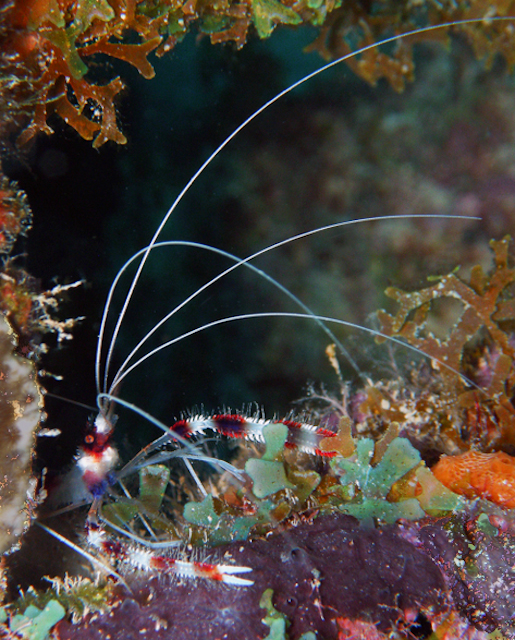
The poor little guy has been cropped, sharpened, saturated, leveled, contrasted etc. At least I didn't eat him for dinner.  Any suggestions for improvement most welcome.

Photo / Video Showcase / Archived topic
Started by Nakedwithoutcamera ·
Read-only discussion
The poor little guy has been cropped, sharpened, saturated, leveled, contrasted etc. At least I didn't eat him for dinner. Any suggestions for improvement most welcome.
Hi Ellen,
You might try rotating the little guy. I used the LR brush to knock down the rock to his left about a stop and also darken the blown out purple in the bottm right corner. That would allow you to bring the whole image up in exposure. I think he pops a little more. Fun stuff, see what you think.
Steve
Thanks for pointing out the blown out parts. I hadn't even noticed them. Did you increase the exposure? I'm not sure if you did or you were telling me what my next step should be. What is the way you prefer to correct hot spots? I usually select the hots spots then decrease the contrast/brightness. If you have another way to do this I'd like to learn other ways that may be better. Also, when you say increase exposure, how do you do that? I'm still pretty new to PS and I don't always understand terminology. Do you mean you would increase brightness or would you use curves? Thanks.
I don't know if rotating helps improve the image in any way. I kind of like the original because it looks to me like he's playing peek-a-boo that way.
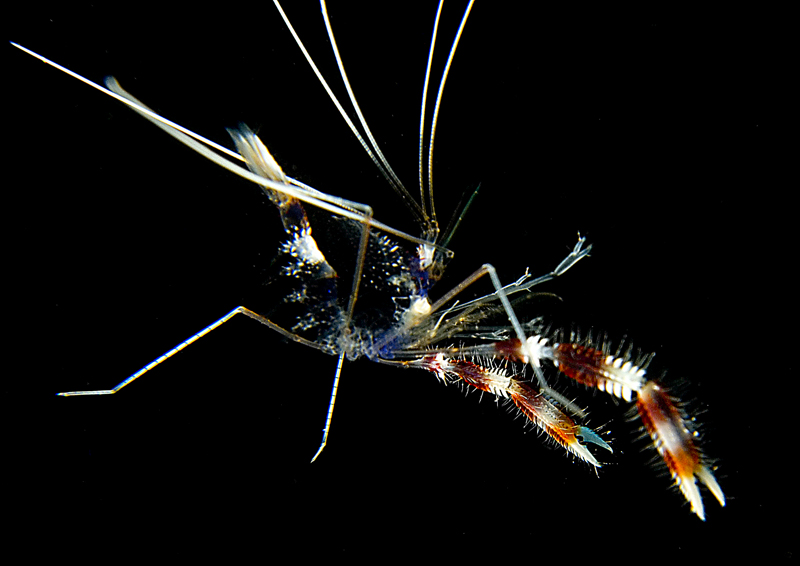
I like Steve's rotation. Now back off the crop a little on the left and I think you have a perfect rule of thirds going for you. Otherwise, great job on a rather tough guy to photograph. Most of the time I'm either too far, or two close. Or, I've blown out the white or underexposed the red. The only real good shot I got was when entering a swimthrough in Coz at 90ft. I turned to look for my wife and saw one floating down the water column...must've fallen from the cleaning station above.
Thanks for pointing out the blown out parts. I hadn't even noticed them. Did you increase the exposure? I'm not sure if you did or you were telling me what my next step should be. What is the way you prefer to correct hot spots? I usually select the hots spots then decrease the contrast/brightness. If you have another way to do this I'd like to learn other ways that may be better. Also, when you say increase exposure, how do you do that? I'm still pretty new to PS and I don't always understand terminology. Do you mean you would increase brightness or would you use curves? Thanks.
I don't know if rotating helps improve the image in any way. I kind of like the original because it looks to me like he's playing peek-a-boo that way.
Ellen,
You should keep it in the orientation that makes you happy. I was just offering alternatives to think about.
Yes, I increased the exposure about a half stop. I use Lightroom to do these simple kind of mods. It's so much easier than PS it's not even funny. In LR I used the adjustment brush and just "painted" on the lower exposure, took about 15 sec. In PS to do the same thing I'd use layers. Ellen you need to try out a copy of Lightroom. They have a 30 day trial if you want to play with it. 
So Gary, did you get a shot of the free swimming shrimp? Sounds like fun.
Cheers,
Steve
I like the new fix, got lightroom and have no clue, is there lightroom for dummies?
Yes Steve...at least I think so. When I turned around and saw it, I raised the camera and got one shot off. I guess it is one of those shots where it looks so staged, that it is tough to explain...so I don't show it too much. There are some magical times underwater when you're in the right place at the right time.
Ditto on liking Steve's rotation. I think the composition of the image is improved. As Gary mentioned, the rotated image has the perfect rule of thirds going for you.
Ellen
That is one amazing image. You're not kidding when you say you were at the right place at the right time
It is so out of the ordinary to see the critter in the open ocean that it really pops! Well done!
Ellen
Edited to add: I meant to post under ce4jesus' post and was referring to his image.
There are some magical times underwater when you're in the right place at the right time.
Amen Ellen, brilliant shot Gary!
Scott, I've read every LR book I can find and it was still much easier to learn by watching the videos on Adobe TV. They are in pretty short 5 to 20 minute segments so I can follow them.
Check this one out, Julie shows the new features in the Develop module
http://tv.adobe.com/#vi+f1512v1405
Have fun,
Steve
great steve, thanks for the link. that should help!
Yes Steve...at least I think so. When I turned around and saw it, I raised the camera and got one shot off. I guess it is one of those shots where it looks so staged, that it is tough to explain...so I don't show it too much. There are some magical times underwater when you're in the right place at the right time.
Oh my. What an absolutely gorgeous shot, Gary. Now I hate mine.
Thanks for the suggestions everyone. I will give Lightroom a shot. As if I didn't have enough to do.
Scott, I have some photoshop books and while they are really helpful, I also find that watching videos is a better learning technique for me.

Terms of Use Privacy Policy Guidelines We have placed cookies on your device to help make this website better. You can adjust your cookie settings, otherwise we'll assume you're okay to continue.

A worldwide community for underwater imaging.
