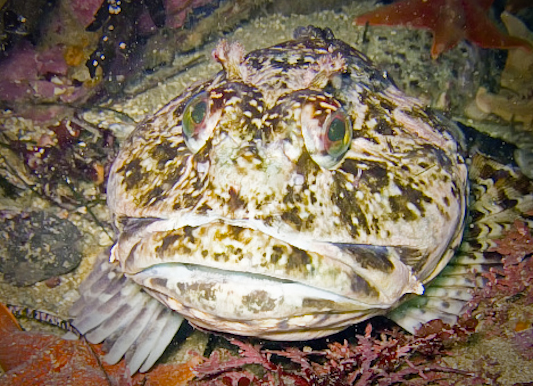
I'm new to underwater photography and just wanted some feedback to see how I'm doing and what elements I should be trying to improve on.
This picture was taken in Monterey, CA with a Canon A720 and internal flash. I cropped the image a bit and did a bit of color balancing in photoshop.
Thanks for the help!
I'm new to underwater photography and just wanted some feedback to see how I'm doing and what elements I should be trying to improve on.
Hi,
Monterrey can be a tough place to shoot, so congratulations, especially new to U/W photos. These guys are really tough since their main job is to blend end to the surroundings. I find that divers and fish folks like images of invisible fish but most non-divers just find them kinda boring. Another thing you may or may not understand is that as the photographer your brain is filling in around the image and I believe adding color and texture to your perception that other folks won't see. Somebody will call me on this and I can't prove it scientifically but I believe it to be true. That's one reason it's hard for us to judge our own images.
Anyway I took a shot at playing with your cabazon. I brought the overall exposure up a little and brought down the exposure on his white face which was closet to the strobe. I think this makes him stand out a little more from the background. Try sharpening him a little too. I did a tighter crop and threw in a vignette around the frame to help him stand out a little more. See what you think.
Welcome to Wetpixel!
Steve
The problems here are all camera angle. The shot is absolutely fine technically - focus, exposure etc. The problem is your choice of camera angle has meant that the subject is lost in the background. Try to find and angle that separates its better - so it stands out more. Since you are using a small compact with an internal strobe - you have the ideal kit to squeese the camera in and create such an angle. In this case moving the camera in one side or other of the fish would have produced a less distracting background.
Hope that this helps,
Alex
I had a brief look at this image, and Steve's treatment proved better than anything I came up with ! And indeed what Alex says is great advice. Of all the articles I read about underwater photography, this one by Alex http://www.amustard.com/?page=pro&ext=...news&size=s has been the most thought provoking for me (I was that guy who painstakingly removed the backscatter) - in other words by far the greatest improvements are to be made by improving the picture underwater rather than in front of the PC. It has certainly made be think more underwater.
Amusingly I am writing an article on backscatter today!
Alex
Considering that you took this shot w/ a point and shoot camera and the internal flash only - great job! If you have photoshop or another image editing program, you may want to try to burn the area around the fish so that it is a bit darker. Steve's crop helps too. Anything to isolate the fish a bit from his/her surroundings.
Cheers
James
For a compact camera, internal flash, and shooting in Monterey this is a good shot.
All the things previously mentioned would help.
I would think of getting an external strobe and maybe an auxiliary wide angle lens. These would give you a better chance to do what others have mentioned. That is to better isolate your subject better without creating backscatter.
Thanks for the suggestions everyone!
Steve, your edit looks a lot better! You definitely made her stand out more.
I actually took this shot right after the one above:
But I feel like it has a lot of the problems of the first one (the distracting background, mainly). I did a tighter crop, which I think improved the image by a lot.
-get lower at the subject's eye level or slightly lower
(the viewer will relate more equally to the subject; instead of making the subject inferior)
-try to find a cabezon sitting/perching on top of a rock
(you'll have water, black or green depending on if you're balancing ambient and strobe lighting, behind it instead of distracting "sea barf" background)
-look for good negative space (background) first then search for subjects on it.