Skip to content

Photo / Video Showcase / Archived topic

Sipadan Topside HDR

Started by loftus ·

  • 14Posts
  • 14Replies

Read-only discussion

Sipadan Topside HDR

14 posts
  1. One thing that has always struck me when one looks out over the ocean is the irony as it relates to the beauty above and the destruction going on beneath the waves. With all the bad news about finning, dynamite fishing etc going on at Mabul / Sipadan, everything looks so perfect topside.

    Here are a couple of HDR Panos from my stay at SWV Mabul, last November
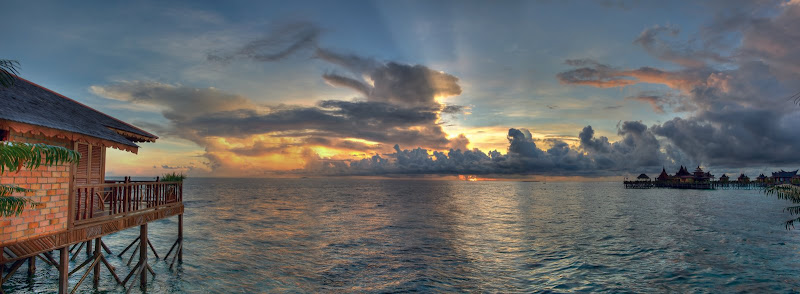
    Test2009-01-217942.jpg


    Test2009-01-217941.jpg

    Edited by loftus
  2. One thing that has always struck me when one looks out over the ocean is the irony as it relates to the beauty above and the destruction going on beneath the waves. With all the bad news about finning, dynamite fishing etc going on at Mabul / Sipadan, everything looks so perfect topside.

    Here are a couple of HDR Panos from my stay at SWV Mabul, last November
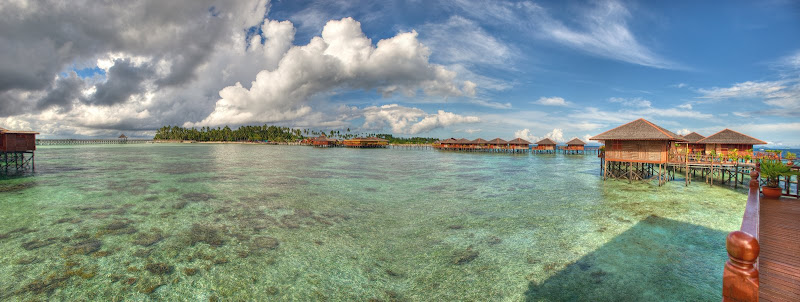
    Test2009-01-217942.jpg


    Test2009-01-217941.jpg


    Glad I checked out the forums today. These are beautiful! Thanks for sharing....

  3. I really like the second one. The wave patterns don't match up on the first...very hard to do.

  4. I really like the second one. The wave patterns don't match up on the first...very hard to do.

    Thanks.

    If you mean the HDR artifact within the detail of the waveforms themselves, you are correct - essentially impossible to do except in the calmest of water. On the other hand, if you mean the dark and light bands down the middle of the picture, those are not pano or HDR artifacts those are actually in both images and the pano seam was off to the right. (These were only two frames for the panos)

    Edited by loftus
  5. Hey Jeff. Very cool. Looks like a very beautiful spot. I'm still taking pictures of snow ... :)


    I like the final tone-mapping result in both. There's a good balance in the "transition areas" avoiding any annoying haloing.


    What were the two source images for each pano? 24mm landscape frames?


    I think this may be the first HDR pano you've shared ... no? What was the workflow and software?


    Here's my latest snowy HDR ...

    post-14536-1232633240.jpg

    Edited by jeremypayne
  6. Thanks Jeremy; the snow scene is very nice with nice detail throughout the range, nice composition.

    Mine were shot with the 17-35 at 17mm on the D700, ISO 400 and 200 respectively; TIFFS processed in Photomatrix Details Enhancer with some slider adjustment. Then sharpened and minor curves adjustment in CS4, and finally 2 images stitched in Double Take. I did post a pano once before of a Guadelupe Sunrise. Dawn is my favorite time of day.

    Edited by loftus
  7. Sweet shots!

  8. Beautiful images! I am glad you were able to keep that eyesore orange oil-rig thingy out of the pictures!

  9. I Wanna go :beer:


    Dive safe


    DeanB

  10. Hi Guys,


    Love the pictures. Proably a really stupid question but what is HRD and how have you created these images? Am I right in saying you take the same shot several times with different ISO's and then merge them in some way and in the case of the Panoramic's stich some shots on the end as well?


    Cheers,

    Mark

  11. Hi Guys,


    Love the pictures. Proably a really stupid question but what is HRD and how have you created these images? Am I right in saying you take the same shot several times with different ISO's and then merge them in some way and in the case of the Panoramic's stich some shots on the end as well?


    Cheers,

    Mark

    Hi Mark,

    HDR is short for High Dynamic Range photography. The primary objective is to attempt to compress multiple images of a scene that has a very wide range of brightness into one. Ideally where the brightness range exceeds the range of the camera sensor, such as snowscenes, sunrises and sunsets etc.

    The technique involves taking multiple identical images shot at the same aperture but varying the shutter speed to incorporate the full range of brightness in the scene, into the images. Then using software the images are blended. It is really a software trick, as the dynamic range of your monitor or printing media cannot truly be extended (unless you have a special HDR monitor). Essentially the brightest and darkest areas are kept and the midtones are compressed.

    You can Google it, but here is a link to get you started to the Photomatrix site, one of the most popular software packages.

    http://www.hdrsoft.com/

    Edited by loftus
  12. Thanks Loftus,


    I really like the results from the technique, Im off to egypt in June and there should be some nice sun-sets over the mountains there so I will have to remember to take my mini tripod to give it a go.


    May I ask how many different shots you took and what range of shutter speeds you used?


    Many thanks,

    Mark

  13. Thanks Loftus,


    I really like the results from the technique, Im off to egypt in June and there should be some nice sun-sets over the mountains there so I will have to remember to take my mini tripod to give it a go.


    May I ask how many different shots you took and what range of shutter speeds you used?


    Many thanks,

    Mark

    Mark,

    It depends on the brightness range. Nikon allows a maximum of 1 stop difference between exposures when using the bracketing setting. Normally I want 2 stops over and 2 stops under, so I take 5 images. You want to use Aperture priority settings. Shutter speed will of course vary on brightness of the scene, generally useaperture of 5.6 or 8.

  14. I've just started playing around with HDR using Photomatix and love it. As Jeff says, I use the Auto Exposure Bracketing (AEB) function on my Canon, taking 3 exposures, -2ev, 0ev, and +2ev on Aperture priority. Jeff, you show admirable restraint - I tend to push the image more to get that "other-worldly" effect


    post-14526-1271891819.jpg


    post-14526-1271892168.jpg


    It's a pretty inexpensive software package that provides hours of fun. But since you're taking 3 images (or more) and combining them into another (compressionless) tiff file, it chews up tons of memory! Lots of info, galleries and tutorial info on the software maker's site, www.hdrsoft.


    Phil

Marelux

Account

Navigation

Search

Search

Configure browser push notifications

Chrome (Android)
  1. Tap the lock icon next to the address bar.
  2. Tap Permissions → Notifications.
  3. Adjust your preference.
Chrome (Desktop)
  1. Click the padlock icon in the address bar.
  2. Select Site settings.
  3. Find Notifications and adjust your preference.