Skip to content

Copyright Issues, Non-Payment, Fraud, Theft / Archived topic

My Photo on a Website -- With the Copyright Removed!

Started by JTemple ·

  • 14Posts
  • 14Replies

Read-only discussion

My Photo on a Website -- With the Copyright Removed!

14 posts
  1. I noticed that one of my pictures on Flickr got a lot of hits recently, clicks referred from a blog, www.strictnorms.com. The post is called "55 Impressive Underwater Photos". http://tinyurl.com/csx5ay Nice to have a picture chosen for a post like that, and the picture did link back to Flickr, BUT the picture was posted with my copyright statement rubbed out! I posted a comment stating I was rather upset about that, felt it was a bit outrageous as the photo had, in effect, been altered by the copyright being removed, and asked it be taken down, threatening legal action if it wasn't. The picture has been removed, my comment never made it to the blog page. So, all's well that ends well, I suppose. But I thought I would share, just in case any of you might be in the same position. You will notice there are a few other comments about the fact that no credit has been given to the photographers.


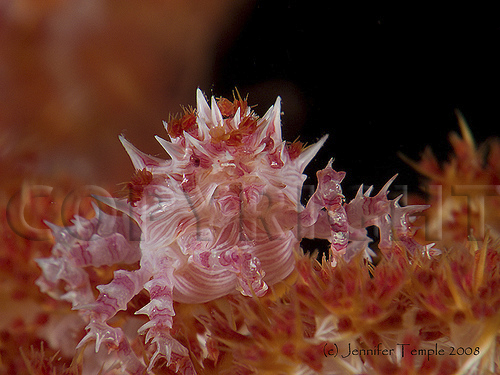
    Here, BTW, is the picture that was posted (which is my all time favorite, and taken on the day I got bent....):
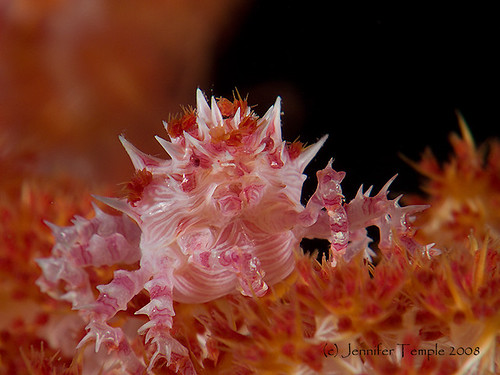
     

    2414112533_300bbdbe21.jpg

  2. beautiful photo


    this person who owns the website is stealing lots of photos and using them to get income from ads


    there are located in seattle


    i'm going to call them and complain once I get back into the states


    here's the info on who owns the domain


    http://www.whois.net/whois_new.cgi?d=strictnorms&tld=com

  3. Hi Jen,


    The person who 'stole' your pic has an eye for class. . . . ;)

    Not many people have the 'smarts' to seperate these critters from their background. . . . .Truly a beautiful picture.


    Must be hard being at the top of your game and everyone wanting a piece of you. . . . ;)


    The act of removing the copyright would suggest a sinister act. . . ;)

    So sue the bastard...


    Happy New Year Jen,


    Bruce...

  4. Such a gorgeous image...


    ... I guess that the only answer is to deface your images with copyright over the subject.


    I've used your method for a while, but I'm now thinking of putting the big "C" over the image.


    I don't Flickr, though.


    Tim


    ;)

  5. They're using one of mine too!!! ;)


    [image removed]


    Many thanks for pointing that out Jen! I'll be contacting them with a complaint too!

    Edited by aussie
  6. The Rat Bastards have nabbed a bunch of David Doubilet's from the Nat Geo site, in fact there's heaps from there!


    I've also seen one of Allison Finch's and one of Erwin Poliakoff's images too. I've sent both of them a message to alert them too.


    Cheers,

    Jim.


  7. post-17443-1232984996.jpg


    Well ? There are some ways to state your copyright and then there are others !

    Choose your weapon

  8. My photo has been removed from this blog post, after I sent a complaining comment.


    Now I just need to get it off the other thief's site (from my other post).


    Linda

  9. That's a fabulous shot, Jennifer!


    That's what makes the rest of us want to shoot super-macro, taking thousands of just-barely-out-of-focus shots ;) in an attempt to get one half that good! ;)

  10. Thanks for the compliments, folks! I'll share my secret: It was taken with a proper camera (an E900)! LOL. I planned on entering this shot in the usual round of photo contests, but I don't know when I'm going to be able to dive again, still waiting for my PFO to get closed. Maybe next year.


    Bruce, honey, you crack me up. Happy New Year to you, as well. ;)

  11. Mine was removed. Dodgey bastards.

  12. I assume some of you have contacted the website about this thief. I see Rand's images and a few others I recognize also.

  13. DANG!! Thanks for the warning, Jim. I tried the link, but it said the site was down. Does anyone have a link to that site that still works? I sure want a piece of their a##, too.

Account

Navigation

Search

Search

Configure browser push notifications

Chrome (Android)
  1. Tap the lock icon next to the address bar.
  2. Tap Permissions → Notifications.
  3. Adjust your preference.
Chrome (Desktop)
  1. Click the padlock icon in the address bar.
  2. Select Site settings.
  3. Find Notifications and adjust your preference.