



Skip to content

Photography Gear and Technique / Archived topic

Ikelite Zoom sleeve

Started by rbailey ·

  • 7Posts
  • 7Replies

Read-only discussion

Ikelite Zoom sleeve

7 posts
  1. Hi Richard,

    Just reading ur comments and noticed your set up very similar to mine. Just about to use the 10-22 in the ikelite housing with 8" dome port, but the gear sleave and focus ring don't fit. I see you have a similar wide angle and wondering what I am missing? Is there a specific extension or additional gear sleave? Only came with a standard size one?


    Cheers

    Steve


    Hi Steve,


    Split the answer off so not to hijack thread on bouyancy.


    For the zoom clamp, check out :-

    http://wetpixel.com/forums/index.php?showtopic=15291&hl=

    or

    http://www.images-underwater.net/Modified_zoom_clamp.html


    For the Port, Ikelite have a range of extensions (all the same diameter) in different lengths. These screw into the back of the port to account for the length and focus point of the lens.


    If you, or anybody else wants any more info just shout.


    Cheers,

    Richard B.
  2. From the port chart on the ikelite site:


    dSLR housings are supplied with two size zoom sleeve and clamp sets: Standard zoom sleeve & #9059.8 clamp set and #5509.28 zoom & clamp set for larger diameter lenses.

    Lenses indicated with a (1) require the #5509.28 set. Lenses without this designation will operate with the standard set. Zoom sleeves and clamps are NOT interchangeable between sets.


    10-22mm is a (1) on the port chart


    If you're missing it, you might need to buy it or contact Ikelite, it should ahve come with your housing when you got it. The 10-22mm doesnt have the same kinds of issues as some of the other larger wide angles as far as I know, so shouldnt need the kinds of things Richard has done for his setup.


    Otara

  3. dSLR housings are supplied with two size zoom sleeve and clamp sets: Standard zoom sleeve & #9059.8 clamp set and #5509.28 zoom & clamp set for larger diameter lenses.

    Lenses indicated with a (1) require the #5509.28 set. Lenses without this designation will operate with the standard set. Zoom sleeves and clamps are NOT interchangeable between sets.


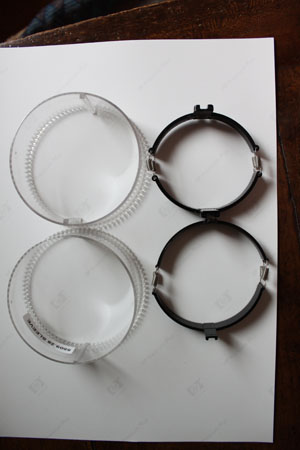
    Any chance of a photo of the two types, I only got one type (and some sticky foam) when I bought my housing (think that was all they made at the time) ?


    Thanks,

    Richard B.

  4. Sorry in your sig it says 10-20, but you said 10-22, do you have the canon or sigma WA? Its only the 10-22 which will work OK with the right zoom clamp.


    The one I got with the housing had a part number label on the inside of the zoom clamp. If you only have one set, it sounds like you didnt get it at some point when you were supposed to, or it got lost.


    Otara

  5. Hi,


    I've got the Sigma 10-20 but Steve, who originate the question but not this post, has a 10-22.


    I was only wondering what the difference between the two Ikelite clamps and rings.


    Cheers,

    Richard B.

  6. Oh sorry,


    One sets clamp has a wider groove on the sleeve, and corresponding zoom ring is also thicker. I think the wide angle one is the thinner one, so as to allow for more room between the sleeve and the ring (the label is gone on mine now).


    Otara


    Edit: Heres a pic, the bottom set is the wide angle one post-4670-1233781896.jpg

    Edited by Otara
  7. Oh sorry,

    One sets clamp has a wider groove on the sleeve, and corresponding zoom ring is also thicker. I think the wide angle one is the thinner one, so as to allow for more room between the sleeve and the ring (the label is gone on mine now).

    Otara

    Edit: Heres a pic, the bottom set is the wide angle one post-4670-1233781896.jpg


    Thanks Otara, very interesting to see.


    Doesn't look like that much difference, but, when your trying to squeeze in your favourite lens its that last mm that counts :-)


    Many Thanks,

    Richard B.

Keldan

Account

Navigation

Search

Search

Configure browser push notifications

Chrome (Android)
  1. Tap the lock icon next to the address bar.
  2. Tap Permissions → Notifications.
  3. Adjust your preference.
Chrome (Desktop)
  1. Click the padlock icon in the address bar.
  2. Select Site settings.
  3. Find Notifications and adjust your preference.

