Skip to content

Shooting Technique, Workflow and Editing / Archived topic

FCP Users - can you open these files?

Started by Nick Hope ·

  • 19Posts
  • 19Replies

Read-only discussion

FCP Users - can you open these files?

19 posts
  1. Final Cut Pro users, or, for that matter, users of NLE's other than Vegas, can you open this HDV MPEG-2 transport stream file in your NLE? It was shot with the Sony Z1P, captured with HDVSplit, and trimmed and smart-rendered (no recompression) in Vegas Pro 8.0c?:


    Original .m2t HDV file


    And how about this MPEG-2 file of the same footage that I losslessly converted to a program stream using Womble MPEG Video Wizard?:


    Program stream version


    The reason I'm asking is that most stock of my footage customers are using Final Cut Pro and I'd really like to give them a nice small file that's not been recompressed. But a friend of mine tried to open one of my .m2t files in FCP on his Mac and it wouldn't open. I'm since hearing that I might have to convert to a format something like 10x the size of my archived clips in order to get them into FCP, which I find surprising.
  2. Hi Nick,


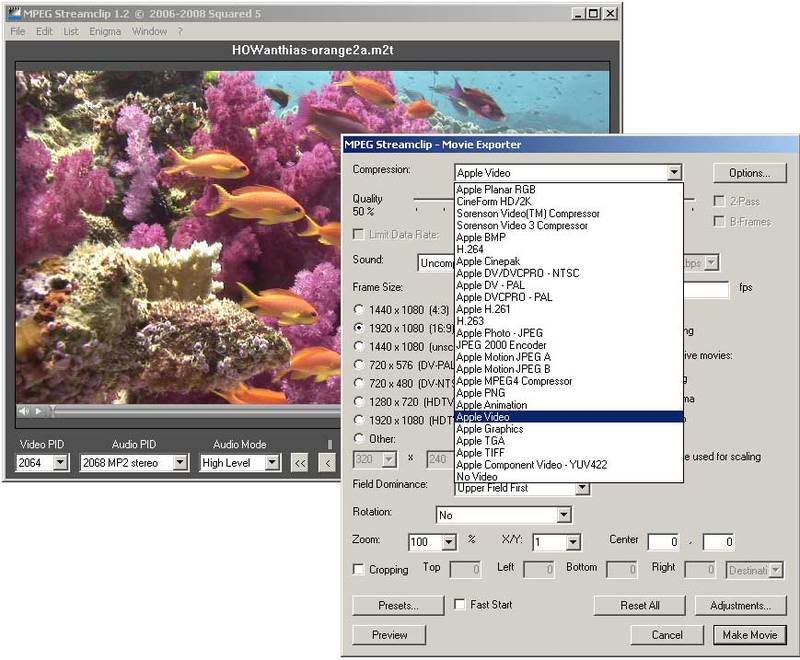
    no, FCP users cannot open the m2t files. However, you can covert them into almost any format with MPEG Streamclip (free app.). I converted it with this app to HDV1080i60, 1440*1080, and works well in FCP, and it is the same size in megabytes.


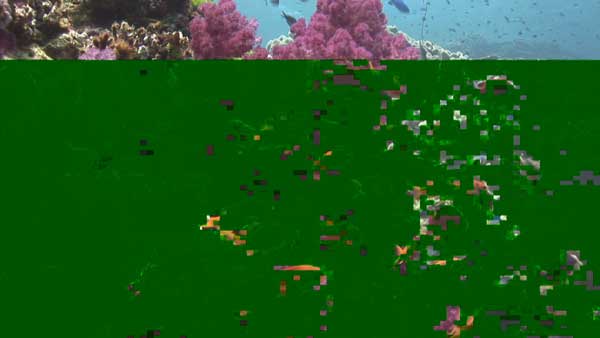
    However, I find the linked m2t file a bit strange, because there were stops in the footgae (I mean the playing fps dropped to 0 in the last third part of the clip).


    best,

    Jules

    Edited by Jules (Helioxfilm)
  3. I agree with Jules - MPEG Streamclip is a must have app for all FCP/FCS users - and most other NLE buffs too!

  4. Hi Guys


    Dropped that m2t clip straight onto the timeline here and it played back at full res no worries although there is bits of green stuff through it in places?

    Dead link for second one?

    In fact it cuts up with my 50i stuff no worries....but then I have not got a MAC......ha ha...

    post-4240-1234254293.jpg

    Edited by wagsy
  5. OK, I think the problem with the program stream link is now fixed. Do a "right click > save as". I'd be very interested to know if this opens and plays properly in FCP, Edius etc. without any further conversion (I'm hoping it's more compatible than the .m2t version). Jules, I'd also be interested to know if this .mpg version plays with no glitches in FCP after converting to HDV1080i60, 1440*1080 in MPEG Streamclip.


    It's weird how my .m2t file is causing problems in both FCP and Edius. I can imagine the Vegas HDV codec might do some strange proprietory stuff but the file appears to play perfectly in VLC, WMP, GOM Player, TMPEGEnc Xpress 4 etc etc.. Fussy things, these NLEs, aren't they.


    I've been trying to experiment with MPEG Streamclip for Windows but unfortunately it crashes, even after rolling my Quicktime Alternative back to 1.81 as per the instructions. I'm loath to install that nasty full version of Quicktime for Windows unless I have to, let alone give Apple money for yet another MPEG-2 codec.


    Quick question for you FCP guys. Do you need to buy the Apple MPEG-2 codec to get MPEG Streamclip working or does the Mac/FCP ship with it?


    Another question... What format do the rest of you generally ship your stock footage in if you're not sending a tape?


    Thanks for your help guys :huh:

  6. Quick question for you FCP guys. Do you need to buy the Apple MPEG-2 codec to get MPEG Streamclip working or does the Mac/FCP ship with it?

    I'm not sure what this even is, Nick? Sorry - can't help you there.


    Another question... What format do the rest of you generally ship your stock footage in if you're not sending a tape?

    I always send my footage via ftp - and usually in full quality QT clips for the client to download off our site. If it's a bunch of footage, I'll either use tape or export the individual clips as QT and then put them all on a DVD.


    As for the clip - it looks beautiful, but has a glitch at 3:20 - and also does not play in full resolution when I drop it straight into a 1080i60 sequence. It's a bit small. I messed with it a bit and FCP crashed - just an FYI.

  7. OK, I think the problem with the program stream link is now fixed. Do a "right click > save as". I'd be very interested to know if this opens and plays properly in FCP, Edius etc. without any further conversion (I'm hoping it's more compatible than the .m2t version). Jules, I'd also be interested to know if this .mpg version plays with no glitches in FCP after converting to HDV1080i60, 1440*1080 in MPEG Streamclip.


    It's weird how my .m2t file is causing problems in both FCP and Edius. I can imagine the Vegas HDV codec might do some strange proprietory stuff but the file appears to play perfectly in VLC, WMP, GOM Player, TMPEGEnc Xpress 4 etc etc.. Fussy things, these NLEs, aren't they.


    I've been trying to experiment with MPEG Streamclip for Windows but unfortunately it crashes, even after rolling my Quicktime Alternative back to 1.81 as per the instructions. I'm loath to install that nasty full version of Quicktime for Windows unless I have to, let alone give Apple money for yet another MPEG-2 codec.


    Quick question for you FCP guys. Do you need to buy the Apple MPEG-2 codec to get MPEG Streamclip working or does the Mac/FCP ship with it?


    Another question... What format do the rest of you generally ship your stock footage in if you're not sending a tape?


    Thanks for your help guys :huh:


    Nick,


    MPEg Streamclip reports two broken data parts in both files, so there is something wrong. Could you maybe re-create them? Otherwise it plays well.


    Jules

    Error.jpg

    Edited by Jules (Helioxfilm)
  8. Nick,


    MPEg Streamclip reports two broken data parts in both files, so there is something wrong. Could you maybe re-create them? Otherwise it plays well.


    Jules

    Error.jpg


    I was able to convert the .m2t clip to a cineform intermediate and pull it into PP CS3. I did notice a glitch or two in the file as well. I wasn't able to test pulling the raw .m2t file in as I'm having a problem with that right now in general for all .m2t clips.

  9. Scratch that - I was able to import the m2t and mpg versions in PP CS3. Issues with both files though (m2t at 2;19-4;21 & mpg at 2;04 and 2;19).

  10. Quick question for you FCP guys. Do you need to buy the Apple MPEG-2 codec to get MPEG Streamclip working or does the Mac/FCP ship with it?

    I'm not sure what this even is, Nick? Sorry - can't help you there.

    If you want to read MPEG-2 files then MPEG Streamclip for Windows requires you to purchase the Apple MPEG-2 codec for £15. I just did that and then found that to stop MPEG Streamclip from crashing I had to disable DirectDraw acceleration in the Quicktime preferences. So probably using the free Quicktime Alternative would have in fact worked. Anyway it's working now so I can do some testing here.


    Another question... What format do the rest of you generally ship your stock footage in if you're not sending a tape?

    I always send my footage via ftp - and usually in full quality QT clips for the client to download off our site. If it's a bunch of footage, I'll either use tape or export the individual clips as QT and then put them all on a DVD.

    Sorry to be pedantic but what do you mean by "full quality QT clips", say in the case of footage that originated as 1080i60 HDV? What codec? What settings? What filesize/bitrate?


    Well, I'm sorry about wasting your time on this so far guys but it's looking like the problems with these files are due to the crappy internet connection I'm on at the moment. With the original clips here I'm having no problem converting them in MPEG Streamclip to Quicktime and with no reported problems but when I downloaded from the links I'm getting data breaks :huh: Major red herring! I'll upload them again tomorrow and this time I'll download them to verify before posting :deadhorse:


    In the meantime, Jules (or anyone else), could you possibly grab a jpeg of your "MPEG Streamclip - Movie Exporter" window showing the settings you would use to convert to an FCP-compatible file? I'm not seeing a "HDV1080i60, 1440*1080" option as such.

  11. Codecs.jpg


    Settings.jpg

    Edited by Jules (Helioxfilm)
  12. OK, I think the problem with the program stream link is now fixed. Do a "right click > save as". I'd be very interested to know if this opens and plays properly in FCP, Edius etc. without any further conversion (I'm hoping it's more compatible than the .m2t version). Jules, I'd also be interested to know if this .mpg version plays with no glitches in FCP after converting to HDV1080i60, 1440*1080 in MPEG Streamclip.


    Another question... What format do the rest of you generally ship your stock footage in if you're not sending a tape?


    Thanks for your help guys :huh:


    Hi Nick


    Downloaded that HOWanthias-orange2a-MVW clip and dumped it straight into the EDIUS timeline here.

    It plays back but it has hiccups in it.


    I just FTP m2t clips to my server for buyers to download.


  13. Why not export as MJPEG file, the client will need to render it but the quality will be unaffected and it should be easily usable by most NLE's. It's what a fair few of the stock footage agencies use.

  14. I was not able to open the first but could view the 2nd tho there was some definite interlacing apparent. Didn't try to bring it in to FC

    Steve

  15. Another FCP user told me that the mpg version opens at 1440x810, which may bear out what Bryce said about it opening at less than full res also. So I think to supply mpg versions as stock would be asking for trouble, even with clear instructions to convert in MPEG Streamclip.


    I have fixed both files now and I'm still interested to know how they open in other NLEs, in particular FCP:


    m2t transport stream version


    mpg program stream version


    Incidentally, even with Quicktime Pro installed on Windows, MPEG Streamclip doesn't offer the "Apple HDV 1080i60" option. That codec must only come with FCP. So I'd definitely be looking at asking the customer to convert.


    MPEG-streamclip.jpg


    EDIT:

    Why not export as MJPEG file, the client will need to render it but the quality will be unaffected and it should be easily usable by most NLE's. It's what a fair few of the stock footage agencies use.

    Might be an idea. Someone also mentioned the Apple Animation codec. Apparently it's what Artbeats use?

    Edited by Nick Hope
  16. They played back here no problems on the timeline at full res.


    Why not just import as normal m2t files, do simple cuts and back out as normal m2t files?


    Can FCP play raw m2t clips?

  17. check this for stock footage specifications:


    http://www.istockphoto.com/videographer_6.0_requirements.php


    So they're asking for the "full res" version to be Quicktime MOV compressed "3:1, 95%, Best" (whatever that means exactly). I guess as part of an automated process they have to offer the most compatible format they can, but no producer wants to receive video that's been compressed from the original. Offering original quality can be a useful point of differentiation between the likes of us and the likes of istockphoto.


    Why not just import as normal m2t files, do simple cuts and back out as normal m2t files?


    That's what my archiving process is since Vegas Pro 8 came out (version 7 did not smart render and I had do it through Womble MPEG Video Wizard. What I'm trying to do now is establish a compatible but losseless format for stock footage supply.


    Can FCP play raw m2t clips?

    Apparently not. It can open the program stream version but apparently at less than full resolution and without audio. So supplying in program stream (mpg) is dangerous because they might think they haven't received the full quality.


    Vegas/Prem Pro/Eduis can read the m2t files I'm capturing/exporting so I'm going to stick with that as my choice of stock offering. If I have an FCP customer I'll send them a link to MPEG Streamclip and some conversion tips, which many of them wouldn't need anyway.

  18. Since this old thread I've done a lot of work on this issue. For sending to Apple people I now render HDV footage to Quicktime Motion JPEG B at 90% quality using Sony Vegas 8.0c. Quality is great and it avoids issues with gamma shift when moving Quicktime files between PCs and Macs.

Backscatter

Account

Navigation

Search

Search

Configure browser push notifications

Chrome (Android)
  1. Tap the lock icon next to the address bar.
  2. Tap Permissions → Notifications.
  3. Adjust your preference.
Chrome (Desktop)
  1. Click the padlock icon in the address bar.
  2. Select Site settings.
  3. Find Notifications and adjust your preference.