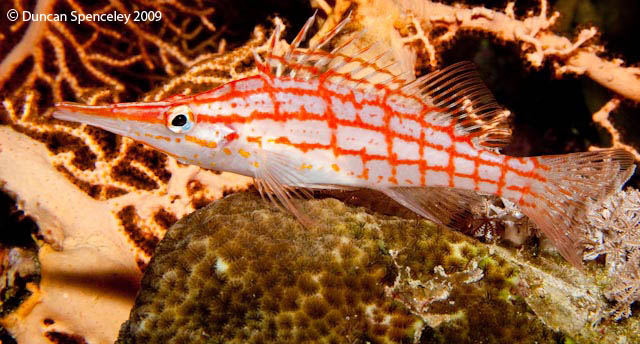
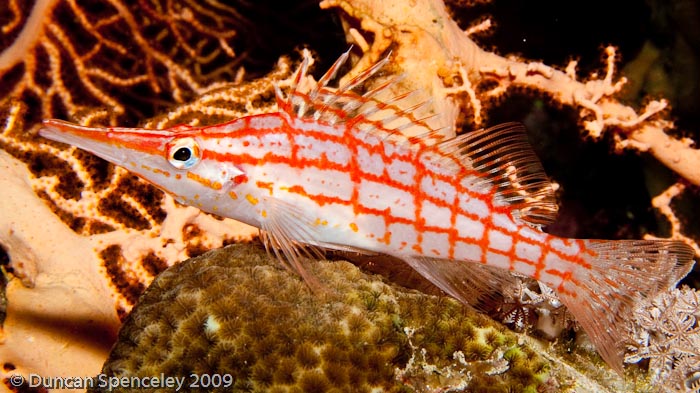
Hi, here is a photo I took of a hawkfish at Thomas Reef , Tiran the other day. I have cropped the image about 20 pc, boosted the exposure and blacks a little and applied a bit of sharpening in Lightroom. Canon 30d 18-55mm @ 55mm , flat port, ikelite housing, sea and sea ys90 full power, iso 100, 1/250, f22.
Given its position - and the background - the only suggestion I can think of would be to have re-framed it a little more on the diagonal. Given you've cropped it slightly perhaps you could try re-doing it more diagonally & see if you prefer the result?
R
Given its position - and the background - the only suggestion I can think of would be to have re-framed it a little more on the diagonal. Given you've cropped it slightly perhaps you could try re-doing it more diagonally & see if you prefer the result?
R
Thanks for that. This is as diagonal as I can make it without clipping the fish. I think it is better. Cheers.
Duncan
Hi Duncan,
I think I might try to reduce the contrast on the background colours-for me the corals are detracting from the subject. If you can select the fish, and then introduce a gaussian blur to the background using a layer mask, that would be good too!
Gennerally, I think the image is a bit overstaurated.
You have lots of opportunites for shooting these-so I would try and get a shot that shows both eyes-it will take some patience though!
All the best
Adam
Hi Duncan,
I like the subject. However highlights are blown out, so i would have taken exposure down on this shot, not up.
Saturation is too high and you can tell.
Composition wise, the background does not provide a good negative space to the subject and is distracting, try to blur it.
All things you will be able to fix in Photoshop.
Good luck.
Cheers,
Simon
Hi Duncan,
you must have more to go on with the image than what you told Ralphy? Your format is not 3:2, it's more like 3:1,68. Or does the fish fill the frame that much to begin with?
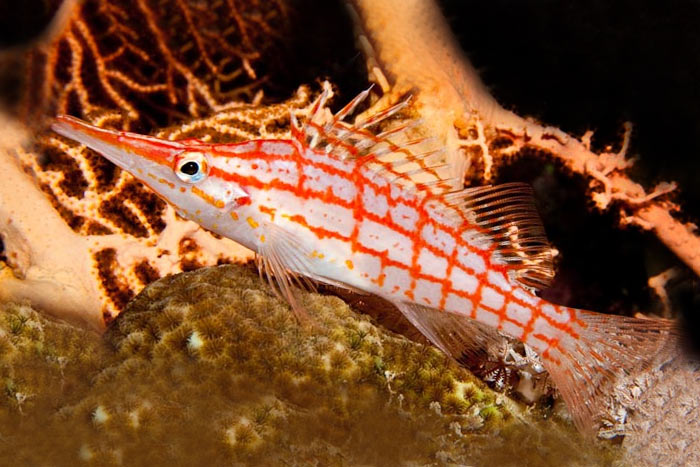
I took the liberty of some quick cloning to show what it might have looked like
Sometimes, there's only so much you can do in PhotoShop afterwards... sometimes, it has to be done before you press the shutter...