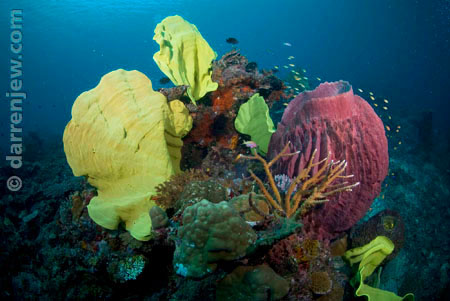
Prompted by Don Silcock's image, referred to in his recent thread on Wide Angle Macro, I thought it may be interesting to see if the Wetpixel community's resources could be pooled to create a visual history of a small part of our underwater world.
Wahoo Point is a popular dive spot for visitors to Milne Bay, PNG. Both Tawali Resort, and the liveaboards that service the area dive the point regularly. I've only been once, and loved it.
This is how the Tawali website describes Wahoo Point:
A small point located on the North side of the mainland with a shelf from 15' to 50' in depth and dropping with a sheer wall down to 200+'. This site is frequently visited by Hammerheads, Manta Rays, occasionally Whale Sharks, Minke Whales and on two occasions, Orca. The site also hosts a variety of anemone, a school of Barracuda and very large Elephant ear sponges. A great place for wide angle photography.
Most descriptions of the site I have seen promote Wahoo Point as "great for wide angle photography" which means many photographers will dive this site set up with similar kit, a wide rectilinear or fisheye lens and dual strobes.
So if you've been to Wahoo Point, we're looking for any photographs you may have of this particular sponge garden.
If you are planning a trip to Milne Bay and you happen to dive Wahoo Point with a wide angle setup, keep your eye out!
Post your photos here and we'll build up a collection of images that will chronicle this lovely aspect of a great dive site.
Please include the date the image was shot.
Here's mine to kick off:
04 May 2008 | Nikon d200 | 10.5mm nikkor | 2x Inon z240s | 1/60th @ f5.6 | 100ISO