



Hi ... if possible, I'd love to hear what technique/filter/process was used to create the effect in the winning "Mystic Clownfish" shot that won this week's contest.
Thanks!
Read-only discussion
Hi ... if possible, I'd love to hear what technique/filter/process was used to create the effect in the winning "Mystic Clownfish" shot that won this week's contest.
Thanks!
Me too. 
I think i found it. Look at http://www.niksoftware.com/cepnx/usa/entry...3_filters.shtml and then the filter "Detail Stylizer".
Cheers
Michael
I think i found it. Look at http://www.niksoftware.com/cepnx/usa/entry...3_filters.shtml and then the filter "Detail Stylizer".Cheers
Michael
Looks like it - thanks for digging that up!
Wow. All of those filter effects are pretty cool. How will I ever go back to the ones in ps3?
That's like asking a magician how he does his tricks!!! Have to admit, I was curious also, I was very impressed. Scott ps. thanks for the link
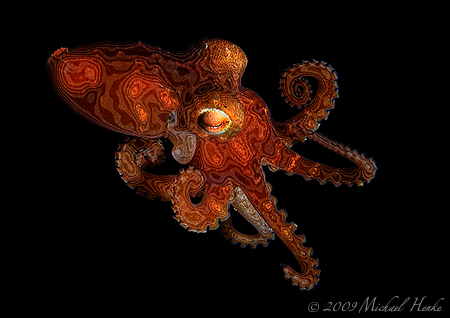
Even when you know how it is done, it's not so easy to find the right picture. This one is the best I try so far, but not as good as the "Mystic Clownfish".
Cheers
Michael
Even when you know how it is done, it's not so easy to find the right picture. This one is the best I try so far, but not as good as the "Mystic Clownfish".Cheers
Michael
I agree! It is a tricky filter to use.
Here's one - albeit not an underwater shot ...

Both you guys impressed me! Nice job Jeremy & Michael.

Terms of Use Privacy Policy Guidelines We have placed cookies on your device to help make this website better. You can adjust your cookie settings, otherwise we'll assume you're okay to continue.

A worldwide community for underwater imaging.
