



Skip to content

Shooting Technique, Workflow and Editing / Archived topic

Flix Standard 4:3 format

Started by Francisco Xavier ·

  • 7Posts
  • 7Replies

Read-only discussion

Flix Standard 4:3 format

7 posts
  1. Hi,


    As sugested the Flix soft. is one of the best converter to *flv. So I bought the Flix Standard to convert my video footage to flash.

    Once the Flix do not recognise (main concept codec) *mpg and *m2t I rendered from timeline (Vegas Pro) to *wmv and imported them to Flix.


    Surprise, the Flix Std. just convert to 4:3 format, even unchecking the "mantain aspect ratio" and writing crazy frame width/height or selecting preset "Hi-def 1080P" it just generate 4:3 format!


    Do you had seen this on Flix or does exists a solution?


    Until now I used the Premiere El to convert *m2t to *flv and it does very well (both are same trade), but the remote server could not extract the still pic (video frontpage thumnail) from flash file I uploaded.


    I would not like to waste my money on a converter that just work on old formats.


    Any help would be welcome


    Thank you.
  2. Hi,


    Using Flix Std. I found out a solution for the bug generating 4:3 files when using 16:9 HD or DV as source files.


    Try and fail - I unchek "mantain aspect ratio" and using same proportion pixel ratio 16:9 like 720:405 it generate 16:9 aspect ratio video file, any "preset".


    The quality is very same the *flv file generated using Premiere Elements (same codec). The color palete and details are a litle better on Flix than Premiere.


    One good thing on Flix - with the clips generated by Flix the HDVUNDERSEA server software could extract the still picture that it will "clip" to video thumbnail. It does not happen with the Premiere (void thumbnail video clip).


    The reverse coin side - Clips *flv generated by Flix when viewed on normal window have 16:9 aspect ratio, but on full screen they are upscaled and the left and right margins are cuted (top and footer are close the screen edges) - may be a local config. matter(?).


    Pardon my poor english spelling, but portuguese is a very diferent language. At least I think you could understand what I said above.


    Thanks

  3. Hello Francisco

    Glad you worked out the Flix encoder.


    I have download flv files made from Premiere and other flv made with other encoders from the site and then looked at the each files specs.

    There is nothing I can find different with them but for some reason the encoder on the server does not make a thumbnail from the flv ones made with Premiere?


    I'll see if the server guys can update the encoder software to fix it.

    In the meantime I will make some thumbnails for those clips that do not have thumbnails.


    You have some nice vids there, thanks for loading them up.


    Cheers

  4. Hello,


    I just made some experiments to find out how the thinks work. And there exists diferences!


    I uploaded two *flv files, both of them was converted from the same HDV file, using the same codec.

    The first (withought thumbnail):

    http://www.hdvundersea.com/view/217/portug...ro-socios-apdm/

    was created with Premiere

    And the second (with thmbnail):

    http://www.hdvundersea.com/view/218/portug...-socios-apdm-1/

    created with Flix.

    You can apreciate the diferences (minimal) and possible to find out the diferences at encoder level.


    Later I will delete the second once as it waste disk space on server and the purpose is just to judge the diferences.


    I will thank you if can create the thumbnails for the clips as you as made before.


    One thing I wish you test: try to play the second clip: http://www.hdvundersea.com/view/218/portug...-socios-apdm-1/ full screen and tell me if see the whole 16:9 clip or cropped at 4:3 aspect?


    Thank you,


    Francisco

  5. Hello,


    Amazing !!! I request technical support to Flix and they reply that they have no support for 16x9 aspect ratio in either Flix Pro or Flix Standard.


    It is amazing at all !!!


    What footage they expect the people who expend some money to aquire Flix P/S to convert to *flv ?


    Old last Century 8mm and Hi8 video tapes 4x3 aspect ratio?


    Why they do not mention this fact on their site?


    Sincerely, no comments ...


    Francisco Xavier

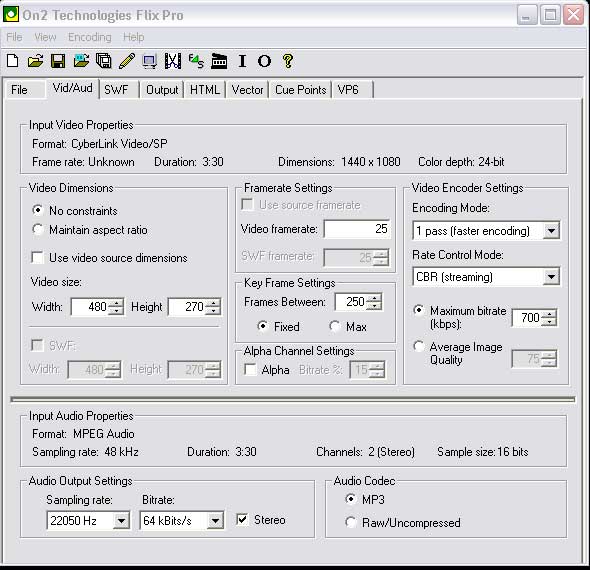
  6. I'll download those two files you made and look at the specs of them again.


    With flix, try setting the aspect ratio to 480/270 - No constraints.

    I just did a 1440/1080 m2t file and it seems to come out fine.


    post-4240-1237939461.jpg

  7. Hello,


    Yes, like I post before:

    I found out a solution for the bug generating 4:3 files when using 16:9 HD or DV as source files.


    Try and fail - I unchek "mantain aspect ratio" and using same proportion pixel ratio 16:9 like 720:405 it generate 16:9 aspect ratio video file, at any "preset"!


    The Flix *flv generated this way seems be have a litle improvment in collor and detail related to others (Premiere w/same codec). Also the HDVUndersea generate the thumbnail with Flix *flv (do not do the same w/others). But when played full screen (if the screen/lcd is not large format=16x9) the frame will be cropped (the sides) to fill all the screen area.


    Please try to play both port... full screen to see wath I say above.


    Thanks.


    I'll download those two files you made and look at the specs of them again.


    With flix, try setting the aspect ratio to 480/270 - No constraints.

    I just did a 1440/1080 m2t file and it seems to come out fine.


    post-4240-1237939461.jpg

Aquatica

Account

Navigation

Search

Search

Configure browser push notifications

Chrome (Android)
  1. Tap the lock icon next to the address bar.
  2. Tap Permissions → Notifications.
  3. Adjust your preference.
Chrome (Desktop)
  1. Click the padlock icon in the address bar.
  2. Select Site settings.
  3. Find Notifications and adjust your preference.

