



I really don't know how to do it and some of you guys really have nice water marks. Thanks, Scott Nielsen
Shooting Technique, Workflow and Editing / Archived topic
Not that I need it but can someone help me make a watermark?
Started by scott_nielsen ·
- 11Posts
- 11Replies
Read-only discussion
Not that I need it but can someone help me make a watermark?
11 posts
-
-
Hi Scott,
Are you talking about a watermark like what I have in the lower right hand corner of this image?

There are also watermarks that you can't see that prevent others from using your image but I'm guessing you are talking about something like the text in my image.
It can be done in Photoshop using a text layer. Others perhaps can provide links to specific directions on how to do it. I did try to do it in Photoshop Elements but it wasn't that easy to do in Elements.
The one in my image above, however, was made using Photo Mechanic.
I'm already looking forward to the one you will come up with. You are so artistic that it's bound to be a winner

Ellen
-
There are also watermarks that you can't see that prevent others from using your image...
Hi Ellen!
Where can I get one of these?
-
Hi Ellen!
Where can I get one of these?
Hi,
iWatermark is a program that costs only $20 and produces a visible watermark.. Here's the link:
According to the web site, iWatermark is the world's # 1 watermarking application for Mac and Windows. On the linked page, click on the link "About Watermarking" and you will be taken to a Ken Rockwell article about visible and invisible watermarks.
Hope that helps!
Ellen
-
Thanks alot !!
-
This may be of interest - using Photoshop Elements
http://graphicssoft.about.com/cs/photoshop...sewatermark.htm
-
Thanks alot !!
Hi, Coincidentally, I searched 'watermarks' in the help file in my CS4 and it brought me to Adobe's community forum page. There I found lots of helpful info on how to set this process, automate it and batch process it for multiple photos. Maybe you should try the same and see if it's helpful to you.
Cheers,
Barttrigger
-
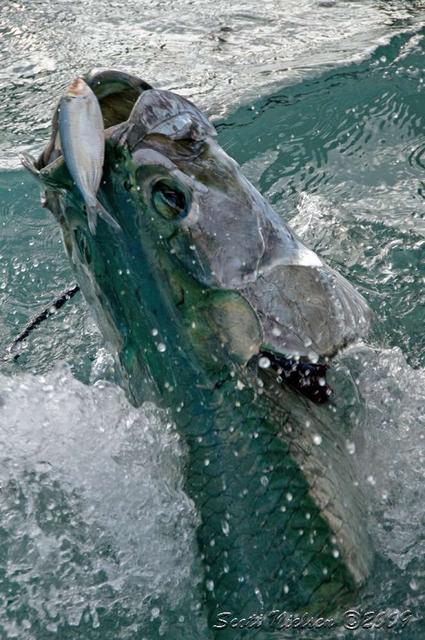
thanks for the advice. I went with this: iWatermark Now I just have to learn how to use it. Scott
-
Thanks Ellen B and Ellen Q here's my mark. Scott
-
The (irritating) Scott Kelby describes a method for Photoshop CS2 in his manual. Curiously, his method for CS4 is not as friendly, as the CS2 method creates a custom brush, but the CS4 method an action. I made a copyright symbol from the preset shapes menu, added some text and then saved this on a white background as a brush preset. It works in CS2 and, unsurprisingly, in CS4.
If you use a watermark to discourage unauthorised copying, however, it will have to go over the interesting part of the image, and then some viewers are really irritated themselves.....
Tim
-

I have a hand written signature on a transparent background saved as a .psd - in a few useful sizes.
I can cut and paste it onto an image, adjust the position and opacity of that layer, then flatten it.


