



Skip to content

Photography Gear and Technique / Archived topic

New PC Book Pro

Started by wagsy ·

  • 3Posts
  • 3Replies

Read-only discussion

New PC Book Pro

3 posts
  1. Hi

    As you know I like to tinker so....


    I just got a Acer Travelmate 7730 running Vista.

    It's taken two days to decrap, tweek and install the OS along with my software but it's running áll very good now. Boots up and shuts down very fast and I'm using free, firewall, virus and bug cleaning software that runs & updates when I want them to run. Commercial vius software apps now days are a viruses in themselves if you ask me. I guess thats why people go to the '$$$ MACS as they are all the same, just hit the power button and away you go.

    Actually once Vista is tweeked it runs very good, I'm impressed...


    Comes with twin internal drives, the whole operating system etc is now imaged onto second drive in case I run into a problems down the track, also got a 3rd extenal USB drive.

    Specs:

    PROCESSOR : Intel Core 2 Duo T9400 processor, 2.53GHz, 6MB L2 cache, 1066FSB

    MEMORY : 4GB (2 x 2GB) DDR2-667 memory

    STORAGE : 500GB (2 x 250GB) 5400rpm SATA drive

    OPTICAL DRIVE : DVD Super Multi (Dual Layer)

    DISPLAY : 17" WXGA Wide Screen LCD display

    NVIDIA® GeForce® 9600M GT with up to 2303*MB of TurboCache™ (512 MB of dedicated GDDR3 VRAM

    Bluetooth, Lan, wireless, HDMI, webcam, etc.


    Windows Performance score is 5.4, FLASH, Dreamweaver, Photoshop, bridge, and Ilustrator CS3 run very fast indeed. Opening up raws with bridge is a snap.

    In fact I'm pretty impressed at how fast they open up for a laptop and can have all 5 programs open at the same time plus EDIUS editing HDV.


    Editing raw HDV m2t video files at full preview res with EDIUS is snap as well, scubbing the timeline there is no lag.

    Encoding out 1 min of 700kbps QT H264 file from a raw HDV m2t timeline takes 2 mins.

    Do some more rendering video tests later.


    Running HDV video files full screen are no problems.

    $1900 AUS... it's a bargin as these things outdate so quick.
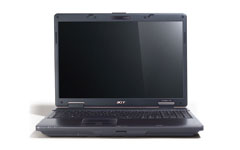
     

    post-4240-1241147747.jpg

    Edited by wagsy
  2. The new machine sounds real nice, Wagsy.


    The only improvement I could think of would be a colour calibrated screen for accurate colour reproduction. I believe some high end laptops are starting to feature these new screens. I vaguely remember a post within the last week or two here on Wetpixel mentioning them.


    Actually once Vista is tweaked it runs very good, I'm impressed...


    And so was I.


    Best operating system from Microsoft yet, as far as I'm concerned. Have not had any crashes or blue screens with Vista. It has been very stable for me.


    I just upgraded to 64 bit Vista and added more memory to the desktop and have been doubly so impressed.


    I heard the Windows 7 is, or will be, publicly unveiled shortly. I have not taken the time to investigate Windows 7 yet, but am interested to see what's new with it.


    Good luck with the new machine.

  3. Hi

    Screen calibration, I will see what I can find once I got all the other stuff sorted.


    Vista certainty needs tweaking and you are in big trouble if you buy one off the shelf as is and don't tweak & decrap the %^*(^$# thing.

    Tweaked... it boots and turns on - off much faster than XP now.

    Has not crashed on me yet, it just works.


    How much ram have you got on the 64 bit version, I got software that does not run 64 so 32 is good enough for me.


    Loaded up EDIUS 5.10, not bad, very fast and it edits the raw HDV easy as but cannot do as many tracks in realtime as my 3.2 gig Quad.

    Rendering out 1 min of HDV m2t timeline to Elementary 720/576 PAL MPEG2 with ac3 files @ 8mbps takes 30 seconds.

    It's really good having the second drive in the laptop for the video to sit on and also be used as a scratch disk.

    Lightroom runs really well and opening up a raw from my D70 (6megs) in photoshop is like instant.

    With Photoshop CS3 closed, and clicking on a raw within Bridge, it take about 4 seconds for Photoshop to start up with the pic in the raw editor waiting. :blink:

    illustrator is very fast.


    Screen is abit glarey in the sun but most laptops are now days anyhow.

    It's made out of plastic so one has to look after it.

    17 inch screen is wonderful to work on for a laptop.

    The secure finger print thingy is finicky and a waste of time


    When Windows 7 comes out I will make a dual boot and try but happy for now, some of the new navigation features look good.

    Edited by wagsy
Aquatica

Account

Navigation

Search

Search

Configure browser push notifications

Chrome (Android)
  1. Tap the lock icon next to the address bar.
  2. Tap Permissions → Notifications.
  3. Adjust your preference.
Chrome (Desktop)
  1. Click the padlock icon in the address bar.
  2. Select Site settings.
  3. Find Notifications and adjust your preference.
