



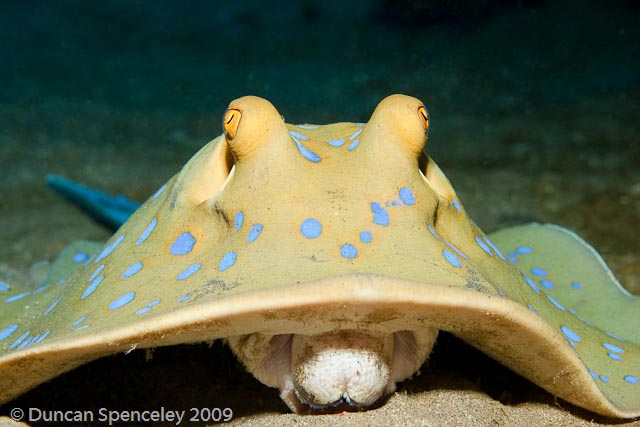
And what a fat tongue it is as well!!!
(Is it a tongue?)
Duncan
Photo / Video Showcase / Archived topic
Started by DuncanS ·
Read-only discussion
And what a fat tongue it is as well!!!
(Is it a tongue?)
Duncan
I believe it's an extension of it's mouth. If you look at the bottom you can see it's teeth. They extend their mouth out to root around in the sand for small crustations and the like and sort of hoover them up.
Jack
Great shot!
Looks like part of the teeth structure to me. I used to work at the Melbourne Aquarium and we would see this behavior quite often on our smooth rays. The teeth aren't really teeth as we know them. Its more like a crushing plate.
Cal
Cool shot Duncan.
That is a cool shot!
Any idea what he was after, food wise?
Cheers, Carol
Very nice shot. Thanks for sharing.
Diggy
That is a cool shot!
Any idea what he was after, food wise?
Cheers, Carol
ME!!!
He was sat on the sand under a small underhang so I snuck in in front of him. He wasn't bothered about me being there so I kept creeping closer. I was watching his eyes and trying to get them both looking at the camera. If i slowly moved the camera forward he would start to pick up his skirt as if he was about to bolt, and then if you moved it back he settled down again. I didn't actually realise I had caught the mouth open until I reviewed the shot.
However anatomically incorrect,I like to think that he was poking his tongue out at me as he couldn't flick me the bird!!!!
Thanks for the comments!

Terms of Use Privacy Policy Guidelines We have placed cookies on your device to help make this website better. You can adjust your cookie settings, otherwise we'll assume you're okay to continue.

A worldwide community for underwater imaging.
