



Skip to content

Photography Gear and Technique / Archived topic

Nikon 5000, Ikelite LCD Magnifier

Started by Marc Furth ·

  • 6Posts
  • 6Replies

Read-only discussion

Nikon 5000, Ikelite LCD Magnifier

6 posts
  1. I have a problem seeing the LCD underwater.

    I do a lot of my diving in shallow

    water were the ambient light reflects off

    the LCD.

    I also have a problem seeing up close.

    The answer for me is to magnify the LCD.


    What I've done is to bond a magnifier

    to the acrylic back plate of the housing,

    right behind the LCD.


    I started off with a round magnifier and

    measured the distance to the LCD.

    This is critical for the right focus.

    The distance for my magnifier was 1 3/4

    inches from the back of the acrylic.


    As you know you have to make up that

    distance with solid clear acrylic.

    If you leave it with water between it,

    it will not be in focus.


    I had to bond three pieces to gether to

    make the proper distance.

    Two pieces of acrylic and the magnifier.


    Before I bonded it to the housing I cut

    it square to the same size as the LCD.


    I panted the outside area black so light

    would not enter the sides.


    You can now place your face mask right

    up to the back of the housing and see

    the LCD Perfect.

    You can see so good, that you can see

    the pixels that make up the LCD.

    This makes it really easy to verify that

    your in focus.


    I have made other changes to my housing

    But I'll leave that for another post.


    Stay Wet,

    Marc
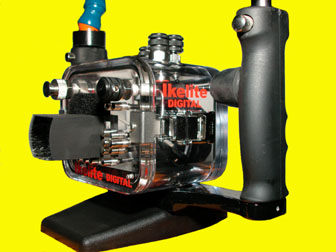
    image

  2. Very interesting idea Marc.


    I too wish I could get some magnification underwater.


    I guess you must have calculated for the curve of the lens, using the index of refraction for water, right? That's why you ended up with such a long focal length...


    Did you try a cylindrical magnifier, like a reading magnifer?


    I think a frenel lens might work well too.


    But the main thing to try and see if it would work better using a glass outer lens, since the difference in refractive index would be larger.


    Cool idea.

  3. Hi Don,


    You probably could answer those Questions better than I could.


    My knowledge is base on trial and error.

    I’ve made video housings for 10 years.

    I made housings for companies called

    Hyper-Tech and Accu Gear.

    Both companies are no longer in business.


    The magnifier I used were some old lens

    that I used inside my Video housings.


    The lens I used was convex on one side.

    I had to sand it flat first before I could

    bond it to the acrylic.

    .

    It was a long process to grind it flat using

    120 to 1500 grade wet sand paper.

    Using a peace of flat glass to sand on top of.

    Than polishing it on a buffing wheel.


    I’m sure you could find a flat lens

    and skip the sanding.

    Try Edmond Scientific they have many

    lens to chose from and are very helpful.


    The glueing of acrylic is an art in itself.

    Tring not to trap any air inside the layers

    takes some experience.

    I suggest practicing on scrap pieces to

    get the hang of it.


    Its not really gluing the pieces together,

    your bonding the pieces together like

    welding.

    They actually melt together.


    I would not know how you could bond

    glass to acrylic ?


    Marc

  4. Hi Marc, Welcome to the board!


    I enjoyed look at your picture and marvelling about the modifications you made to your housing.


    I just gotta ask: what is that big black knob you put on the shutter release lever? What is it for?


    I also thought your lens hood was pretty cool.


    Cheers

    James Wiseman

  5. Marc, I would like to see a pic of your rig. Where is it located? I didn't find any problem seeing the LCD the first time I took out my 5000 housing and the LCD seemed plenty bright. I did have the same idea. We have a number of flat frennel maginfiers at work and I was going to try them. I have a high powered maginfier I use on land and found it of limited value as it mags the LCD too much and you see individual pixels and is thus somewhat distracting. I take it you prefer this?


    [Edited on 5-22-2002 by davephdv]

  6. That big black knob is my shutter release.


    The first thing I changed was to take off

    that spring that holds back the shutter.


    I found my self taking pictures with out

    focusing.

    It's hard to feel the first detent on the

    shutter button.


    Now the control touches the button and

    I can feel the difference when I put pressure on it.


    I also turn the base of the handles around.

    They now angle forward and the shutter

    knob can be used by your thumb and

    index finger. This works better for me.


    I also had to rotate the rubber hand

    grips.

    You have to unscrew the locking device

    that Ike uses to lock there strob arms.

    Pull them out, and then rotate the grips,

    than reinstall the strob locks.


    I also cut that washer on the bottom

    of the housing. Just a little so you can

    move the housing closer to the right

    hand grip.


    That where that black Rubber knob comes

    in.

    It's a 1/2 rubber chair leg cover.

    Fits nicely over the shutter knob and

    makes it easy to feel and rotate the

    shutter button.


    I'm not recommeding that you change your housing.

    These are my personal preferences.

    The housing is a first class engineered

    product made by a very reputable company.


    That's it, Stay Wet.

    Marc

Nauticam

Account

Navigation

Search

Search

Configure browser push notifications

Chrome (Android)
  1. Tap the lock icon next to the address bar.
  2. Tap Permissions → Notifications.
  3. Adjust your preference.
Chrome (Desktop)
  1. Click the padlock icon in the address bar.
  2. Select Site settings.
  3. Find Notifications and adjust your preference.

