Skip to content

Lights, Strobes, and Lighting Technique / Archived topic

Magic filters on wreck dives

Started by CarlSagan ·

  • 11Posts
  • 11Replies

Read-only discussion

Magic filters on wreck dives

11 posts
  1. Hello,


    I've made a search for this topic (using magic filters on wreck dives) without sucess.


    I have one Magic Filter to test on a wreck dive. The wreck lies on a sandy bottom, from 25m to 10m deep. The visibility is normally about 15m. I need to shoot a WA, using available light and magic filter on a Nikkor DX 10.5. I'll be shooting at 10m deep slightly downoards.


    Shooting JPEGS: what WB setting do you think it'll be best option? And about contrast level?

  2. Shooting JPEGS: what WB setting do you think it'll be best option? And about contrast level?


    Use manual WB, that is the "PRE" white balance mode on the D90. You will need to set this underwater at the depth you intend to photograph.


    "Normal" contrast should be fine, but you can try "High" contrast too, if you want.


    Also have a look at these web pages: http://www.magic-filters.com/tips/wb.html and http://www.magic-filters.com/tips/shoot.html


    Good luck.


    Alex

  3. Hello,


    Alex, many thanks for your advice.


    Today it was my first dive using Magic Filter. Used on Nikon D90 and Nikkor 10.5mm. It's a new world... :)


    It's not easy to Preset WB because of 10.5mm is too wide and I had a 18% grey card of the size of my hand. Maybe I'll need a bigger grey card... I'll give it another try with the Tokina 10-17, doing PRE WB on 17mm and shooting on 10mm. :P


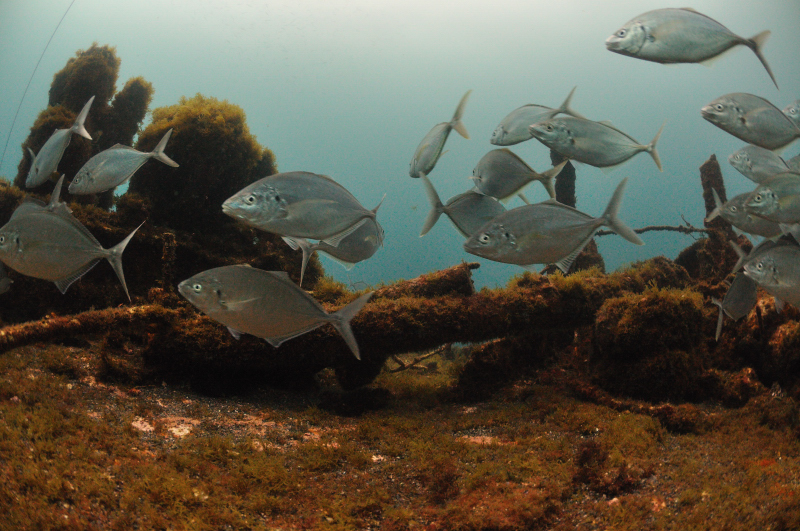
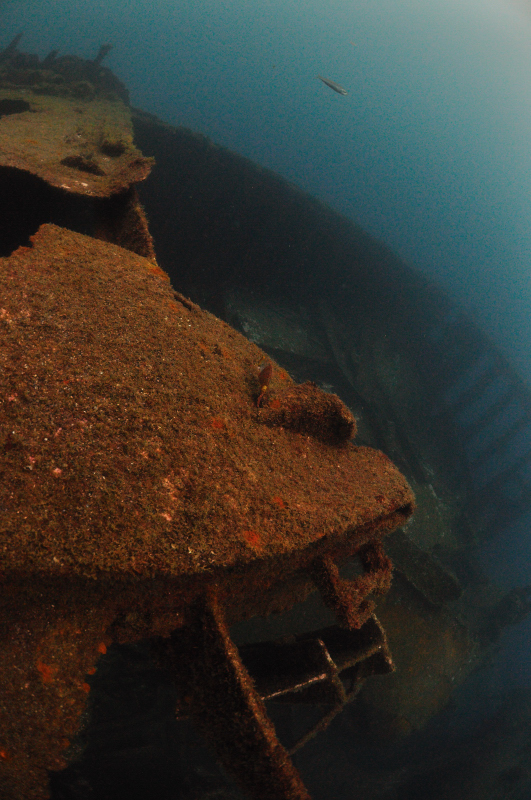
    Here are two shoots from the wreck dive. Exactly 12m deep, cloudy sky, no Sunshine, bad visibility (less than 6m).


    What should I improve?

    post-24955-1244764965.jpg

  4. and another

    post-24955-1244765101.jpg

  5. The photo with the fish is shot a little into the light, rather than with the light, which has led to a slightly washed out background. The second image uses a good downward camera angle, with the sun coming over your shoulder illuminating the wreckage. When using a very wide lens (e.g. 10.5mm) it is important to use more of a downward camera angle than with a less wide lens (e.g. 10-17mm @ 17mm).


    When shooting wrecks (without strobes) you need to keep the shutter speed to at least 1/40th. Below that you will get blur, but there is no need to go much faster, instead reduce your ISO to get the minimum noise.


    With moving subjects (like the fish) you need a bit more shutter speed to freeze the action. At least 1/90th.


    Cloudy days are not too much of a problem, they reduce your ultimate light levels, so you might have to bump ISO a bit, but they also make the light a little less direction less - which allows you to shoot from more angles.


    Both shots don't really have the best WB settings. On wrecks I tend to set the white balance on an illuminated section of the wreckage. I generally find that this gives a good white balance. Here is an example on a wreck (that we filmed) at a depth of 10m, shot with a compact.


    This is me setting the white balance on the wreck, just below the winch
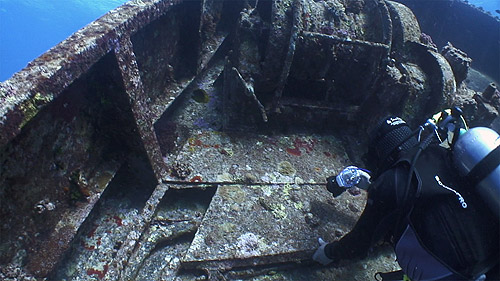
    post-713-1244794124.jpg


    Then I recomposed and shot this - this is JPG as shot:

    post-713-1244794203.jpg


    Alex

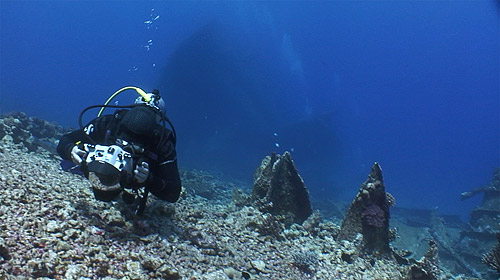
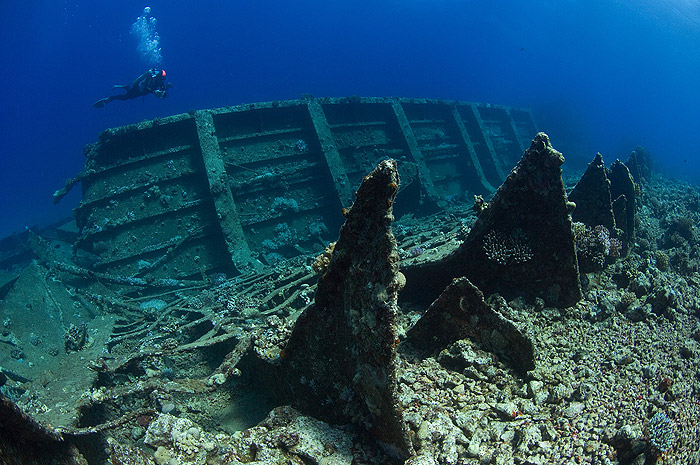
  6. And here is a DSLR example, with the 10.5mm at a depth of 13m


    Video grab of me setting the white balance. this time using the seabed.

    post-713-1244794412.jpg


    Then turning around and shooting the wreckage. Again this is as shot, straight from the camera:

    post-713-1244794484.jpg


    Hope that this helps show the sorts of subjects I set the white balance on. I have stopped using a slate as I find the seabed or the wreck provide good alternatives.


    Alex

  7. Alex,

    Sorry I'm so slow, hope you can help. When using a Magic Filter, what is the benefit of doing a white balance at depth versus just picking one out in post? If your shooting RAW does it make any difference technically? I'm going on a trip with Jim Abernethy next week and plan to try the filters out at Tiger beach. Can I get a white balance off the sand after the dive in LR and get the same image quality?


    Cheers, hope the back is fully recovered,

    Steve

  8. Alex,

    Sorry I'm so slow, hope you can help. When using a Magic Filter, what is the benefit of doing a white balance at depth versus just picking one out in post? If your shooting RAW does it make any difference technically? I'm going on a trip with Jim Abernethy next week and plan to try the filters out at Tiger beach. Can I get a white balance off the sand after the dive in LR and get the same image quality?


    Cheers, hope the back is fully recovered,

    Steve

    Steve - if you are shooting RAW, the only advantage to getting it "right" in-camera is a good WB for the JPEG preview on the LCD.

  9. Steve and all,


    Alex's advice (being the inventor :) is best and I too have had my best results finding some nondescript "average" bottom to shoot my reference white balance shot off. Messing with white or grey cards I think is a waste of time.


    The key is to make sure your reference shot is illuminated by full sun OVER your shoulder. See a couple of years old photos shot available light with a lowly Fuji E900 in Ikelite housing and INON UFL 165 Fisheye lens.


    RAW will allow you to even fine tune your final output too, but if you're lazy (as I am) a nicely exposed JPEG can make great looking prints too.


    Good luck!


    dhaas


    post-244-1244899093.jpg post-244-1244899077.jpg

    Edited by dhaas
  10. Alex,

    Sorry I'm so slow, hope you can help. When using a Magic Filter, what is the benefit of doing a white balance at depth versus just picking one out in post? If your shooting RAW does it make any difference technically? I'm going on a trip with Jim Abernethy next week and plan to try the filters out at Tiger beach. Can I get a white balance off the sand after the dive in LR and get the same image quality?


    Cheers, hope the back is fully recovered,

    Steve


    No massive difference Steve. Although quite a few users (who have emailed me) have found that they get more noise from doing it in post - than in camera. Its only a small difference and only something they swear that they see from Pixel peeping at 100-400%.


    It may be a case of using third party RAW converters (PS/Lightroom/Aperture) rather than using Nikon/Canon/etc ones.


    It is certainly not a significant problem with flash photos, but for filter photos we are talking about quite extreme WB settings it does seem to generate more noise doing it a RAW converter - rather than in camera. Again I'd stress that the difference is small and most people (myself included) wouldn't notice it. But the few people who have really swear by setting WB in camera now.


    Furthermore, it is very easy to set Wb and at Tiger Beach you only have to set it once for the whole trip - so I'd do it that way.


    Alex


    p.s. Back almost fully recovered. thankfully.

  11. Thanks guys,

    I'm convinced, I'll give it a try. In thinking about it I had come up with Jeremy's point that I bet that Alex is using the in camera WB to dial in those beautiful exposures he makes. I'm not crazy about spending a lot of time with my head down and locked looking at the camera with the big tiger's roaming around but I hadn't thought about only having to do the WB once. Thanks Alex! If it does anything to improve the IQ I'm all for it.


    Have fun,

    Steve

Isotta

Account

Navigation

Search

Search

Configure browser push notifications

Chrome (Android)
  1. Tap the lock icon next to the address bar.
  2. Tap Permissions → Notifications.
  3. Adjust your preference.
Chrome (Desktop)
  1. Click the padlock icon in the address bar.
  2. Select Site settings.
  3. Find Notifications and adjust your preference.