



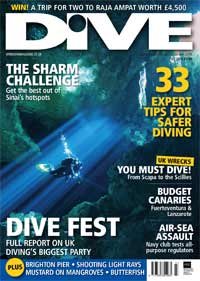
Just got a post from Alex Mustard that my cenote image is on the cover of DIVE Magazine in the UK!!!! This is really more than my feeble mind can imagine!
Read-only discussion
Just got a post from Alex Mustard that my cenote image is on the cover of DIVE Magazine in the UK!!!! This is really more than my feeble mind can imagine!
Just got a post from Alex Mustard that my cenote image is on the cover of DIVE Magazine in the UK!!!! This is really more than my feeble mind can imagine!
Congrats! Love the shot, which Cenote was it?
Congratulations!!
Kudos!
Congrats! Love the shot, which Cenote was it?
The cenote is Taj Mahal...one of my favorites! Karen
That's great!
The cenote is Taj Mahal...one of my favorites! Karen
Taj is great... Hopefully I can get back down there in the not too distant future, really missing Mexico right now....
Awesome! Well done!
Phil
Awesome shot. Congratulations!
Great shot. Perfect for a cover too!
Way to go Karen! Outstanding 

Cheers,
Steve
The cenotes are beautiful as is your image! WTG.
Jack
JEEEYY !!!
Congrats!
nicely done!
What a great shot and an amazing feeling you must have right now.
All the best,
Stew
Was just looking at this earlier and thought it was a lovely shot...
Well done Karen
Dive safe
DeanB
Congratulations! that is an extremely inspiring shot!
Awesome
Todd
Congratulations! Way to go.
very atmospheric shot Karen
congrats!
Steve

Terms of Use Privacy Policy Guidelines We have placed cookies on your device to help make this website better. You can adjust your cookie settings, otherwise we'll assume you're okay to continue.

A worldwide community for underwater imaging.
