Skip to content

Shooting Technique, Workflow and Editing / Archived topic

RED, now you see it, now you don't

Started by diver dave1 ·

  • 12Posts
  • 12Replies

Read-only discussion

RED, now you see it, now you don't

12 posts
  1. I calibrated my monitor for the first time yesterday using Spyder 2express and I also downloaded Lightroom 2.3 a few days ago but had not downloaded any files from the new version until now. In Lightroom, I see no big differences from before/after the calibration. I am using the RAW image in Lightroom, export a jpg for sharing and future prints and placing a smaller file of that jpeg in Flickr.


    When I looked at the file in the windows file manager, it had no red or orange color.

    I opened the saved jpg in photoshop elements 3, it had no red or orange color either. I adjusted photoshop 3 to using adobe RGB color and that did not help. Downloading it to flickr (from the lightroom jpg) and still no red or orange colors.


    I made a copy of the RAW file, opened it in Lightroom, saved the jpg again and this time in file mgr and Elements, it looks right.

    I deleted the flickr pic, downloaded the new lightroom jpg into Flickr. BUT, it still has the red/orange missing in Flickr, at least at on my monitor.


    How does it look at your end?


    At my end, there is no red or orange in Flickr but lots of it in Lightroom.

    In lightroom, I am using 16 bit ProRGB color space and have been for quite some time.


    3687745091_ee11dafc1d.jpg


    This is a Bearded Fireworm (Hermodice carunculata) and there is plenty of red on it.


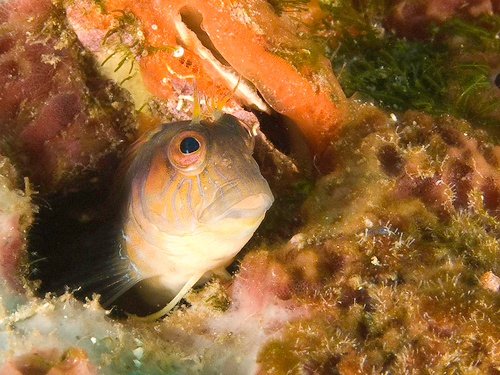
    So I tried another image. Similar results. All now looks fine until I send to FLICKR. There is a lot of orange behind the blenny, quite a bit of red around his pupil everywhere but on FLICKR.


    3689257084_985b7531ee.jpg


    I tried a third image for red testing. They guy is all bright red with spots everywhere but in FLICKR I see not red.


    3689272068_a1965a4033.jpg


    I use a G9 and shot RAW + JPG.


    Any suggestions or thoughts?


    Never had trouble using FLICKR before. All former images look fine.

    I have been making no corrections for colors in any of the images. Only cropping, spot removing, adjusting exposure, adjusting blacks and highlights.

  2. I am using the RAW image in Lightroom, export a jpg for sharing and future prints and placing a smaller file of that jpeg in Flickr.


    When I looked at the file in the windows file manager, it had no red or orange color.

    I opened the saved jpg in photoshop elements 3, it had no red or orange color either. I made a copy of the RAW file, opened it in Lightroom, saved the jpg again and this time in file mgr and Elements, it looks right.


    Hi Dave,

    It doesn't sound like a Flickr problem. How do you create the smaller file that you put up in Flickr that you mention? Are you exporting 2 jpegs from LR.? If you got it to look right in Elements, you should be good to go. Is it possible that you mistakenly loaded one of the original problem files again? Long shot I know but it's easy to get turned around. Which tool are you using to upload to Flickr?


    Steve

  3. Images look ok to me.


    Esp the last coney .. I can't say I have ever seen an all red one before. Maybe slightly red brown colour.


    Either way a LONG time ago there was a discussion about Flickr and colour in these forums.

    I think James and Eric discussed it at some depth. If memory recall is working .. something to do with how you saved the image. I think sRGB was the issue then.


    I searched but can't find the thread, it is that old. Maybe someone else can shed some light.

  4. First image isn't showing up.. Second and third not showing up orange/ red as described for me at all... probably the monitor calibration gone wrong. Hope that helps. Happy 4th!

  5. Thanks for the suggestions. I tried some more things based on the comments above.

    I have been quite careful in naming and getting correct files, etc.


    I expect I am doing something wrong but no idea what so far. Since I had no issues with Flickr before, I figure it something at my end.

    I recalibrated the monitor today.


    I copied the RAW file, opened the copy in PS4 this time. Made no color changes, removed 3 or 4 white spots, sharpened and saved as '3' quality jpeg. Put the jpeg on Flickr, still no red. The red's look brown at my end.


    Here is the image below.


    3691294321_9ac2c66bb1.jpg


    Then I opened the original JPEG file (I shoot RAW+JPEG) in photoshop elements 3, saved it as a low jpeg in a different location and put that copy on Flickr.

    The red is back on my screen with that shot. Here it is below.

    Do the colors in the shots above/below look any different at your end? They are quite different at mine.


    3692123438_fdfa476d5d.jpg

  6. Are you using a color-managed browser?


    IE is not color managed, but Firefox 3.0.x is ... or at least can be enabled (I believe color management is 'off' by default).


    here's a link for an add-on to FF that makes enabling color management easier ...


    https://addons.mozilla.org/en-US/firefox/addon/6891

  7. Dave,

    If it's not a browser problem I think your issue may be that you are comparing the jpeg which has automatically had processing applied to it based on your camera profile and possibly settings you've selected in camera, to the raw file in LR which does not modify the raw file at all. Some of the post processing SW like Canon's apply processing to raw files before you see them, while LR does not. It truly is RAW. It is normal to apply color correction and WB to the raw file in LR. You can try looking at the different camera profiles in the develop module and see the difference. There are a bunch of threads about this in the Flickr Lightroom forum that may help. Here's one to get you started; http://www.flickr.com/groups/adobe_lightro...57603590978170/


    Steve

  8. I really think it is a browser/color management problem ... I just opened this thread in IE and the pics as the top are all washed out and brownish, but quite bright and red/orange in Firefox.


    Are you converting your images to sRGB before uploading to Flickr? You should use sRGB for all web-based images.

  9. It is without a doubt a color management/profile problem.


    I downloaded your image and opened in PS to check the color profile ... you are uploading PhotoProRGB JPEGs ... you really shouldn't do that if you want most people to see it as you intended.


    You should convert to sRGB when you convert to JPEG and upload to Flickr ... most monitors can only display a gamut approximately equal to sRGB, so there is no real loss for web-images.


    Additionaly, most monitors aren't calibrated and lots and lots of browsers aren't color managed ... Firefox and Safari are color-managed, so anyone using those browsers will at least have the PhotoPro tag and profile interpreted correctly ... but for anyone using Internet Explorer, they will look washed out and under-saturated unless you convert to sRGB.


    Does this look better? All I did was convert to sRGB.


    post-14536-1246841263.jpg

    Edited by jeremypayne
  10. Jeremy,

    I thought for certain you were correct and likely are but my test did not work.

    Your photo correction has the correct colors at my end so I thought for certain that was it.

    I use firefox, downloaded the link you provided.


    I used lightroom, exported to jpeg using sRGB, put it in Flickr but the photo looks the same as before, washed out red.

    Its time for bed now but I will try to work on it tomorrow night.


    Any other thoughts are quite welcome.

    Here is the sRGB pic from flickr. It does not look like the PS elements pic from this end.


    3692918066_f0e264616f.jpg


    Steve,

    I have not had a chance to study the link you provided. I will try to do that tomorrow as well.


    Dave

  11. Thanks for the help. I really appreciate the time you all spent for someone of limited experience and knowledge.


    Importing the add-on from Jeremy has the colors here matching Lightroom and Flickr. They do not match the JPEG from the camera which was adding to my confusion. AND making color adjustments as suggested by Steve got the colors in Lightroom to match what I think I saw and the JPEG file from the camera more closely.


    I have started reading information from the threads Steve provided. Not surprisingly, there is a lot there for me to learn.


    Here are a few things I learned the last few days...


    I need to export to the web in sRGB

    I should expect to do more color balancing in Lightroom

    Browsers need to be color balanced and likely do not come that way to start with

    Good red wine does not improve my editing/computing skills but makes me less concerned about them


    "A woman drove me to drink and I never had the decency to thank her." W.C. Fields

  12. Good red wine does not improve my editing/computing skills but makes me less concerned about them


    LOL,

    You've discovered the secret. If you bring Captain Morgan along they will look great in no time at all. :nea:


    Cheers,

    Steve

Scuba.com

Account

Navigation

Search

Search

Configure browser push notifications

Chrome (Android)
  1. Tap the lock icon next to the address bar.
  2. Tap Permissions → Notifications.
  3. Adjust your preference.
Chrome (Desktop)
  1. Click the padlock icon in the address bar.
  2. Select Site settings.
  3. Find Notifications and adjust your preference.