



Either way; particularly if one is vertical in the water with large animals, horizontal movement is not very efficient, at least for me. Neither chasing after large animals or backpeddling work well for me.
A couple of examples where having a variable focus length lens on a dive and being able to zoom was helpful.
Jeff -
If you're still following this thread, I've got a question that's only slightly off-topic. Based on your recommendation I tried using the Tokina 10-17mm lens with a 1.4X teleconverter with my full-frame DSLRs. It works well, but when viewing the image either on the camera review screen or in Photo Mechanic, there is an odd, and annoying artifact: the appearance of reverse vignetting, i.e. a bright hazy ring around the edges of the frame. However, when opening the file in Photoshop (with Adobe Camera Raw), this artifact does not appear at all. I find it very odd that I get this effect only with that lens combination, and not with any other lenses I have used. Have you ever noticed this? Have any idea what causes it? And do you know if it is really an artifact, or is there really a brightness around the edges that either does not appear in Photoshop or is somehow corrected by Photoshop? Thanks.
Photography Gear and Technique / Archived topic
Tokina 10-17 + 1.4x Teleconverter problem
Started by Kogia ·
- 20Posts
- 20Replies
Read-only discussion
Tokina 10-17 + 1.4x Teleconverter problem
-
-
Jeff -
If you're still following this thread, I've got a question that's only slightly off-topic. Based on your recommendation I tried using the Tokina 10-17mm lens with a 1.4X teleconverter with my full-frame DSLRs. It works well, but when viewing the image either on the camera review screen or in Photo Mechanic, there is an odd, and annoying artifact: the appearance of reverse vignetting, i.e. a bright hazy ring around the edges of the frame. However, when opening the file in Photoshop (with Adobe Camera Raw), this artifact does not appear at all. I find it very odd that I get this effect only with that lens combination, and not with any other lenses I have used. Have you ever noticed this? Have any idea what causes it? And do you know if it is really an artifact, or is there really a brightness around the edges that either does not appear in Photoshop or is somehow corrected by Photoshop? Thanks.
I use Aperture and I have not seen this; it is strange. Does it happen at 10mm and 17mm?
-
I use Aperture and I have not seen this; it is strange. Does it happen at 10mm and 17mm?
It's much more obvious at the 10mm end of the range. If you look at the pictures in Adobe Bridge you see this effect in the initial thumbnails. But as Bridge progresses through the folder rendering its own thumbnails (or if you click on an image to get a larger thumbnail), the halo disappears! From just that information I would think that it was just a problem with the thumbnails that are rendered in camera. But it also appears in the full-size previews rendered by Photo Mechanic. And only on images taken with this lens/ converter combination! Very strange. I heard from another photographer, off-forum, that he had also noticed this effect. Try looking at some of your pictures in Bridge or something and tell me what you think. (Or play them back on your camera's LCD screen next time you're shooting with this combo).
-
Doug
Shoot a jpeg and see if it still happens. If not, then it's a RAW thing and not a lens thing.
-
The only thing I notice on loading images is the images are lighter while they load and then darken on completion of loading, but this happens with all lenses and images. I'm shooting underwater this Sunday, and I will see if I notice it on my LCD. I think Drew is on track, it's probably an issue in the RAW/JPEG conversion process, not directly a lens issue. I am not an expert at all on camera software function, but trying to find a reason, possibly it has to do with the information transmitted from the lens / convertor combination (or lack of it) to the camera. Good news is that it does not affect the final images. What camera are you using?
-
The only thing I notice on loading images is the images are lighter while they load and then darken on completion of loading, but this happens with all lenses and images. I'm shooting underwater this Sunday, and I will see if I notice it on my LCD. I think Drew is on track, it's probably an issue in the RAW/JPEG conversion process, not directly a lens issue. I am not an expert at all on camera software function, but trying to find a reason, possibly it has to do with the information transmitted from the lens / convertor combination (or lack of it) to the camera. Good news is that it does not affect the final images. What camera are you using?
I'm using this lens combination on both my Nikon D700 and my Canon 5D MKII. I was thinking it was happening with both, but I've just gone back and checked and it's only with the Canon. The other guy I heard from who had noticed it was shooting a Canon 1Ds MK II. You're a Nikon shooter, as I recall, so you probably won't see it. I just tried shooting some pictures with the camera out of the housing, and it's just as obvious in air as underwater, so nothing to do with the dome port. Also, it looks exactly the same shooting in jpeg as shooting in Raw. It does not appear when using the 15mm lens on the same camera. The Canon 15mm fisheye has approx the same angle of view as the Tokina zoomed wide, so it's clearly an interaction between this particular lens/ extender combination and Canon full-frame cameras. I'd love to know what's going on. The white halo effect is quite dramatic when you compare pictures of the same scene shot with the 10-17+1.4extender vs. the Canon 15mm.
-
Doug
Wanna post a pic of the effect? Also what teleconverter are you using?
I split the thread to stay on topic.
-
I have found when shooting any fisheye with teleconverter that I sometimes get some nasty flare in the image when shooting towards the sun. Is this the same effect we're talking about here? I'm not sure it is, but worth mentioning
You can see it above the head of the trout in this shot:
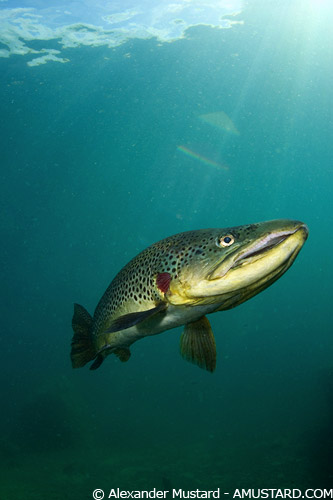
I only get this when using a TC, which I conclude makes the lens much more prone to flare than normal. I get this with both the Sigma 15 and Nikon 16 fisheyes - using Subal housing and FE2 port (get this on both of my ports).
You can see it when shooting, so a change of camera angle will enable you to avoid it, but that is not always possible with a moving subject.
Alex
-
The fact that it goes away once a RAW image is loaded into ACR, still makes me conclude it is a software / electronic artifact and not actually part of the recorded image. If it was part of the image it would have to be present everywhere.
-
Doug
Wanna post a pic of the effect? Also what teleconverter are you using?
I split the thread to stay on topic.
Well, I can't post a pic because the effect disappears when I convert to jpeg. But anybody who wants to download a raw and have a look-see for themselves can just plug the URL below into their browser window and hit the enter key. It's about 24 MB.
http://www.seapics.com/clients_only/downlo.../white_halo.zip
I'm using a Tamron 1.4X TC with the Canon
-
Doug,
I can confirm you're not seeing things.
 The thumbnail has an obvious white vignette effect and when I opened it in Lightroom the RAW file looked fine. Once I import into LR the effect is completely gone. I tried opening it in Bridge but I guess I don't have the latest, I can't open it in CS3.
 New one on me, which camera and what in camera software version are you running?
Steve
-
Can see in thumbnail but when I preview it using canon raw in Vista, it shows then goes 'normal'. If I open it as a RAW in Photoshop, it doesnt show.
Automatic lighting optimiser maybe? Overall I dont think its an issue and would also put it down to how the software works rather than anything to worry about.
Otara
-
Here is what Doug is talking about. This is opened with DPP and shows the entire RAW file in full resolution. This is not the thumbnail but the preview from DPP.
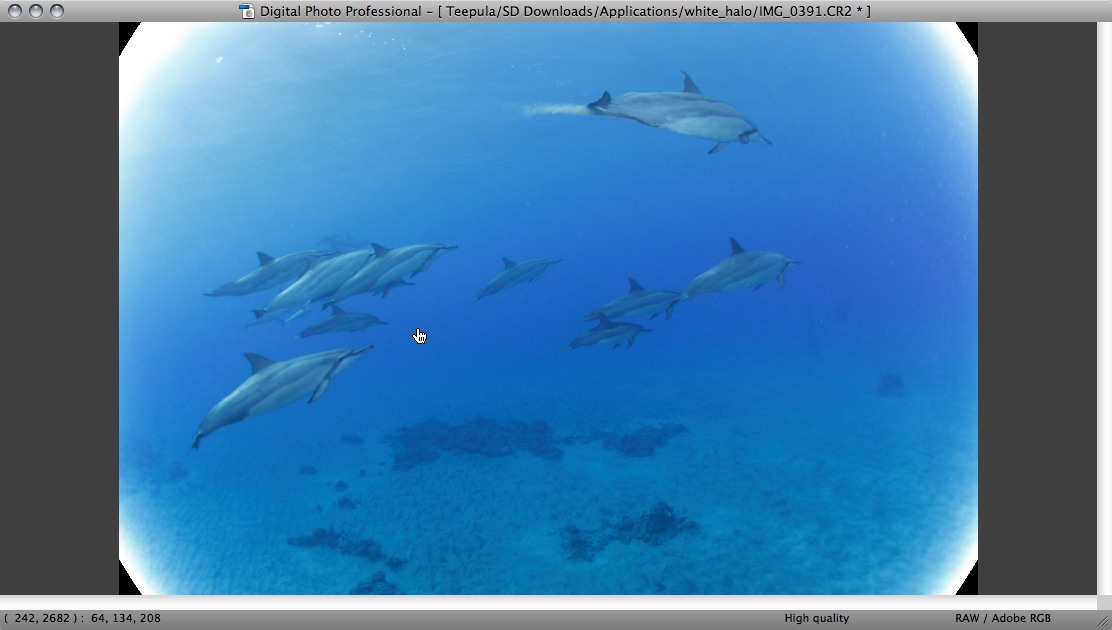
Seems DPP thinks the vignetting is recorded in the file. It is not read or removed in software automatically by many programs. Here is C1 Pro doing it (as well as my quick standard process (Sorry Doug, but I couldn't stand it
)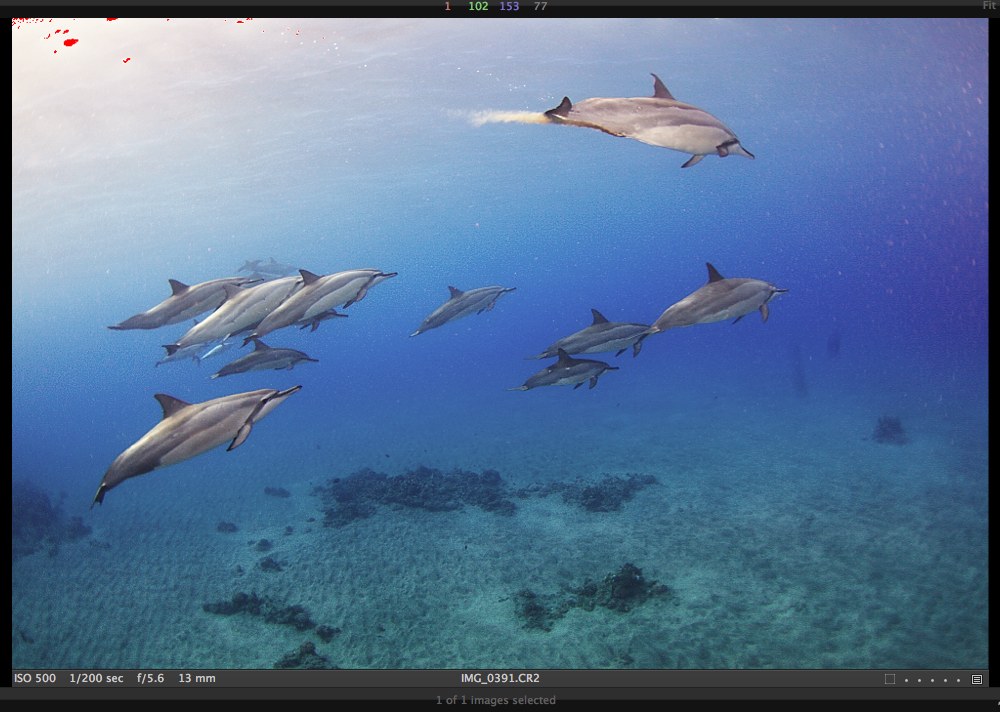
It is probably a RAW file thumbnail bug since the detail is obviously there. I'm assuming some programs use the thumbnail data to do a preview instead of processing the RAW data. No big deal. It probably is vignetting from the full sensor readout and that's where the thumbnail data is from. Then the RAW file is captured sans vignetting/halo effect but thumbnail generation includes it.
BTW Doug seems like you have 2 big dirt specks on your lens or dome.
 If you're really bored, you can bring this bug to the attention of Canon.
 -
I get two kinds of vignetting too, the white halo alone in thumbnail in Vista, and the black corners and white halo in DPP.
The black corner version stays there when you transfer from DPP to Photoshop.
But if I open it directly in PS, its not there.
So it cant only be a thumbnail issue can it?
V strange.
Otara
-
Doug,
I can confirm you're not seeing things.
The thumbnail has an obvious white vignette effect and when I opened it in Lightroom the RAW file looked fine. Once I import into LR the effect is completely gone. I tried opening it in Bridge but I guess I don't have the latest, I can't open it in CS3. New one on me, which camera and what in camera software version are you running?
Steve
That was taken with a Canon EOS 5DM2 firmware 1.0.7. with Tokina 10-17mm lens and Tamron 1.4X TC.
BTW I don't see the black corner effect with my software (PhotoMechanic, Adobe Bridge, Adobe Photoshop CS4)
-
BTW Doug seems like you have 2 big dirt specks on your lens or dome.
Those "dirt specs" were two scratches on the Subal 8" glass dome. Check my recent post on the pinned dome polishing forum to find out how I just got rid of them.
-
Oh well why didn't you say so? Well I could've checked with Exif but hey! It's a RAW file thing with the Periphery Illumination setting enabled. Doug, try upgrading to firmware 1.1 which clears the bug. Also turn it off.
Basically the PI tries to compensate for light dropoff and is probably confused by the 10-17 being a foreign lens. For kicks you should try the Kenko TC with another 3rd party lens with PI enabled.
Why DPP and the thumbnail see it is because Canon programmed them for PI effects. The RAW data is obviously still there and so the other programs don't see it.
-
Doug,
I may have figured this one out for you. I don't shoot Canons so this is my best guess. I downloaded your RAW image and I see that in Photo Mechanic the thumbnails display the halo. Every RAW images contains an embedded .JPG version within it. I extracted the .JPG version and noticed that it displayed the halo even when opened in Photoshop, but the RAW version only showed the halo in PM. Photo Mechanic can be set to display thumbnails based either on the RAW file or the embedded .JPG. If you check your preferences in Photo Mechanic you'll likely find that you are seeing .JPG thumbnails (they display faster this way). So why does your .JPG version have a halo, but the RAW version does not? In your camera's custom menu, there is a feature Canon calls, "Lens Peripheral Illumination Correction." The camera's default setting is to "Enable" this function. I'll bet if you set this to, "Disable" your halos will disappear. These custom settings sometimes apply only to a .JPG image which is written with all sorts of decisions applied (such as white balance) but are certainly not applied to the RAW data. I hope that helps. I shoot Nikons so I have no way to test this theory myself, so please let me know if I was right.
P.S.
I think we met in Kona last year at the Kona Classic. My name is Randall Benton, and I took a photo of you on the night manta dive. If you're the same Doug, you have a photo on you website from that night that my wife and I both appear in that I'd like to purchase.
Bentoni
-
Doug,
I may have figured this one out for you. I don't shoot Canons so this is my best guess. I downloaded your RAW image and I see that in Photo Mechanic the thumbnails display the halo. Every RAW images contains an embedded .JPG version within it. I extracted the .JPG version and noticed that it displayed the halo even when opened in Photoshop, but the RAW version only showed the halo in PM. Photo Mechanic can be set to display thumbnails based either on the RAW file or the embedded .JPG. If you check your preferences in Photo Mechanic you'll likely find that you are seeing .JPG thumbnails (they display faster this way). So why does your .JPG version have a halo, but the RAW version does not? In your camera's custom menu, there is a feature Canon calls, "Lens Peripheral Illumination Correction." The camera's default setting is to "Enable" this function. I'll bet if you set this to, "Disable" your halos will disappear. These custom settings sometimes apply only to a .JPG image which is written with all sorts of decisions applied (such as white balance) but are certainly not applied to the RAW data.
Bentoni
Kudos to Drew & Randall for figuring this one out. I shoot only RAW (not RAW + jpeg), but of course there is a jpeg embedded in the RAW anyway. Photo Mechanic shows the halo in both the thumbnail and the large preview, which is drawn from the RAW, but obviously they are using the data from the thumbnail to render the RAW. Since I shoot only RAW, I normally don't bother with all the Canon camera settings to render the jpegs. For the Peripheral Illumination correction, the default is ON. I turned it OFF, and the problem is gone.
-
Well it's obviously a software bug as the Digic IV thinks there's a need to compensate for corners.
Firmware 1.07 had an issue with PI that was fixed with 1.10:
Fixes a phenomenon where the peripheral illumination of images cannot be properly corrected, even if the images were captured with the lens peripheral illumination correction function set to Enable.


