



Skip to content

Lights, Strobes, and Lighting Technique / Archived topic

Manual mode was not working on my new z240 type 4

Started by acuevas ·

  • 4Posts
  • 4Replies

Read-only discussion

Manual mode was not working on my new z240 type 4

4 posts
  1. Yesterday a did the first test of my two new Inon Z240 type 4 in a pool.


    I'm using fiber optic cables and the camera and the strobes in manual mode.


    The two strobes worked but I noticed that no matter what power setting I used the strobes fired with the same power all the time.

    After one hour in the pool I decided to check the system out of the water, after trying several combinations I found the problem, it was the position of the +1/4EV Compensation Switch:
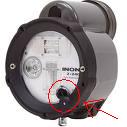
     

    post-24761-1251130808.jpeg


    If the switch is activated and you are using manual mode, the strobe will fire with the same power all the time (I could be wrong, but I didn't notice any difference).

    If the switch is deactivated you can control the power of the strobe.


    The user manual only gives this description of the switch:


    +1/4EV Compensation Switch: "When using External Auto Mode, with strobe's Aperture Switch set to a particular value, add +1/4EV output compensation to that set value"


    But it doesn't say what happens if you are using manual mode.


    I think I will use locktite or something in order to avoid moving this switch.


    Regards,

    Andres.

  2. Andres

    What camera setup is this for? Is there preflash? Did you set the ACC switch?

  3. Andres

    What camera setup is this for? Is there preflash? Did you set the ACC switch?


    What camera setup is this for?

    Canon A590IS, Ikelite housing, fiber optic cable and manual mode the camera and the strobes.


    Is there preflash?

    No preflash in manual mode for this camera.


    Did you set the ACC switch?

    Actually I didn't.

    I will test it tonight when I get home.

  4. Andres

    What camera setup is this for? Is there preflash? Did you set the ACC switch?


    Thanks Drew, it was the ACC switch.


    I had to push it in order to cancel the pre flash functionality.

    Now it works as expected.


    Regards,

    Andres.

Reef Photo & Video

Account

Navigation

Search

Search

Configure browser push notifications

Chrome (Android)
  1. Tap the lock icon next to the address bar.
  2. Tap Permissions → Notifications.
  3. Adjust your preference.
Chrome (Desktop)
  1. Click the padlock icon in the address bar.
  2. Select Site settings.
  3. Find Notifications and adjust your preference.
