Skip to content

Photography Gear and Technique / Archived topic

diopter versus no diopter

Started by StephenFrink ·

  • 4Posts
  • 4Replies

Read-only discussion

diopter versus no diopter

4 posts
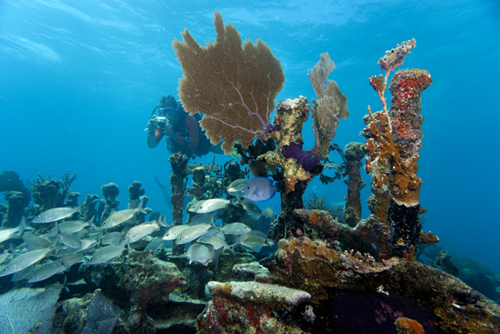
  1. I was doing some editing today for a Florida Keys shipwreck project and I came across a photo I did in April 2006 with a Canon 1DsMKII, 17-40, lens and a +3 diopter.


    Looks like this:
    post-630-1251640351.jpg


    Now, last weekend I was on the same wreck, shooting a similar set-up at what I presume is very close to the same position on the wreck, this time with a Canon 1DsMKIII and 16-35mm II lens, no diopter. Both were shot with 9" SEACAM superdome and the appropriate port extension.
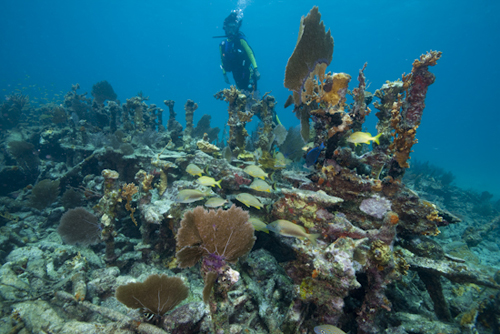
    post-630-1251640382.jpg


    Yes, I know it is a slightly wider lens on the more recent shot, and yes, I know there is no certainty I was in exactly the same spot over three years later. But, it is likely the distance is nearly the same, as that's where I would have had to be to get the right color and resolution for the set-up. The 16-35II is 108 degrees coverage, the 17-40 is 104 degrees. The point is that the biggest variable is one lens had a diopter and one lens did not.


    The decrease in angle of coverage that occurs with the addition of a diopter first became obvious to me with this series, back in 2006, when I took a location well known to me and saw how significantly it changed the angle of coverage when composed from the same POV.

    Edited by StephenFrink
  2. It is interesting to compare the growth or lack of growth in the attached cnidarians after three years!

    Tom ;)

  3. It is interesting to compare the growth or lack of growth in the attached cnidarians after three years!

    Tom ;)


    Tom - This wreck has had considerably more growth on it at various times in the 30 years I've been diving it, but it has been scoured several times with huge storm-driven waves. She's in only 22 feet of water, and that part pictured is probably only 15-18 feet.


    Contrast that with the Spiegel Grove, in deeper water with plenty of current, only down since 2002 (upright since 2005). These shot last Sunday:


    post-630-1251662787.jpg


    post-630-1251662812.jpg


    However, I'm sure our recruitment is anemic compared to your Alaskan waters, where every square centimeter is alive with something!


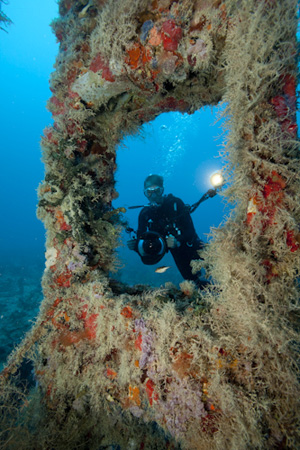
    BTW ... do you know what the whitish hydroid-looking thing is growing on the ship in the vertical shot? That seems to have grown very quickly over the summer and I'm wondering if it has something to do with water temperature and whether it will die off in the winter. It is ruining some nice photo-ops!

    Edited by StephenFrink
  4. Hi Steve,


    It seems to me that the diopter is going to have the same effect on a wide lens as it does on a macro lens regardless of the shape of the port, I.E. flat or curved. It magnifies so the subject is brought closer to the primary lens than the minimum focus distance resulting in a virtual image outside the minimum focus range. With a macro lens that is 1:1 (life size) at the minimum focus if you add a +10 diopter the resulting image would be 2:1 (give or take depending where is it mounted in relation to the prime lens) This would seem to be a 100% reduction in the size of the captured image. With a +3 diopter the resulting reduction would be about 30% of the original 1:1 size.


    I think the same thing is being applied to the 17 mm (104 Degree angle of view) with a +3 diopter where at the same subject to camera distance the field of view has been reduced by about 30%.


    So at the same distance you end up with the 17 zoom being no wider than a 20 or 24 mm without the diopter.


    Phil Rudin


    http://www.sfups.org/Galleries/PhilRudin/index.html

Retra

Account

Navigation

Search

Search

Configure browser push notifications

Chrome (Android)
  1. Tap the lock icon next to the address bar.
  2. Tap Permissions → Notifications.
  3. Adjust your preference.
Chrome (Desktop)
  1. Click the padlock icon in the address bar.
  2. Select Site settings.
  3. Find Notifications and adjust your preference.