Skip to content

Shooting Technique, Workflow and Editing / Archived topic

Those dramatic black backgrounds

Started by wbk ·

  • 10Posts
  • 10Replies

Read-only discussion

Those dramatic black backgrounds

10 posts
  1. Ok, i have tried and tried to get the really beautiful black background around my subject but have just had no real success.. how do you guys do it? I have tried spot metering and whilst that helps it never comes out totally black. Alpha channel masking? maybe i am not feathering enough but it just ends up having that fake background look.. 


    the backgrounds i mean...http://www.divephotoguide.com/img/user_galleries/b/1097_1245462640.jpg


    (though not a fish in this one..)http://www.divephotoguide.com/user/markmawson/gallery/featured_gallery_167/photo/5374


    I know night dive shots make this a lot easier but i know there is some secret to it and it is bugging me!! Please help!

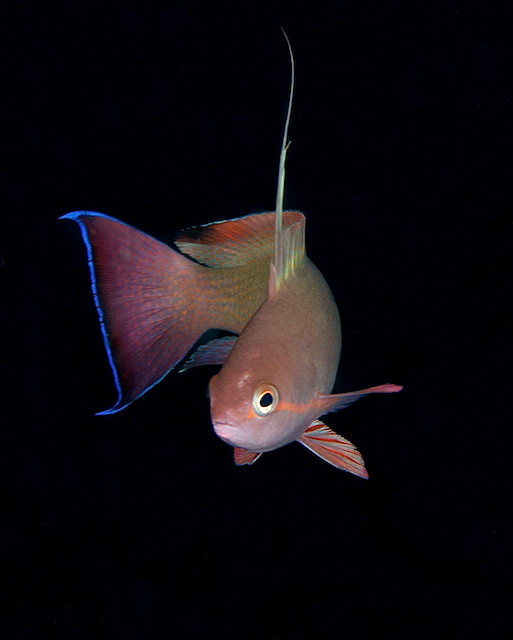
  2. To get black water, you need an exposure that will be completely underexposed w/r/t ambient light so that all your illumination comes from the strobes.


    With my Canon G9, that meant about f/8 @1/1000th with ISO 80

    Edited by jeremypayne
  3. The secret was imparted to me at the Digital Shootout, so consider this a testimonial for taking photo workshops :D


    Put your subject against blue water (or at least nothing in the background) and use the highest shutter speed your strobes will synch with. For me, that's 1/250th. The theory is that your shutter speed controls your ambient light exposure, typically your blue background. With a fast shutter speed, you eliminate any ambient light (making the background black) and just have the strobe on your subject. I also find bumping contrast in post helps too.


    post-14526-1254419687.jpg


    post-14526-1254419714.jpg


    Good luck and have fun with it!


    Phil

  4. Ah ha!! Will try both tips out! thanks very much indeed! back in the water soon!


    Thanks for the help.. much appreciated!

  5. Along with the shutter speed I always angle the strobes in around 45 degrees.

  6. You don't say what camera you use. How to do it depends upon the type of camera.


    It is very easy if you use a DSLR. You use a high Fstop... like F16 or greater, and with your strobe sync at ~1/160 or faster, and you will get black background every time.

    For getting a blue background with a DSLR, well, that is much more difficult, as you must use a low F stop and a slower shutter speed. This results in a shallower depth of field, and introduces camera shake, potentially decreasing image sharpness.


    With compact P&S cameras, I understand it is easy to get the blue water background, but hard to get black backgrounds. Probably you do it as other posters have suggested.


    Good luck.

  7. You don't say what camera you use. How to do it depends upon the type of camera.


    Using the Canon G10 and just about to upgrade and get a case for my Canon 5D MkII...

  8. Along with the shutter speed I always angle the strobes in around 45 degrees.


    ... but only in clear water, or if you're very close: otherwise the backscatter demon will strike!


    Tim


    :D

  9. Photoshop will also work!

  10. Photoshop will also work!


    Sacrilege! Burn the heretic!!


    Tim


    :(


    PS I use Noise-Ninja, followed by the patch tool for large blobs and then paint over the spots from a blurred layer that has a small amount of noise added to match the noise in the original file...

Sea & Sea

Account

Navigation

Search

Search

Configure browser push notifications

Chrome (Android)
  1. Tap the lock icon next to the address bar.
  2. Tap Permissions → Notifications.
  3. Adjust your preference.
Chrome (Desktop)
  1. Click the padlock icon in the address bar.
  2. Select Site settings.
  3. Find Notifications and adjust your preference.