



Skip to content

Classifieds / Archived topic

Gates Housing and Sony TRV-950 Camcorder System

Started by jimirak ·

  • 5Posts
  • 5Replies

Read-only discussion

Gates Housing and Sony TRV-950 Camcorder System

5 posts
  1. Housing Manual

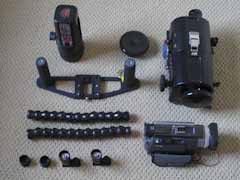
    Focus Gear

    Spare Oring

    Housing

    Small Dome Port

    Flat Port

    Handles


    UK Light Canon Video Light

    Double Arm Set with arm adapters to light and housing


    Sony TRV-950 Camcorder

    Electronic Manual


    Sell for $2100.

    Sale without Camcorder for $1400

    Buyer pays shipping


    The housing was bought brand new from Gates in 2007 but I never

    used it until one month ago for a total of 7 dives. Housing and

    camera work perfectly and housing is in brand new condition.

    Camcorder is also in mint condition and was serviced one year

    ago for my guarantee that it is performing to specification.


    Paypal only accepted or cash if buyer is in San Diego.
  2. Price of this system is reduced as follows:


    System with camcorder reduced from $2100 to $1900

    System without camcorder reduced to $1200


    Please see picture below and refer to the original Post for a description of the items.


    post-342-1254854384.jpg

  3. Price of this system is reduced as follows:


    System with camcorder reduced from $2100 to $1900

    System without camcorder reduced to $1200


    Please see picture below and refer to the original Post for a description of the items.


    post-342-1254854384.jpg

  4. Hi,

    I am interested in your housing, could you please check for me what the shipping will be to MALTA Europe.


    Thanks in advance


    Kevin


    Please e-mail me on kevin.sciberras@yahoo.co.uk

  5. Sold.

Nauticam

Account

Navigation

Search

Search

Configure browser push notifications

Chrome (Android)
  1. Tap the lock icon next to the address bar.
  2. Tap Permissions → Notifications.
  3. Adjust your preference.
Chrome (Desktop)
  1. Click the padlock icon in the address bar.
  2. Select Site settings.
  3. Find Notifications and adjust your preference.

