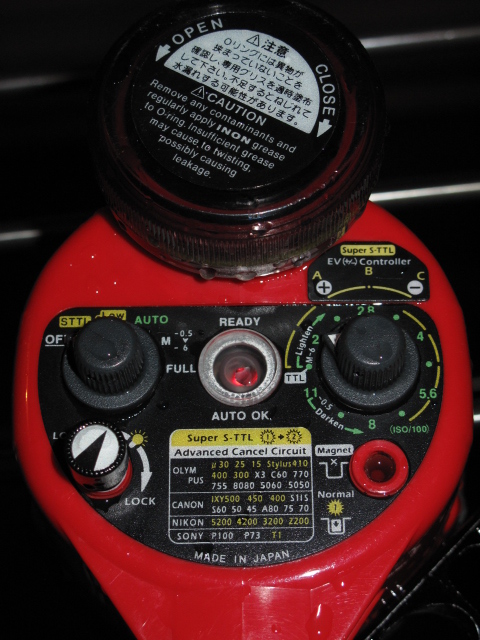
I've recently bought a pair of 2nd hand Inon D2000 strobes. I'm not sure which version they are, but they're optically triggered only, they have no sync cord attachment. They came without the magnetic screw-in switches.
Now, I'm using a Canon G10, and normally run it in manual mode. In this mode, the camera's internal flash is also manual, and so has no pre-flash. I'm also using the strobes in manual mode, and finding that the output of the strobes is extremely low, even when set to full power. When I change the camera to Av mode (using TTL flash, with pre-flash), the Inons suddenly behave properly. So, I'm assuming that the Inons are expecting a pre-flash from the camera, and putting out a weak initial flash, followed by a full-strength 2nd flash, in order to trigger any other optically-slaved strobes that expect a pre-flash.
Now, what I'm wondering is, will replacing the magnetic screws (if I can find them or build a replacement) set the strobes to fire on a single flash, rather than a double flash? The diagram on the back of the strobes (image attached) isn't very clear.
Thanks!