It's time to look at some options for how I will work in the future. One option (the one I'm most interested in) is getting a 17 inch mac for the living room for those days when retiring to the office is impossible or unpractical.
For me the absolute most important issue is the quality of the screen. Specifically how good are the new screens when properly calibrated. My old macs (G4) have been a pain and even when calibrated they have not come even close to my Lacie crt. Are there any tests than anyone know of that document how much of adobe 1998 color space the new screens can display? And how well they calibrate. I'm trying to figure out how big the difference will be between a calibrated macbook pro and a calibrated crt. Small differenced I can deal with, but the color casts I have had to deal with on older mac screens would be a deal breaker.
Anyone?
Thanks,
Espen
Hi Espen,
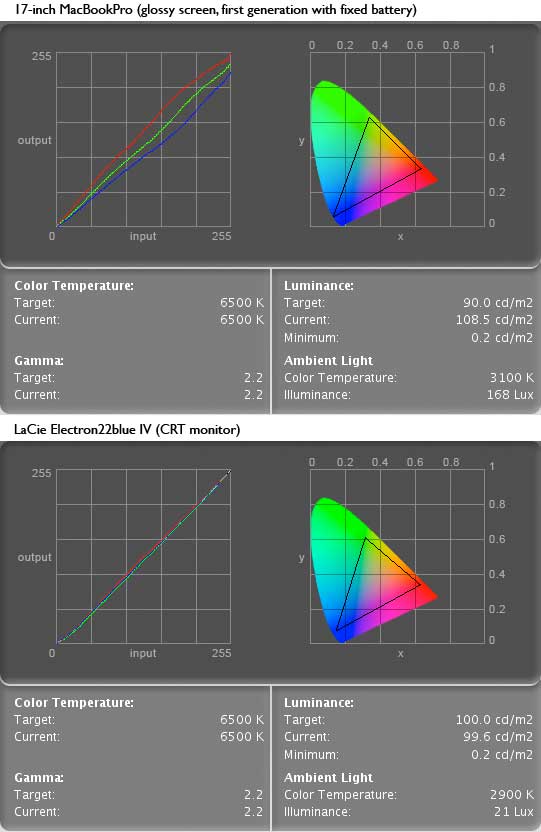
I have a calibrated profile from both:
-17-inch MacBookPro (Early 2009)
-LaCie electron22Blue IV (CRT monitor)
They have very similar gamuts. (MacBookPro's is very slightly larger)
Both calibrate well with xrite Eye1 Display2 (output curves on LaCie are better because it has more manual controls)
Look at attached image for visual comparison.
Take Care,
ChrisS
Thanks Chris!
I went out and bought one. Looks great after i calibrated it. I am looking for a new calibration solution also as my old spyder (yes first generation) probably doesn't cut it anymore.
Now my problem is that I cant't get my new mac working with the Lacie. Having both connected would enable me to see any differences between the two. It seems my new macbook pro has a faulty connector as the 6month old macbook my wife has had no problems hooking up to it.
Thanks again for the input Chris, I love being able to work more flexible.