Skip to content

Classifieds / Archived topic

Sea&Sea RDX450 Camera Setup

Started by Lancer4545 ·

  • 8Posts
  • 8Replies

Read-only discussion

Sea&Sea RDX450 Camera Setup

8 posts
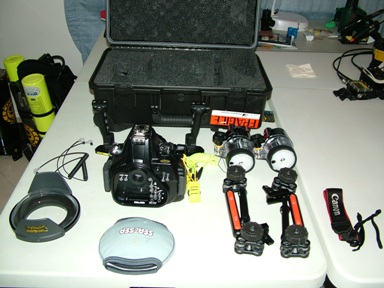
  1. I have decided to upgrade to a deeper rated unit and have this nearly new setup for sale.

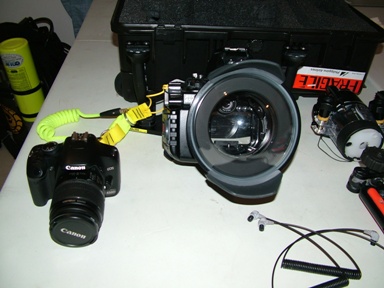
    Canon EOS 450D Camera Body

    Canon 18-55 EF-S Lens

    UV filter

    Polarizing filter

    Sea&Sea RDX450 housing

    Heavy Duty Lanyard

    NS Compact Dome Port & soft cover

    RDX Port Adapter

    RDX Tray & Handles

    2 x S&S Strobe Arm kits

    2 x S&S YS110a Strobes & optic fiber cables.

    Spare oring kit

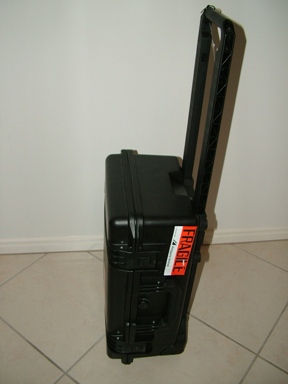
    Pelican Roller Case

    All the spares and spanners etc.


    For the lot $5000.00 plus shipping.

    Drop me an email if you're interested

    info@closedcircuitdivers.com.au


    Regards,


    Lance
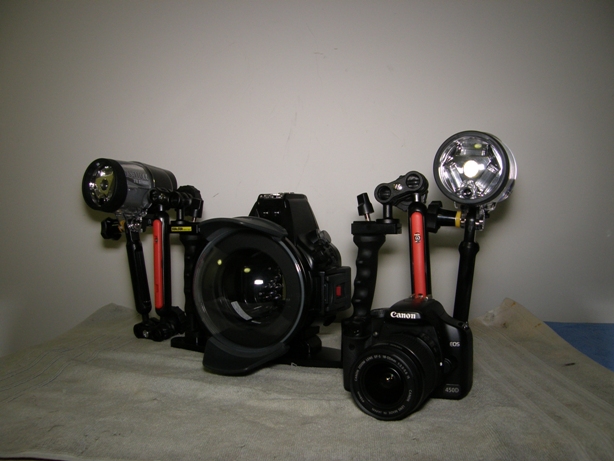
     

    post-28545-1257509928.jpg

    Edited by Lancer4545
  2. I am upgrading and still have this setup for sale.


    Offers???


    Regards,


    Lance

  3. Thanks for the offer but I want to upgrade to a Canon 5D MkII/Aquatica


    Regards,


    Lance

    Edited by Drew
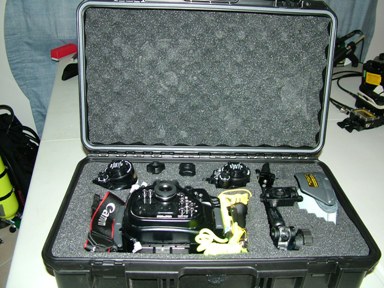
  4. I just took some more pics to show it all tucked away in the Pelican Case.


    Regards,


    Lance


    post-28545-1267343219.jpg


    post-28545-1267343206.jpg


    post-28545-1267343196.jpg


    post-28545-1267343237.jpg

  5. Hi would you split one of the strobes if so how much with postage to the UK

  6. I really want to sell this as a whole setup......Offers anyone??


    Regards,


    Lance

  7. I really want to sell this as a whole setup......Offers anyone??


    Regards,


    Lance


    What are you wanting to part with it? What do you think is fair?

  8. Thankyou everyone for the interest in this camera kit.


    Now sold.


    Regards,


    Lance

Marelux

Account

Navigation

Search

Search

Configure browser push notifications

Chrome (Android)
  1. Tap the lock icon next to the address bar.
  2. Tap Permissions → Notifications.
  3. Adjust your preference.
Chrome (Desktop)
  1. Click the padlock icon in the address bar.
  2. Select Site settings.
  3. Find Notifications and adjust your preference.