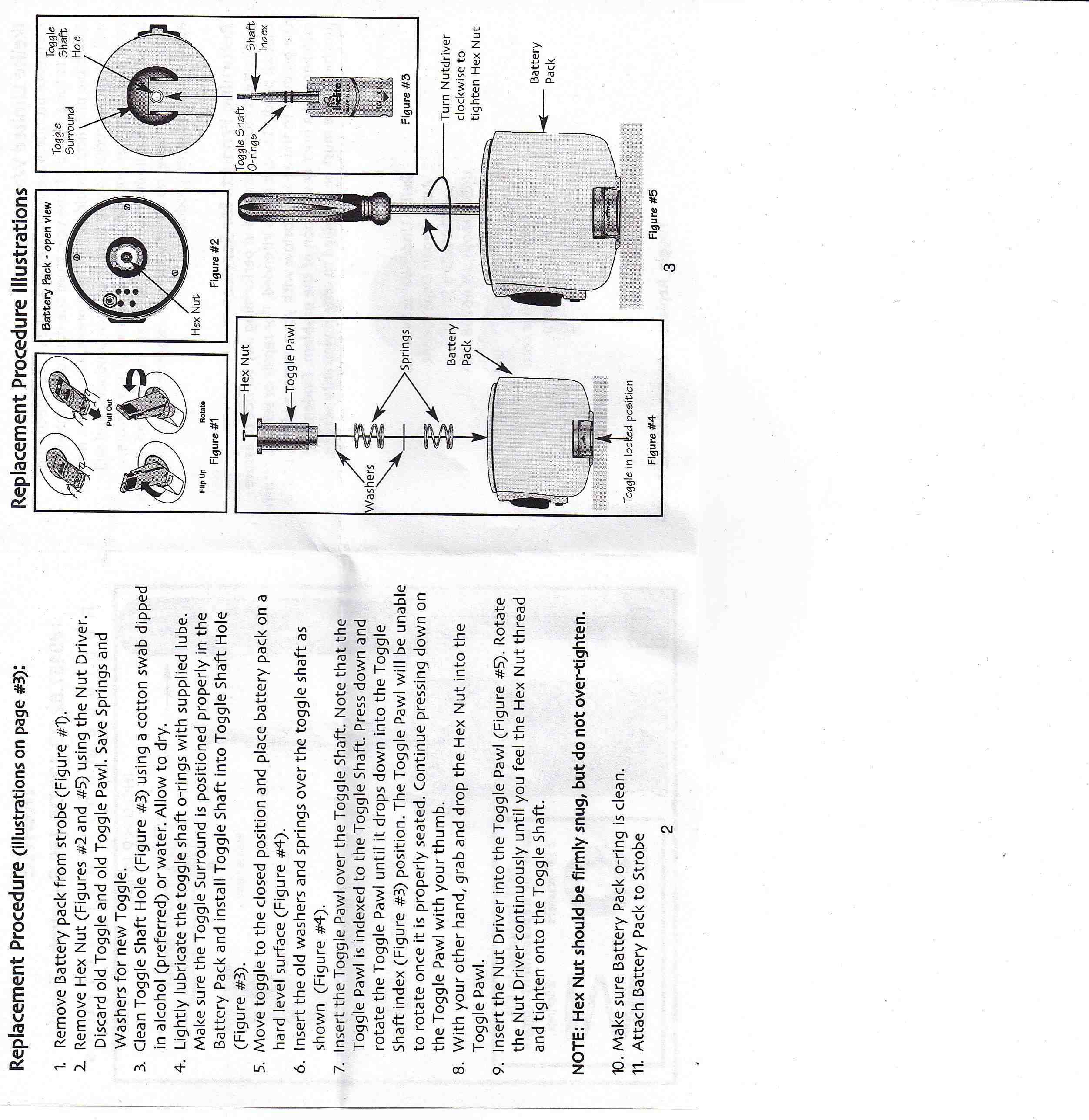
Does anyone out there happen to have an Ikelite DS-125 assembly diagram? I'm specifically interested in the battery pack section.
The stem that holds the release lever in broke on one of my battery packs, and whilst I've managed to source another off a spare I just want to confirm that I'm putting it back in the correct order. It seems to have two washers, two springs, the black locking barrel thing and the nut.
Alternatively if someone can tell me the sequence in which the aforementioned items stack back into the bulkhead I would be much grateful.
Here you go.
Here you go.
Brilliant. Thank you!!!!
Does anyone know where I can source the metal shaft indicated in the DS-125 assembly diagram above? I tried to source this from a local Ikelite dealer in Australia, who were apparently told by Ikelite that they do not offer the part as a replacement.
If this is the case it's the last piece of Ikelite equipment I will ever buy.
There is a DS-125 Toggle replacement kit. A certain limited run of DS125 battery packs had a recall for toggles that were breaking due to a material defect. The Ikelite notice is located at this page http://www.ikelite.com/web_pages/important.html
Ikelite will send you a replacement toggle set for free if your battery pack is one of the defective ones and if it is not then you will have to buy one.