Skip to content

Lights, Strobes, and Lighting Technique / Archived topic

Strobe refusing to fire underwater!

Started by Drygear ·

  • 9Posts
  • 9Replies

Read-only discussion

Strobe refusing to fire underwater!

9 posts
  1. I've been using an Olympus UFL-1 strobe wirelessly mounted on top of my Olympus 790SW and housing for some time now without issue.


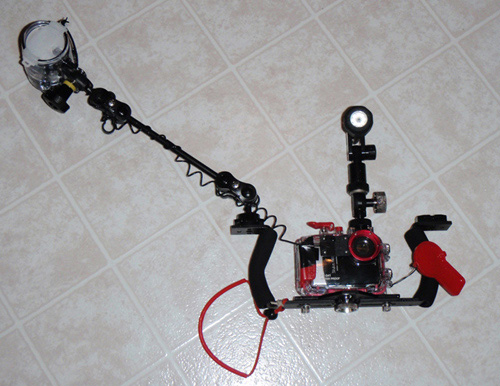
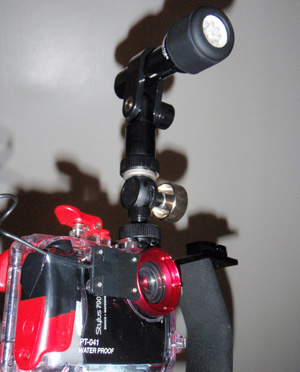
    I recently invested in a tray/arm and fiber-optic cable to get the strobe away from the camera to improve my shots. I've been playing around with the new setup for a few dives now and have tried mounting the cable in a couple different configurations but for the life of me I cannot get the strobe to fire when u/w at all! It fires out of the water every time with no problem (and I've made sure it is using the fiber-optic cable and cannot see the camera flash) but the minute I get it u/w (even only a foot sometimes) it simply does not work, I try all possible strobe settings on every dive to the same result, I have the camera flash set to fire every shot w/no preflash.


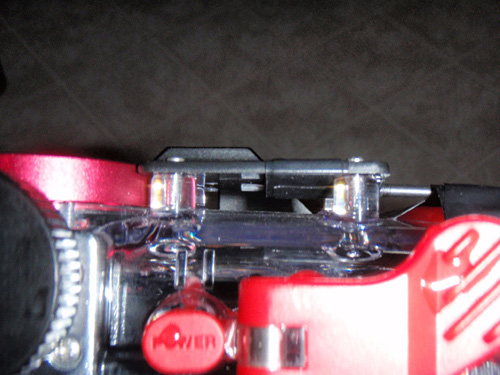
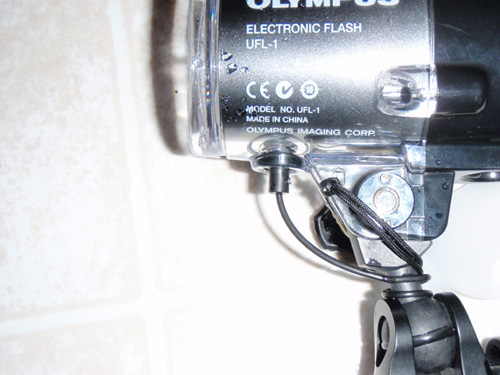
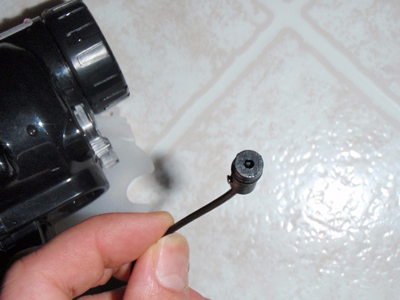
    I've attached some pictures of the way I have it set up at the moment. I'm hoping someone can shed a little light on my problem, at this point after multiple dives with multiple variations of the cable setup with no luck u/w and they always work dry I'm sure it must be something simple and stupid that I'm missing but I'm out of ideas at the moment.


    Any input appreciated,


    Nathan
    post-29627-1258388007.jpg

    post-29627-1258388020.jpg

    post-29627-1258388035.jpg

    post-29627-1258388048.jpg

    post-29627-1258388060.jpg

    Edited by Drygear
  2. I've been using an Olympus UFL-1 strobe wirelessly mounted on top of my Olympus 790SW and housing for some time now without issue.


    I recently invested in a tray/arm and fiber-optic cable to get the strobe away from the camera to improve my shots. I've been playing around with the new setup for a few dives now and have tried mounting the cable in a couple different configurations but for the life of me I cannot get the strobe to fire when u/w at all! It fires out of the water every time with no problem (and I've made sure it is using the fiber-optic cable and cannot see the camera flash) but the minute I get it u/w (even only a foot sometimes) it simply does not work, I try all possible strobe settings on every dive to the same result, I have the camera flash set to fire every shot w/no preflash.


    I've attached some pictures of the way I have it set up at the moment. I'm hoping someone can shed a little light on my problem, at this point after multiple dives with multiple variations of the cable setup with no luck u/w and they always work dry I'm sure it must be something simple and stupid that I'm missing but I'm out of ideas at the moment.


    Any input appreciated,


    Nathan
     

    Hello Nathan,

    You might try trimming between 1/16th and 1/8th of an inch of the FO cable's insulation off and from the camera end of the FO cable.

    Larry

  3. I've had similar problems with my S&S DX8000G and YS-90 strobe. Works like a champ on the surface, but underwater the strobe fires only rarely. I even switched to a brand new FO cable and got identical results.


    Can you be a little more specific about trimming the FO cable?

    Edited by harrym
  4. I've had similar problems with my S&S DX8000G and YS-90 strobe. Works like a champ on the surface, but underwater the strobe fires only rarely. I even switched to a brand new FO cable and got identical results.


    Can you be a little more specific about trimming the FO cable?


    Hello Harry,


    Well, from past experiences I have found that 'sometimes' trimming some insulation makes a difference. I noticed in Nathan's photos that the FO cable on the camera end appeared to be positioned so it laid 'across', not 'at' or perpendicular to the camera's flash. It seems sometimes that the camera end of an FO cable can be 'finicky'.


    If your question was about how to trim the insulation, I used a razor blade to carefully trim the insulation. This leaves the camera end of the FO bare on its sides and easier for it to pickup the camera's flash.


    Not sure my suggestion will be the 'fix' in this case, but, thought I would suggest it.


    If it works, cool! If not, a guy is only out about an eigth of an inch of FO cable!


    Larry

  5. Just to clear something up, when you say the flash triggers out of the water, does it actually sync with the camera, in other words, if you take a picture of the strobes while its attached to you get a grossly overexposed picture, that means your strobes is properly sync with the camera. If you visually see the flash trigger but it shows as off in the picture it means your pre flash is triggering the strobes prior to the actual camera exposure, if that is the is the case then you need to switch that preflash off (or usually just putting the camera in manual mode will switch it off)


    You might be fooled by thinking the strobe works top side when its actually is triggering of sync. you say the flash does not work underwater, does it trigger at all and if it does if it appear under then its that sync. being off.


    Cheers.

  6. I think larry has it right. You need to get the f/o right over the flash and tight to the housing. I can't tell what type of end you have for it, but usually it's a velcroed on piece. Check it's position and maybe go and get some more 3m tape from Radio Shack - they sell quite a large packet for $1.99. Make sure there's a good clean 2mm stripped section within the holder. Same on the strobe end; about 1mm. Make sure that it hasn't broken off or otherwise that the cord has broken within the insulation.


    What's happening is that the water density is cutting the light to the strobe sync cord enough so that it doesn't fire.


    Jack

  7. Thanks for the replies guys.


    After playing with it in the bathtub it turns out the 1/8" - 3/16" of water between the camera flash and the cable end was indeed enough for the strobe not to fire (but in air it fired just fine). By moving the cable against the housing it fires everytime now, I've since decided to mount the cable perpendicular just for good measure. ...I had no idea that fiber-optics were sensitive enough that an 1/8" of water would be enough affect it!


    Cheers,


    Nathan

  8. Thanks everyone.


    My problem was that the camera's flash would fire, but the YS-90 would not go off at all. Nothing. Zippo. I repeatedly checked all the flash's switches and re-tried a shot - Nothing. No flash.


    I'll try some of your suggestions and try the flash underwater later today.

  9. Ive had a few problems myself with the same thing. After playing with the cable a hell of a lot i found that yes, FO cables should have the end pointed at the flash as it helps the light travel better i guess.


    Trimming some of the plastic insulation off certainly helps this too. Just be super careful when you trim it: a small crack can really screw up the way it works. I actually caught the edge of mine in my Pelican box seal and that was enough to end it.


    Make sure the cable is pressed down into contact with the housing, the closer the better. Sometimes mine did 'slip' in the velcro end and i had to rework it to make sure it was close enough.


    And the final one, which can go unnoticed is that on entry bubbles will lodge on the end of the cable. Im sure you notice bubbles on ur port and 'waft' them away, you should also check the end of the FO cable. A bubble would refract the light away from the cable and making it not fire.


    Hope this helps. Know how frustrating this can be.

Fotosub Shop

Account

Navigation

Search

Search

Configure browser push notifications

Chrome (Android)
  1. Tap the lock icon next to the address bar.
  2. Tap Permissions → Notifications.
  3. Adjust your preference.
Chrome (Desktop)
  1. Click the padlock icon in the address bar.
  2. Select Site settings.
  3. Find Notifications and adjust your preference.