Skip to content

Photography Gear and Technique / Archived topic

Diopter choice for Nikon 60mm micro, 105mm micro?

Started by simonmittag ·

  • 13Posts
  • 13Replies

Read-only discussion

Diopter choice for Nikon 60mm micro, 105mm micro?

13 posts
  1. Hi,


    I have been reading through the Wetpixel threads on diopters and am trying to make up my mind what to buy. My main objective is greater magnification and closer focus distance and I decided against extension rings.


    From the older posts on here, dating back to 2005 many people recommend the Nikon 5T, 6T diopters, however those are not available for sale anymore and have end-of-lifed at Nikon.


    I have found a Hoya Nikon 62mm diopter set +1, +2, +4 at Marinevisions, but am unsure whether these are the cheaper '1 element' or better quality '2 element' diopters? Does anyone have experience using this set underwater and is able to tell me something about image quality? There doesn't seem to be a great deal of recent information on diopters...


    What would you buy today for the 60mm and 105mm VR Nikon lenses? Both have 62mm filters and I'm using them on a Nikon D300 camera.


    Thanks,


    Simon

    Edited by simonmittag
  2. Hi Simon,


    More recent thread is HERE


    Mine was about 80 GBP.


    Don't anticipate that it would be a lot of use on a 60mm ( if you already have the 105mm why would you? ).


    Paul C.

  3. the Canon close-ups are excellent but expensive and heavy, unless you're planning on shooting the 105 wide open (and even then it's probably okay) you'll be fine with the step-down ring and the money saved on the 58mm


    the other alternative is a wet diopter -- see the pinned "getting more than 1:1" thread


    for quality images a straight +2 diopter is not the best choice

  4. I've used a B+W single element +2D with my 105mm: optically fine, except for the ridiculous depth of field and the way the image slides around the viewfinder. I don't know how important it is to use a doublet when you factor in all the other problems that degrade super-macro images underwater.


    Tim


    ;)

  5. What would you buy today for the 60mm and 105mm VR Nikon lenses? Both have 62mm filters and I'm using them on a Nikon D300 camera.


    This has been mentioned elsewhere but i will reiterate - don't use a diopter on the 60mm. Diopters do not magnify, they only allow the lens to focus closer. Since the 60mm already focuses to about 2-3 inches from the front of the lens (manufacturer stated distances are from the sensor) it will already focus on the front of your flat port, or very close to it. A diopter would actually damage image quality by adding an unneeded optical element to the mix.


    For the 105mm i use a 77mm Canon 500D and a step up ring. Expensive, but good quality.


    Cheers,


    Chris

  6. thanks everyone, lots of good hints here. I picked up the Canon 500D and the step up ring from the store today.

  7. This is an extreme magnification example, but if shows clearly some of the fringing problems associated with using cheaper (single element) dioptres for super macro.


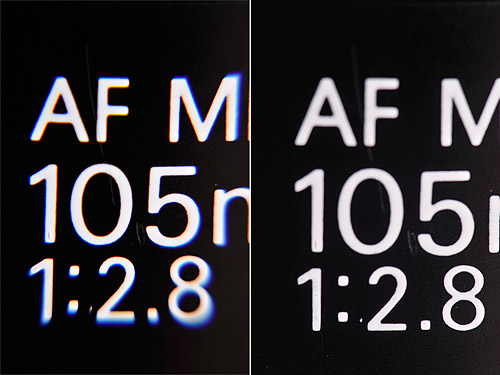
    These are two test images I took with 105mm + 1.7x TC. Both show the whole frame (not crops). The one on the left was taken with a 10x dioptre (brand name withheld!) and the one on the right with stacked 500D and 5T dioptres.


    post-713-1259834860.jpg


    The 10x dioptre has produced a more contrasty result, but with horrible fringing away from the centre of the frame (this would not matter with some subjects), while the stacked dual element dioptres give much better corner to corner performance. Although do seem to be less contrasty (not 100% sure why this is - may be an experimental error?).


    Alex

    Edited by Alex_Mustard
  8. This is an extreme magnification example, but if shows clearly some of the fringing problems associated with using cheaper (single element) dioptres for super macro.


    These are two test images I took with 105mm + 1.7x TC. Both show the whole frame (not crops). The one on the left was taken with a 10x dioptre (brand name withheld!) and the one on the right with stacked 500D and 5T dioptres.


    post-713-1259834860.jpg


    The 10x dioptre has produced a more contrasty result, but with horrible fringing away from the centre of the frame (this would not matter with some subjects), while the stacked dual element dioptres give much better corner to corner performance. Although do seem to be less contrasty (not 100% sure why this is - may be an experimental error?).


    Alex


    Zounds! Is that on a full frame or is it APSC sensor?

    Bob

  9. Those are full frames on full frame (D700 + 105mmVR + 1.7x TC and then the different dioptre combos in each case).


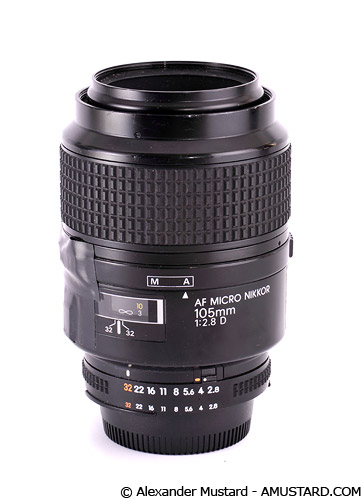
    The subject is the numbering on the side of the old style Nikon 105mm macro:

    post-713-1259857310.jpg


    The 10x dioptre wasn't at minimum focus.


    Alex

    Edited by Alex_Mustard
  10. Those are full frames on full frame (D700 + 105mmVR + 1.7x TC and then the different dioptre combos in each case).

    [snip]

    Alex


    Thank you Doctor; 10-4 on the fringing. I sometimes have trouble differentiating between contrast and sharpness. I am viewing your shots on LT LCD. The 1:2.8 in right hand shot (with stacked 500D and 5T dioptres) seems to me to be in sharp focus, the 105 less so and the AM the least. But then, I have old eye balls!

    Bob

    Edited by Deep6
  11. Both images are snaps, so I wasn't being too careful with the focus etc. I actually had the lenses out to photograph the different macro setups (rather than to take pictures with them). But when I saw the fringing I thought that they were worth sharing - to post an extreme example - give the double versus single dioptre discussion above.


    Alex

  12. This could be what my wife calls a "#37 bus"*, but I think that the single element produces sharp images, though with the wavelengths displaced, so the blue and red fringes distort the image. A doublet pulls the extremes back together, but at the expense of less sharpness unless the elements are aspherical (hence the sophistication of, for instance, the 105mm behind the dioptre!).


    * idle speculation based on limited knowledge: when a poverty-stricken postdoc in London, before we were married, I told her that I'd missed the last bus, only for the #37 to roll up 5 minutes later....


    Tim


    :wacko:

    Edited by tdpriest
  13. It would be interesting to see those images with some post-processing to correct the chromatic distortions, using something like the software described here.


    There are two issues with chromatic aberrations. One is that the red and blue images will be slightly offset from each other (the lens acting like a prism causes something like a registration error in printing, except it's more like a different magnification of different colors causing misalignment on the edges). This can be corrected with software, although I'm no expert in it.


    The other issue, and the reason why I'd like to see some post-processing on those images, is that the same effect that causes the red and blue fringing side-to-side also distorts the focus of the red and blue light, so it's possible to be focused on only blue light but have out-of-focus red light. Correcting out-of-focus images is much more difficult (by which I mean nearly impossible) in post-processing software.


    Now I'll go back to dreaming about a camera with dichroic filters to split up the red, green and blue images and three full frame sensors (with independent ISO settings) on nanopositioning stages that won't have any of these problems.

Kraken Sports

Account

Navigation

Search

Search

Configure browser push notifications

Chrome (Android)
  1. Tap the lock icon next to the address bar.
  2. Tap Permissions → Notifications.
  3. Adjust your preference.
Chrome (Desktop)
  1. Click the padlock icon in the address bar.
  2. Select Site settings.
  3. Find Notifications and adjust your preference.