After viewing succesful u/w photo I feel that Photoshop is become important part of post processing. I am just starting diving late last year and getting my DSLR rig for my first on my last trip to Bali. I am doing top side photography for quite number a years, but I always resist photohop. I always thinking get it right for the first time, like when I did when shooting with film camera. Now I am really thinking to seriously learn photoshop.
When I was using Nikon I am using Nikon Capture, with Sony/Minolta CaptureOne, now with Canon I am using canon software DPP and thinking whether I should go for photoshop or lightroom,
My purpose is to salvage photo that have lots of backscatter or and like in the attached photo. Anyone can give me some input? Thank you.
HI David
Try this site and dvd package from a WP member, Doug Sloss
The easiest method for backscatter is the clone tool . If you google Jack and Sue Drafhals book, thats a good underwater photoshop intro http://www.jackandsuedrafahl.com/
Also consider your flash position to help eliminate backscatter, and do not point it directly at the subject.
Good luck!
Cheers
Woody
HI David
Try this site and dvd package from a WP member, Doug Sloss
Any idea if they might come out with a video tutorial for Lightroom?
Mike
Hi Woody,
I was told by our local guide is wire shrimp and based on my field guide is called Dasycaris zanzibarica. In this particular shot the sand was courtesy of my wife, I think she tried to bury me six feet under.
Cheers,
thedidavid
Thanks for the link.
HI David
Try this site and dvd package from a WP member, Doug Sloss
Your past resistance to Photoshop might make you a great candidate for Lightroom. You can think of it as the tool to use to process your images. Much like in the good old days of taking your film into a darkroom. If you want to add things that weren't there or combine images in any way Photoshop is the way to go. If you want to easily process your RAW files and have a great tool to keep track of all your images Lightroom is the way to go. Most folks miss the fact that the complete name is Adobe Photoshop Lightroom. They are made to go together. They have the same RAW engine and many of the same tools and interfaces.
Photoshop is built for graphic designers (is my bias showing? )
Dear Steve,
Same sentiment here about my past resistance to Photoshop (maybe I am biased too).
Cheers,
David
Lightroom is built for photographers
Photoshop is built for graphic designers (is my bias showing? )
Steve
I have not heared this one before, but it sounds quite accurate.
And David, I give my vote for Lightroom (for starters) as well.
Karel
Hi David,
I used to use Photoshop a great deal, but find that I probably only use it for 5% of the images that I take. Lightroom pretty much does it all for me!
The difference is that Photoshop is a graphics package, and as such does things I as a photographer am unlikely to need to do. Lightroom is designed to be a photographers tool.
In terms of backscatter, Lightroom does have a correction tool.
You can download a free trial of Lightroom here. Give it a try and see if you can get on with it!
Best
Adam
After viewing succesful u/w photo I feel that Photoshop is become important part of post processing. I am just starting diving late last year and getting my DSLR rig for my first on my last trip to Bali. I am doing top side photography for quite number a years, but I always resist photohop. I always thinking get it right for the first time, like when I did when shooting with film camera. Now I am really thinking to seriously learn photoshop.
When I was using Nikon I am using Nikon Capture, with Sony/Minolta CaptureOne, now with Canon I am using canon software DPP and thinking whether I should go for photoshop or lightroom,
My purpose is to salvage photo that have lots of backscatter or and like in the attached photo. Anyone can give me some input? Thank you.
I use the Spot Healing Brush Tool for backscatter, in situations like that one where there is only a fairly small amount of easily distinguishable spots.
30 seconds of that tool to nuke the most noticeable backscatter, one swipe of the Shadows and Highlights tool (bump highlights about 18%) to tone down the fact that it's a little blown out, and I'm done. A subtle improvement, but improved it is.
There are lots of other tricks that could be done, but I seldom spend more than that much time on a photo, else write it off and move onto the next one unless there is some reason the shot is worth extra time.




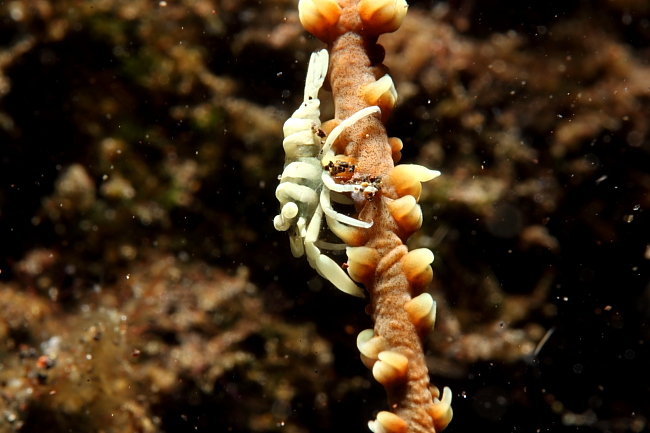
 What is it!?

.jpg.857dbbfbdc4d79d9c6ebf7b4ba96ed1b.jpg)

