Skip to content

Shooting Technique, Workflow and Editing / Archived topic

Lighroom: Masking for Auto White Balance?

Started by jjoy ·

  • 9Posts
  • 9Replies

Read-only discussion

Lighroom: Masking for Auto White Balance?

9 posts
  1. Sorry if this is an obvious question, I tried to google search and find this in my LR book but I cannot. I am using the latest version of LR.


    I figured out how to use the LR masking tool to selectively change certain elements (contrast and so on) but I'd like to be able to mask for white balance correction. Is this possible and if so can someone give me a hint on directions?


    A secondary question is why when you fix white balance the shadows turn blue? I guess I can mask and unblue them somehow, or just live with them. I'm still learning and mostly trying to explore what I can and cannot do even if the photo isn't all that great.


    Thanks

  2. Hi,


    White balance is a global correction-you can't mask or white balance only a portion of the image.


    I did try and explain this before, but failed I think! If you are finding that your shadows are changing colour when you WB, then this would suggest that your images WB is off at capture. Yes you can change the global WB post capture, but changing your cameras WB settings will allow you to acheive the colours that you want in the final image, without distorting the colours in other areas.


    As a remedy, try increasing the shadows in exposure, or play with the saturation/hue settings.


    All the best


    Adam

  3. A secondary question is why when you fix white balance the shadows turn blue?


    Have you tried using the Split Toning tool? This tool allows you to independently adjust the hue and saturation of highlights and shadows.

    Edited by Gudge
  4. ... trying to explore what I can and cannot do even if the photo isn't all that great...


    After several years I have discovered that the answer is:


    "go back and take another shot!"


    Tim


    :island:


    PS In Photoshop I would try making adjustments on a new layer, masking off the part of the image that doesn't need to be modified, perhaps using colour balance or curves adjustments.

    Edited by tdpriest
  5. If you are finding that your shadows are changing colour when you WB, then this would suggest that your images WB is off at capture. Yes you can change the global WB post capture, but changing your cameras WB settings will allow you to acheive the colours that you want in the final image, without distorting the colours in other areas.


    That is only if you shoot jpeg .... it is just not true if you shoot RAW - if you shoot RAW there is no difference whether you get it "right" in camera or not - the WB is set when the image is rendered and that can happen at any time if you maintain the RAW capture data.


    To the OP ...


    One other thing you can try is the "Brush" tool in Lightroom ... to warm stuff up, try the default Hue of 50 and try 230 to cool stuff down ... I find that painting these colors can help warm or cool an area in images with mixed light.

    Edited by jeremypayne
  6. Hi Jeremy,


    We've had this discussion before!


    I agree you can change the global WB settings with RAW-absolutely! What you can't do is change an area or areas WB-only the whole images. This means that if one area of the image is correctly while balanced and another area not, then you cannot correct the area that isn't. Underwater, particularly with strobe lit wide angle scenes, you will have two sets of lighting with different colour temps to match-the ambient and your outputs from your strobe. If you globally WB in Lightroom or Camera Raw for one colour temp, it often throws the other out. This cannot be corrected in WB (or at least I don't know how to...!) All you can do is try and get the most pleasing effect between the two colour temps. This is often why you can get muddy blues-they have corrected the WB in LR or Camera RAW for their strobes colour temp, which then throws out the colour temp for the ambient.


    I agree you can try and adjust this by altering the hue, but this is not the same as actually altering WB!


    Or am I completely wrong....?


    Adam

  7. I've only had a couple of occasions where I wasn't happy with the WB. It typically happens on overunders. In one exterme case I made a virtual copy of the RAW file in LR applied the two different WB adjustments then layered them together in PS. Pretty easy really. I was able afterward to get colors I was happy with using the gradient filter to the same image.


    Lots of paths to the treasure.

    Steve

  8. Steve-


    Lots of paths to the treasure


    true, true!


    Adam

  9. Hi Jeremy,


    We've had this discussion before!


    I agree you can change the global WB settings with RAW-absolutely! What you can't do is change an area or areas WB-only the whole images. This means that if one area of the image is correctly while balanced and another area not, then you cannot correct the area that isn't. Underwater, particularly with strobe lit wide angle scenes, you will have two sets of lighting with different colour temps to match-the ambient and your outputs from your strobe. If you globally WB in Lightroom or Camera Raw for one colour temp, it often throws the other out. This cannot be corrected in WB (or at least I don't know how to...!) All you can do is try and get the most pleasing effect between the two colour temps. This is often why you can get muddy blues-they have corrected the WB in LR or Camera RAW for their strobes colour temp, which then throws out the colour temp for the ambient.


    I agree you can try and adjust this by altering the hue, but this is not the same as actually altering WB!


    Or am I completely wrong....?


    Adam


    We have discussed it before ... and I said the same thing last time! RAW capture makes the WB setting at capture irrelevant.


    I agree that mixed light can present challenges - but that has nothing to do with what the WB setting is at capture. For mixed light, as Steve pointed out, one can render two or more different versions of the image and and blend them ... but that requires Photoshop or similar and the original question was what can one do in Lightroom.


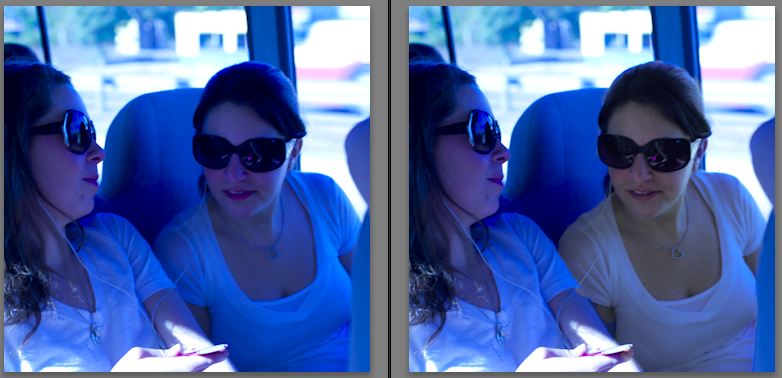
    You can get a lot of mileage out of the color tool in LR ... here's a quick example ... the WB was way too cool, but I painted the girl on the right to get more natural color.


    With more care, you can get much better results ... but this gives you the idea.
     

    post-14536-1264556070.jpg

Marelux

Account

Navigation

Search

Search

Configure browser push notifications

Chrome (Android)
  1. Tap the lock icon next to the address bar.
  2. Tap Permissions → Notifications.
  3. Adjust your preference.
Chrome (Desktop)
  1. Click the padlock icon in the address bar.
  2. Select Site settings.
  3. Find Notifications and adjust your preference.





