



Hi all,
Here are some of my dodgy photos  from one of my local dives sites.
Comments, criticisms and praises  welcomed.
Karl


Read-only discussion
Hi all,
Here are some of my dodgy photos from one of my local dives sites.
Comments, criticisms and praises welcomed.
Karl
Nothing dodgy about those images Karl - nice job.
I dived with a guy called Karl out in Auz in 02 & 03 on a weekend photography competition on the Oceantreck in Jarvis Bay - I know there is about 20 million people in Auz but its not you by any chance is it ? I was the Irish guy on the boat.
Hi all,
Here are some of my dodgy photos
from one of my local dives sites.
Like the shots alot, and I am a sucker for seahorses. The only thing is perhaps do a little bit of work in post, like the last one where you could tweak it a bit more. This was a bit of a rough tweak (sorry not stealing the photo ) to give you an idea
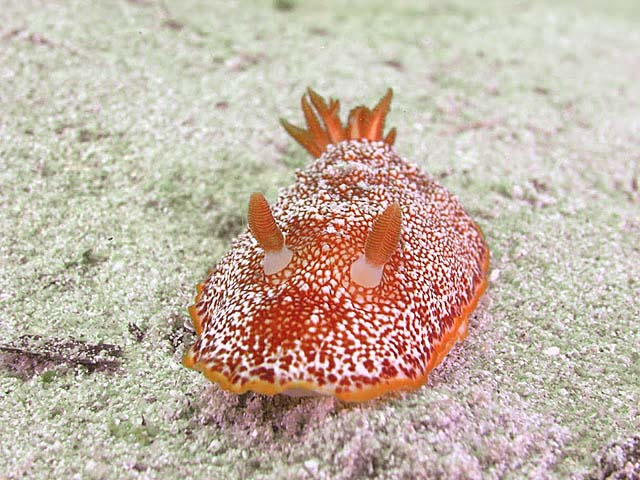
Like the shots alot, and I am a sucker for seahorses. The only thing is perhaps do a little bit of work in post, like the last one where you could tweak it a bit more. This was a bit of a rough tweak (sorry not stealing the photo
Hey thanks for that - I am still learning to use Photoshop Elements 7 - basically all I did was slightly adjust the light levels (very slightly), removed a couple spots of scatter, sharpened abit and then found the 'Photo Filter' in Levels and changed it to a cooler filter.
What did you do - so I can learn?
Thanks Karl.
Nothing dodgy about those images Karl - nice job.
I dived with a guy called Karl out in Auz in 02 & 03 on a weekend photography competition on the Oceantreck in Jarvis Bay - I know there is about 20 million people in Auz but its not you by any chance is it ? I was the Irish guy on the boat.
Nah wasn't me - I haven't dived JB yet.
If you ever come to Western Australia be glad to show you a couple of sites.
Karl
Hey thanks for that - I am still learning to use Photoshop Elements 7 - basically all I did was slightly adjust the light levels (very slightly), removed a couple spots of scatter, sharpened abit and then found the 'Photo Filter' in Levels and changed it to a cooler filter.
What did you do - so I can learn?
Thanks Karl.
Used Photoshop, so do not know the Element moves (though it probably has something similar)
Basically (due to the fact I recognize certain tones from my own experience ), there was a heavy Cyan cast. So I dialed down the Cyan (in the original dialed down to just about 0)
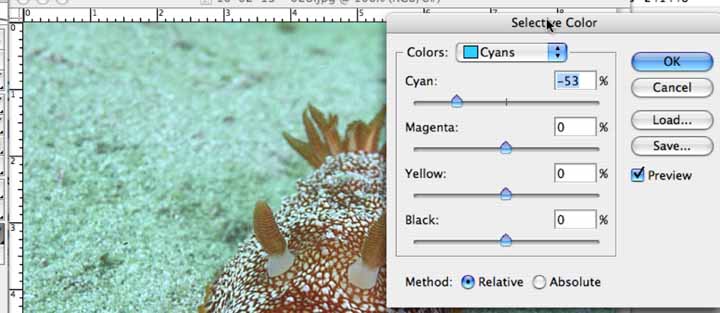
Then went for a general WB (not sure if you can see this in the screen grab, but there is a tip of the dropper towards the lower right)
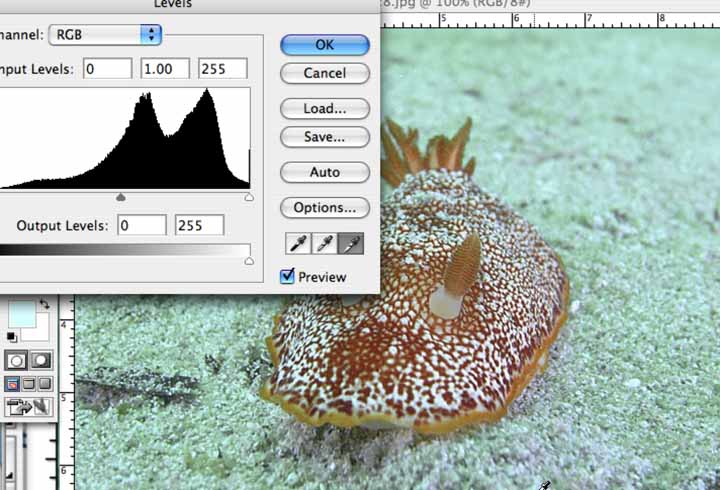
Which results in this
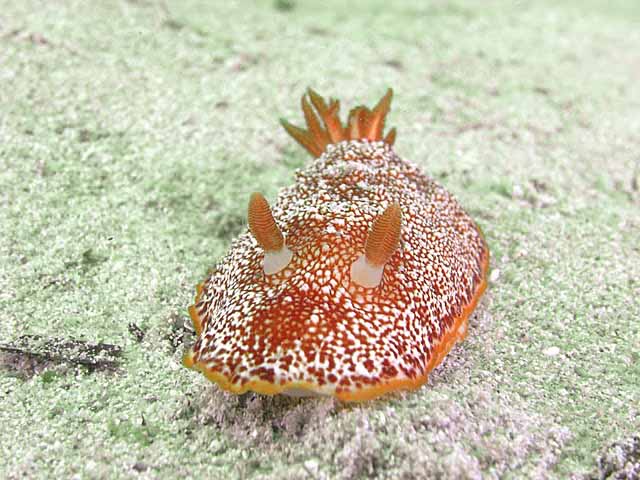
If you were shooting RAW it is going to be even better when you process this. Play with a couple of photos and you will get the hang of it quickly. The 3 screen grabs were from me just doing it again to get the grabs, and it can be quick. You have great shots and you need very little tweaking. Some of my shots, urgh
Thanks for that - I'll look for something similar in Elements (I am slowly learning). At the moment I am just shooting in JPEG but I have started to use RAW for some of my topside photos and I am learning to tweak with them as I go.
Thanks for your help.
Karl
Thanks for that - I'll look for something similar in Elements (I am slowly learning). At the moment I am just shooting in JPEG but I have started to use RAW for some of my topside photos and I am learning to tweak with them as I go.
Thanks for your help.
Karl
Looks like Selective Color is in Elements as described here Selective Color Elements
In programs such as Photoshop and Photoshop Elements, you can make a Selective Color Correction on an individual layer (Choose Image > Adjustments > Selective Color). A separate Adjustment Layer can also be used (Choose Layer > New Adjustment Layer > Selective Color).
And Levels here
Though I cannot personally say for sure
Also you will find over time there are different approaches that are needed depending on the photo that can lead to different/better results.
And shoot RAW (I am a big RAW fan, and think many others around here are also. There is some debate from time-to-time about whether RAW is needed every shot, but I go with shooting RAW and JPG at the same time. With the costs of cards and drives really pretty reasonable, I much rather have the RAW version available.

Terms of Use Privacy Policy Guidelines We have placed cookies on your device to help make this website better. You can adjust your cookie settings, otherwise we'll assume you're okay to continue.

A worldwide community for underwater imaging.
