



Skip to content

Photography Gear and Technique / Archived topic

dive log

Started by athensgirl ·

  • 8Posts
  • 8Replies

Read-only discussion

dive log

8 posts
  1. I am trying to track down pages for this dive log as I have only one page left. I really like the waterproof pages, the size and the hard cover of this particular log. The company on the main page of the log is listed as "Northwest Underwater Services Inc. P.O. Box 73100 Puyallup, WA 98373.


    Online it appears that they may have gone out of business.


    Does anyone out there know where I could find additional pages, or have blank pages they're willing to sell?
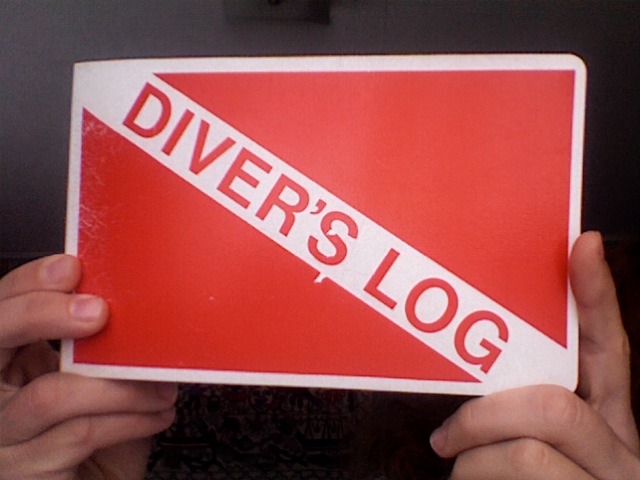
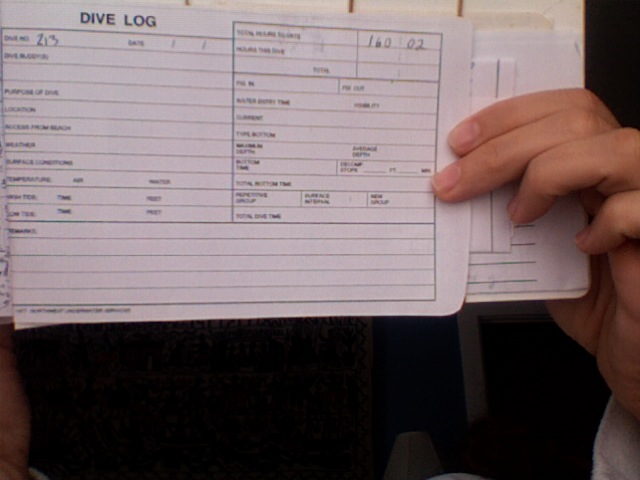
    post-23359-1266944532.jpg

    post-23359-1266944540.jpg


    I have tried to upload photos of the cover and pages here.


    Thanks in advance for any help with this!!

    Edited by athensgirl
  2. I haven't seen it before, but don't write on that last page you have. You could photocopy it onto waterproof paper if you can't find the same log anywhere.

  3. I haven't seen it before, but don't write on that last page you have. You could photocopy it onto waterproof paper if you can't find the same log anywhere.


    thanks guys for the suggestions. i really do love this one and def could save that last page to xerox onto waterproof paper--how would i go about doing that? I'm guessing not at Staples??


    Thanks!

  4. thanks guys for the suggestions. i really do love this one and def could save that last page to xerox onto waterproof paper--how would i go about doing that? I'm guessing not at Staples??


    Thanks!


    Close. I'm not sure what sizes they stock, but you can get it at Office Depot.

  5. Or you could get fancy, scan the last page to PDF, and use forms software (included with some PDF software) to fill it in on your computer, at least partially, and even customize it a bit if you want, and then laser print it at home (if you have a laser printer... there's no excuse for inkjets when lasers are only $100) as needed.

  6. I am trying to track down pages for this dive log as I have only one page left. I really like the waterproof pages, the size and the hard cover of this particular log. The company on the main page of the log is listed as "Northwest Underwater Services Inc. P.O. Box 73100 Puyallup, WA 98373.


    Online it appears that they may have gone out of business.


    Does anyone out there know where I could find additional pages, or have blank pages they're willing to sell?

    post-23359-1266944532.jpg

    post-23359-1266944540.jpg


    I have tried to upload photos of the cover and pages here.


    Thanks in advance for any help with this!!

    I loved this system, but NUS when out of business more than 5 years ago. We ordered water proof paper, made a master with x logs/page and laser copied (both sides) onto the wp paper. I have several of the plastic covers. I got Al post extensions at Staples (office supply) and keep older logs in one book and last year's dive with empty logs to carry on a trip in another. You can buy a heap of water proof paper for $17 USD.

    Bob

    Edited by Deep6
  7. I loved this system, but NUS when out of business more than 5 years ago. We ordered water proof paper, made a master with x logs/page and laser copied (both sides) onto the wp paper. I have several of the plastic covers. I got Al post extensions at Staples (office supply) and keep older logs in one book and last year's dive with empty logs to carry on a trip in another. You can buy a heap of water proof paper for $17 USD.

    Bob


    awesome bob, thanks!

    starfish suggested this paper (thanks Starfish!) is this what you used to re-create the log pages, Bob?

    http://www.officedepot.com/a/products/6532...per-Semi-Gloss/

Aquatica

Account

Navigation

Search

Search

Configure browser push notifications

Chrome (Android)
  1. Tap the lock icon next to the address bar.
  2. Tap Permissions → Notifications.
  3. Adjust your preference.
Chrome (Desktop)
  1. Click the padlock icon in the address bar.
  2. Select Site settings.
  3. Find Notifications and adjust your preference.