




X-Rite hosts a neat color IQ test in which you arrange color tiles in hue order. I scored a 3, with errors in the part of the spectrum right on the green side of blue-green.
What did you score?
Read-only discussion
X-Rite hosts a neat color IQ test in which you arrange color tiles in hue order. I scored a 3, with errors in the part of the spectrum right on the green side of blue-green.
What did you score?
An interesting couple of minute diversion.
I had 4 faults exactly where Eric's were.

Got a 0
Monitor quality would appear to make a difference to the score. When I did it on my crappy uncalibrated monitor at work my score was 18, on my calibrated not so crappy monitor at home my score was 8.
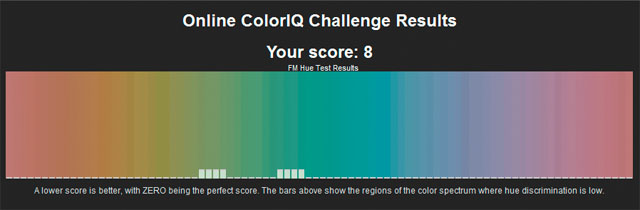
What did you score?
I agree on monitor quality.
On my calibrated laptop, I got a 34 ... on my calibrated Samsung I got a zero.
I had 0 errors. guess my dell has pretty good calibration.

0 - on an Apple 20" Monitor - in all honesty I would have thought that a poor monitor might just make a difference, or one that's very biased, but as we're looking at differentials its interesting to see how some scores have varied. Food for thought on monitors - might be a helpful test when looking for a new one?
8 with issue at the right of the greens or is it blue. LOL
Cheers Todd
got a 50, did not fare so well but hues are my worst in oranges and pinks from being partially color blind. Monitors do make a difference, hope one day we can calibrate our eyes.
Thanks
Karen
My score is 3, same green problem as Eric...
That is basically the Farnsworth 100 hue test.
You 100 cubes the same size as those on this test. One is fixed. Like this you line them all up in order.
When done turn them over. They are numbered. The numbers are one the edges of that U shaped color range. The one you have all seen showing you the range of color for different types of color spaces and for showing you the colors your printer can print.
Connect all the numbers in order and it will show you your type of color deficiency if you have one.
Got a 4 on my MacAir. My desktop is calibrated with Colormunki. I may take it again. I hated that test in school though. You could fall asleep watching someone go through the 100 hue version.
Using my calibrated home monitor got a 24. Maybe I need a better monitor as its not a top brand. Then again, I do not see the same color shade with both eyes. Perhaps not so good for photography but it could keep a kid from getting bored by moving the arm across from one eye to the other...and watch the shade of everything change as I switched eyes.
This may just be the fuel needed for me to convince the wife I NEED a new monitor for my birthday.
A great little diversion Eric, well spotted.
Managed a 4 on my dodgey old XP laptop that I retired from active service 3 years ago, it now resides at my Gf's house. 
BTW GF got 34 LMAO, bragging rights to me 
I got a 16 but just had cataract surgery in both eyes. My color perception isn't quite back yet.
I got 0, what wrong with my eye.
mine was on on my 3 year old MacBookPro3,1 -- first of the LED screens, no calibration except I do alter the brightness depending on the ambient light to match a standard target print from my print system...

I did this test a couple of weeks ago and got a not such great score cant remember exactly what it was. I just retried it after having a couple of rums and got a perfect score I guess i should drink more often

Terms of Use Privacy Policy Guidelines We have placed cookies on your device to help make this website better. You can adjust your cookie settings, otherwise we'll assume you're okay to continue.

A worldwide community for underwater imaging.
