Back in Dominica snorkeling with Sperm Whales. The whales are quite far out, and only small groups so far, and Scar has not appeared yet.
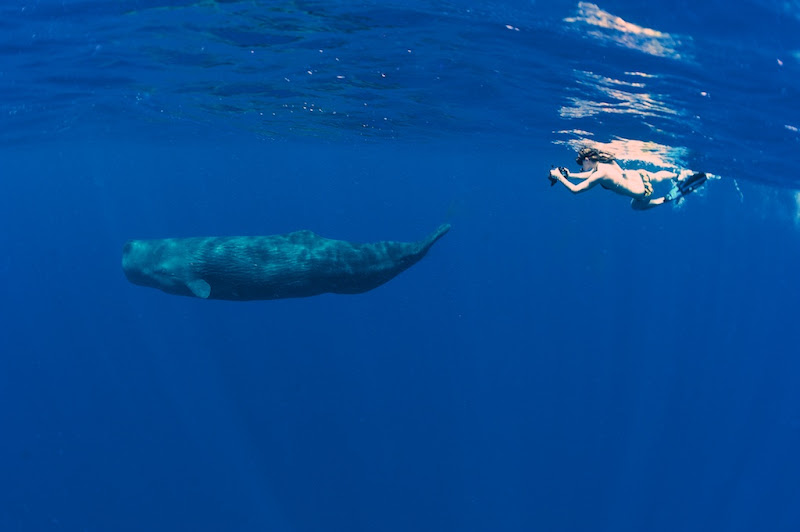
Nevertheless I probably have my favorite pic yet, my daughter Kyra swimming with a young whale using her G10.
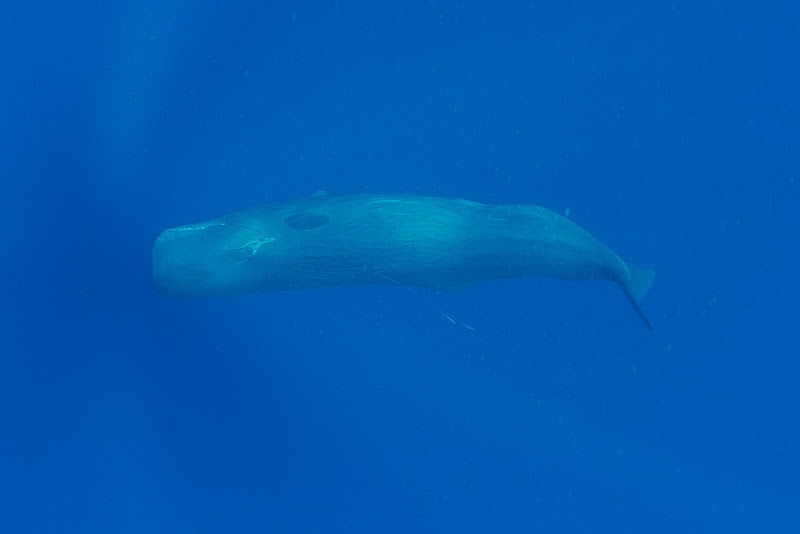
On a less happy note, closer inspection reveals this young whale to have a fishing line hooked to it's mouth. Hopefully will not interfere too much with his progress.
That looks like some mighty blue water! Looks and sounds fun ... something I MUST do someday ...
my daughter Kyra swimming with a young whale using her G10.
That is cool that Kyra is letting the Whale use the G10 (Sorry Jeff, sorry, please forgive me for that one. ) Good shot and looking forward to seeing more from the trip.
On a less happy note, closer inspection reveals this young whale to have a fishing line hooked to it's mouth. Hopefully will not interfere too much with his progress.
:-( That really stinks, hopefully at some point the line or hook will work itself out or someone can assist in removing it.
Great shots,
Would love to hear about what Wide Angle attachment (if any) your daughter is using on the G10. And if possible seeing the shots it produced.
I know that there is one wide angle attachment out there, but have not seen a review or pictures taken with it.
Thanks, and enjoy the trip!
Steve
That is so cool Jeff - can't wait to see more and have fun!




 (Sorry Jeff, sorry, please forgive me for that one. ) Good shot and looking forward to seeing more from the trip.


