



Experiences - good & bad? Any problems with vignetting or soft corners/edges? Currently using FP170 port (because I already had it). How does custom port compare to other possible setups optically?
- 9Posts
- 9Replies
Read-only discussion
Nexus 10-17 Custom Port
9 posts
-
-
-
Experiences - good & bad? Any problems with vignetting or soft corners/edges? Currently using FP170 port (because I already had it). How does custom port compare to other possible setups optically?
I bought it to use with my 50D cos of the small size. No issues with it but i aint no expert here. small size, good for travel, can do CFWA. impossible to do split shots. No Vignetting. Not sure about soft corners.
-
I have the Nexus 1017 dome and really love it. I have only had 2 trips with it so far. If you want to see my results so far, go to my site below.
http://www.shiningseastudio.com
All pics from North Carolina and Cenotes were shot with the 10-17 in that dome.
All the pics from Cozumel were shot with that dome with 20mm extension plus a Kenko 1.4x with one exception. I think the stoplight parrotfish was the only posted pic with the 10-17 only, no 1.4x.
Its great having the option of closeup plus wide angle all the time.
I have no way to compare the 1017 to any other dome as its the only one I have.
There is no vignetting at 10 nor any with the 1.4x with 20mm extension.
-
Dave - Does 10-17 port normally mount directly to housing without extension ring? To me the pic of parrotfish looks a little dark around the edges. Just wondering if its lighting or post processing. Others all look great. Thanks for your input. I have a backing problem - need either smaller port or bigger case.
-
Dave - Does 10-17 port normally mount directly to housing without extension ring? To me the pic of parrotfish looks a little dark around the edges. Just wondering if its lighting or post processing. Others all look great. Thanks for your input. I have a backing problem - need either smaller port or bigger case.
The 1017 dome fits directly to the housing when using the 10-17 lens alone. If you use the 1.4x, you need a 20mm extension and a different zoom ring. I use the FIT zoom ring when using the extension - when you get it, that ring is so tight you can barely get it on. After a bit of use, the fit is wonderful. Alignment is important for the FIT zoom ring as you can have it slightly off plane and rotating the dial is much more difficult but on-plane its great.
I love packing the small dome. Its about the same size as the port for the 60mm micro. I carry all camera and housing gear, sans arms and clamps, in a Lowepro Vertex 200AW with multiple lenses. Photo of packing is below. Total wt is 25 lbs. including bag.
The parrotfish was post processing, driving the contrast high for that effect.
Here is a jpeg straight from the camera, no post work, no crop. 10mm, ISO 400, f8, 1/160

Shown packed:
Nexus D90 housing, two Z240, D90 body, 1017 dome in upper right with neoprene cover, port for 60 micro, extension for 105 micro, 20mm extension for 1.4x, lenses packed:10-17, 60 micro, 105 micro, 18-200 VR, Kenko 1.4x in blue box, four Stix Large floats on bottom (lower right in orange trim bag)
As you can see, if I took off the 10-17 lens, the camera body could be inside the housing and I could pack more.

-
I love packing the small dome. Its about the same size as the port for the 60mm micro. I carry all camera and housing gear, sans arms and clamps, in a Lowepro Vertex 200AW with multiple lenses. Photo of packing is below. Total wt is 25 lbs. including bag.
Shown packed:
Nexus D90 housing, two Z240, D90 body, 1017 dome in upper right with neoprene cover, port for 60 micro, extension for 105 micro, 20mm extension for 1.4x, lenses packed:10-17, 60 micro, 105 micro, 18-200 VR, Kenko 1.4x in blue box, four Stix Large floats on bottom (lower right in orange trim bag)
As you can see, if I took off the 10-17 lens, the camera body could be inside the housing and I could pack more.
Very nice Dave, if only I could reach into that photo and borrow a few items from that bag

I'll have to keep that bag in mind for when I can finally get my rig built up to that level.
Cheers,
Jim.
-
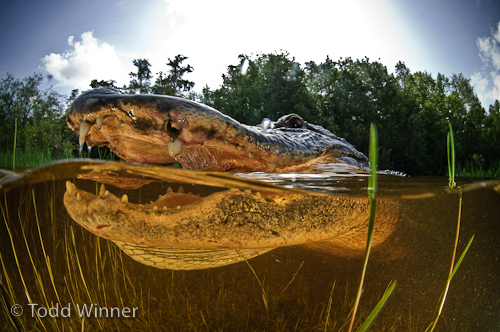
I've been using the custom dome for the 10-17 since they came out with it a few years ago. I use it for everything including split shots.
I'd recommend it.
If you'd like to see more go to www.toddwinner.com
Todd

-
Very nice Dave, if only I could reach into that photo and borrow a few items from that bag

I'll have to keep that bag in mind for when I can finally get my rig built up to that level.
Jim,
After looking at all the wonderful creatures on your Flickr site.....
If you can arrange the airfare for me to visit while you are in front of some of those creatures , you can borrow anything in the kit. I will shoot with whatever is left. If nothing is left, I will take turns with you on the photo-taking and you get to go first. But of course, the airfare from me to you is probably about the same price as getting whatever you are missing.

Todd,
Very nice O/U shots there. Many nice shots on your website as well. I have not tried o/u with my setup yet but its on the list.


