Skip to content

Shooting Technique, Workflow and Editing / Archived topic

Problems with whiteout/burnout

Started by bigdog69 ·

  • 4Posts
  • 4Replies

Read-only discussion

Problems with whiteout/burnout

4 posts
  1. Hi,

    I have been using a Canon IXUS 980 with the official Canon housing and no add ons (and no plans to get these yet).


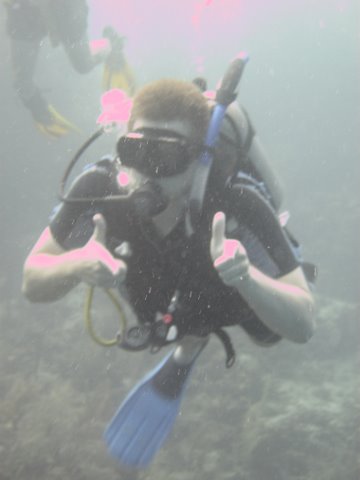
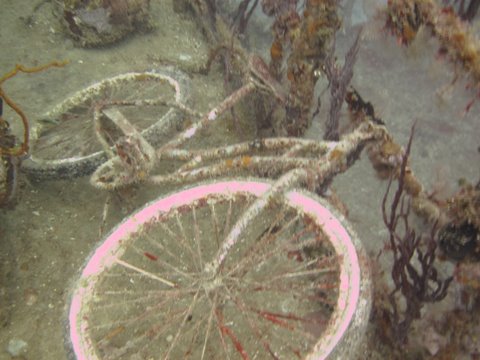
    I have been struggling that some of my pictures come with large white areas where there is no information - is this overexposure?


    How can I stop this on a compact camera?


    Thanks (and I am a beginner so please be gentle!)


    [NB camera readout -

    Picture of diver Focal length 13.7mm, 1/25s 4.0f/ ISO 100

    Picture of bike Focal length 7.7mm, 1/15s 2.8f/ ISO 100


    post-24777-1269877756.jpg

    post-24777-1269877563.jpg

  2. Hi,

    I have been using a Canon IXUS 980 with the official Canon housing and no add ons (and no plans to get these yet).


    I have been struggling that some of my pictures come with large white areas where there is no information - is this overexposure?


    How can I stop this on a compact camera?


    Thanks (and I am a beginner so please be gentle!)


    [NB camera readout -

    Picture of diver Focal length 13.7mm, 1/25s 4.0f/ ISO 100

    Picture of bike Focal length 7.7mm, 1/15s 2.8f/ ISO 100


    Looks like it can be over exposed. Quick general background, your ISO, f-Stop and Shutter speed all combine to affect exposure.


    If a properly exposed photo would be 1/100s, f/5.6, ISO 200, for example, moving any of those items will over or under expose the photo. So if you moved the ISO to 400, the photo would be over exposed unless you increase the shutter speed to a faster number (such as 1/250) or the f/stop to f/8 (BTW those adjustments examples not accurate, more of an idea.) And when you have highlights in a photo, it makes it more difficult. On the camera you have it is pretty much automatic, you can set the ISO, but then the camera is setting the other items to make the exposure selection. The camera does have an EV adjustment setting, so you can dial down the EV (exposure compenisation) do that the image is over/under exposed from what the camera is saying is "correct" and have the highlights blown out a bit less. You could also try the different metering modes to help.


    Ultimately you may want a strobe to bring out the colors of items closer to you and stop thing camera down via the EV to try to preserve the highlights a bit more.


    EDIT TO ADD: One other thing to consider is moving the ISO up a bit more to be able to have faster shutter speeds and smaller apertures (eaning f/5.6, f/8 etc) The slower shutter speeds will lead to more blurry photos and you may want a bit more depth in the shots to up the odds of having photos in focus across a wider area of the shot.


    Edited by TheRealDrew
  3. Right: it's overexposed, meaning some of the pixels are pure white (with a pink cast even) which is not good unless you're photographing a clean-room :-)


    The S-90 has a very easy to adjust EV control meaning (exposure compensation). If you are blowing out photos you can dial in -1/2 or -2/3 stops of compensation to help (rotate the dial on the back). I almost always do this - as the camera basically "thinks" it's above water so it tries to make for a "blue sky" which just ends up w/ cyan water.


    HTH

    James

  4. Right: it's overexposed, meaning some of the pixels are pure white (with a pink cast even) which is not good unless you're photographing a clean-room :-)


    The S-90 has a very easy to adjust EV control meaning (exposure compensation). If you are blowing out photos you can dial in -1/2 or -2/3 stops of compensation to help (rotate the dial on the back). I almost always do this - as the camera basically "thinks" it's above water so it tries to make for a "blue sky" which just ends up w/ cyan water.


    HTH

    James

    I second that ... in my experience using Canon compacts underwater, I almost always dialed in -2/3 of stop of EV comp.

Nauticam

Account

Navigation

Search

Search

Configure browser push notifications

Chrome (Android)
  1. Tap the lock icon next to the address bar.
  2. Tap Permissions → Notifications.
  3. Adjust your preference.
Chrome (Desktop)
  1. Click the padlock icon in the address bar.
  2. Select Site settings.
  3. Find Notifications and adjust your preference.